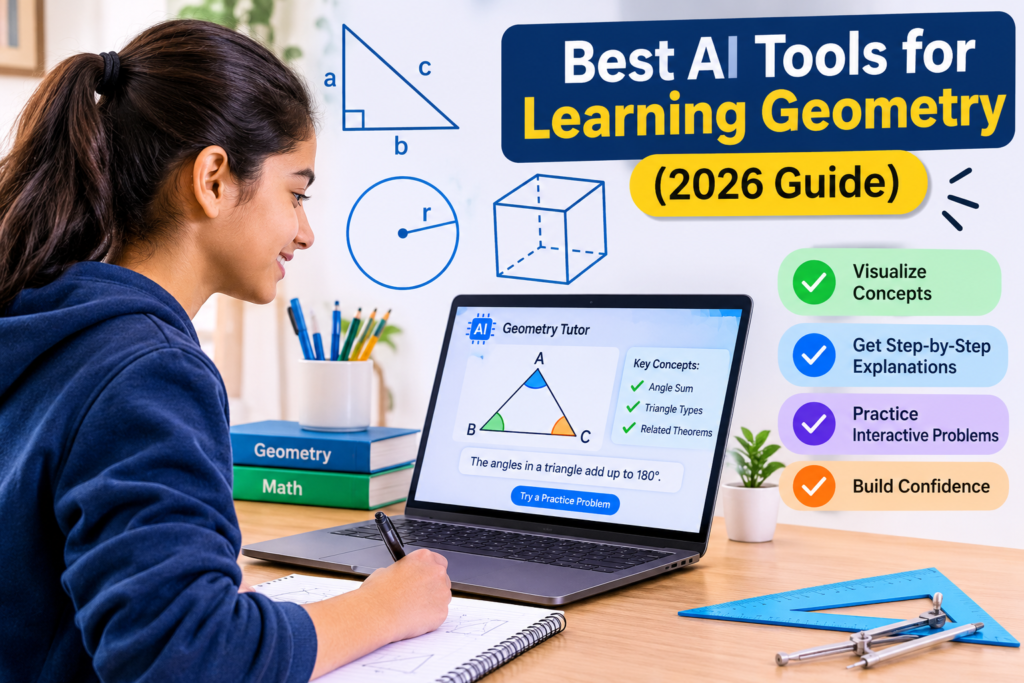
Geometry can be difficult to understand when all you have is a textbook diagram and a list of formulas. A triangle may look simple on paper, but understanding why its angles add up to 180 degrees or how changing one side affects the entire shape takes more than memorizing rules.
The right digital learning tools can make those ideas easier to explore.
The best AI tools for geometry learning (2026 guide) combine guided explanations, interactive diagrams, visual constructions and opportunities to practice. Some use artificial intelligence to explain concepts, while others use interactive mathematics software to help students explore shapes and geometric relationships.
These are not the same thing, and knowing the difference can help you choose a better learning resource.
This guide compares both types of tools for US middle school and high school students, parents and educators. It also explains how to use them effectively, what is available for free and where their limitations matter.
Quick Answer
The best options depend on what you want to understand.
| Tool | Best Use | Actually AI-Powered? |
|---|---|---|
| ChatGPT Study Mode | Guided geometry explanations | Yes |
| Khanmigo | AI-guided academic tutoring | Yes |
| GeoGebra | Interactive constructions and 3D geometry | No |
| Desmos Geometry | Exploring angles, shapes and transformations | No |
| CanFigureIt Geometry | Geometric proofs | No |
| Mathigon Polypad | Visual geometry activities and manipulatives | No |
Our practical recommendation: Use an AI tutor when you need an explanation, GeoGebra when you want to explore a construction, Desmos for interactive geometry exploration and CanFigureIt when you need to practice geometric proofs.
GeoGebra and Desmos are particularly important because they provide genuine geometry functionality rather than simply generating text-based answers.
Introduction
Geometry is different from many other areas of mathematics.
Students need to understand relationships between points, lines, angles, shapes and dimensions. Sometimes, memorizing a formula is easy, but understanding why it works is much harder.
For example, knowing that the interior angles of a triangle add up to 180 degrees is one thing. Understanding how this relationship works when the triangle changes shape is another.
This is where visual learning becomes valuable.
Interactive geometry platforms let students move points, adjust angles, construct figures and observe what changes. AI tutors can complement these activities by explaining unfamiliar terms, breaking down difficult concepts and generating additional practice questions.
However, not every geometry application uses artificial intelligence.
Some of the most useful AI tools for geometry learning are actually traditional interactive mathematics platforms. They deserve consideration because their educational value comes from visual exploration rather than AI-generated explanations.
The goal is to choose tools that help students understand geometry, not simply finish homework faster.
Best AI Tools for Geometry Learning
Here are six options selected for different geometry-learning needs.
ChatGPT Study Mode
BEST FOR GUIDED EXPLANATIONSChatGPT Study Mode is an AI-powered learning experience that can help students understand geometry through questions, explanations and guided problem-solving.
Instead of only requesting an answer, students can ask the tutor to explain a concept gradually and check their understanding along the way.
Useful Features
Geometry Learning Example
A student struggling with triangle congruence can ask:
The tutor can explain the concepts and help the student work through examples.
Yes. Study Mode is an AI-powered learning experience.
Study Mode is available across ChatGPT plans, subject to applicable usage limits and feature availability.
ChatGPT is not intended for children under 13. Users aged 13–17 need parental consent. For classroom use with children under 13, an adult must conduct the interaction. Students should avoid uploading private school or personal information.
AI-generated mathematical reasoning can be incorrect. It may misunderstand a diagram or make a mistake in a proof. Always check important calculations against mathematical rules and class materials.
Khanmigo
BEST FOR GUIDED MATH TUTORINGKhanmigo is an AI-powered teaching assistant and tutor developed by Khan Academy.
Its educational approach focuses on helping learners reason through questions rather than simply receiving completed answers.
For geometry students, this can be useful when a topic involves several connected ideas, such as triangle relationships, area calculations or geometric reasoning.
Look at this right triangle. Can you identify its longest side? Which side is the hypotenuse?
Useful Features
Geometry Learning Example
A student learning the Pythagorean theorem could ask for help understanding why the theorem works, followed by a guided example involving a right triangle.
A student can explore how the two shorter sides and the hypotenuse are related, then work through a guided example to understand the theorem.
Pythagorean theorem
Yes. Khanmigo provides AI-powered tutoring and learning support.
Khan Academy’s core learning library is free. Khanmigo learner access requires a paid parent or learner arrangement in the United States. Current access and subscription conditions should be checked on the official website.
Parents or guardians must arrange access for children under 18. School-based student access is limited to participating district implementations. Ordinary teachers cannot independently enable Khanmigo access for their entire class.
Khanmigo is not a dedicated geometric construction platform. Students who want to manipulate shapes directly will benefit from combining it with GeoGebra or Desmos.
GeoGebra
BEST FOR INTERACTIVE GEOMETRYGeoGebra is one of the strongest choices for students who learn better by seeing mathematics in action.
It combines geometry, algebra, graphing and other mathematical tools in an interactive environment.
Students can construct geometric figures and investigate what happens when they change their measurements or move different points.
Useful Features
Geometry Learning Example
A student studying triangle properties can construct a triangle, measure its three interior angles and change its vertices.
Create a triangle using GeoGebra, measure all three interior angles and drag its vertices to change the shape.
Students can observe that the angle relationship remains consistent as the triangle changes.
Sum of the interior angles of a triangle
GeoGebra’s core geometry tools are interactive mathematical software, not an AI tutor.
GeoGebra’s calculators, apps and educational resources are free for noncommercial use, including typical student and teacher use.
Students and parents should review the applicable account and privacy conditions before creating accounts or sharing learning materials.
Beginners may need time to understand the interface. It also does not replace a tutor who can explain every mathematical idea in conversational language.
Desmos Geometry
BEST FOR VISUAL GEOMETRY EXPLORATIONDesmos Geometry provides an interactive workspace for constructing and exploring plane geometry.
Its visual approach is particularly useful for students who want to understand how geometric objects relate to one another.
Useful Features
Geometry Learning Example
Suppose a student wants to understand how a perpendicular line is constructed.
The student can create a geometric construction, move points and observe how the relationship between the lines changes.
This provides a visual way to investigate perpendicular relationships and right angles.
No. Desmos Geometry is an interactive mathematics tool, not an AI geometry tutor.
The Geometry Tool is available as a web-based learning tool. Desmos also offers separate products and services with different licensing arrangements.
Desmos’s privacy policy states that its services are not directed toward children under 13 in the United States, subject to specified exceptions. Parents and educators should review the applicable school and account arrangements.
Desmos focuses on visual construction and exploration. Students looking for conversational explanations or AI-generated tutoring will need another resource.
CanFigureIt Geometry
BEST FOR GEOMETRIC PROOF PRACTICEGeometric proofs require more than identifying the correct answer.
Students need to understand which mathematical statements are valid, why a relationship holds and how to connect each step logically.
CanFigureIt is designed specifically to help students practice geometric proofs through an interactive workspace.
Useful Features
Geometry Learning Example
A high school student working on triangle congruence can use a structured proof activity to practice selecting appropriate statements and reasons.
The student works through a proof exercise, identifies relevant geometric relationships and selects appropriate mathematical reasons for each statement.
CanFigureIt is an interactive proof-learning platform, not a conversational AI tutor.
The official website offers sample activities and teacher registration. A universally available student subscription price or unrestricted free-plan entitlement could not be confirmed from the public information reviewed. Check the current access terms before recommending it for a class.
Teachers and parents should review classroom access arrangements and the applicable policies.
Its main focus is geometric proofs. It is not a complete replacement for a broader geometry learning platform.
Mathigon Polypad
Best for visual and hands-on geometry exploration. Mathigon Polypad gives students a digital canvas where they can arrange shapes, explore patterns and investigate mathematical relationships.
📐 What Is Mathigon Polypad?
Some geometry concepts become easier to understand when students can manipulate objects instead of looking at static textbook illustrations. Mathigon Polypad provides a digital canvas with virtual mathematical manipulatives. Students can explore shapes, geometric patterns and spatial relationships through visual activities.
✨ Useful Features
🎯 Geometry Learning Example
A middle school student learning area and perimeter can arrange geometric shapes and investigate how changing their arrangement affects the overall figure. Moving and rearranging the shapes helps make these concepts more visual and easier to explore.
📋 Important Details
💰 Free vs. Paid
Mathigon’s Polypad resources are offered free of charge. Some additional classroom and account features may have separate arrangements.
👩🏫 Age and Privacy
It can support school learning across multiple grade levels. Parents and teachers should review account requirements before enabling student accounts.
⚠️ Limitations
It is not designed to generate AI explanations or solve advanced geometric proofs automatically.
🤖 AI Capabilities
No. Polypad is an interactive mathematics learning environment, not a conversational AI tutor.
Comparison Table
The following comparison uses the same criteria: educational purpose, geometry functionality, AI capabilities, free access and main limitation.
| Tool | Best For | AI Capabilities | Geometry Learning Features | Free Availability |
|---|---|---|---|---|
| ChatGPT Study Mode | Guided explanations and step-by-step learning | Yes | Explains geometry concepts, provides hints, generates practice questions and gives feedback. | Plan limits apply Study Mode availability and usage depend on the ChatGPT plan. |
| Khanmigo | Guided math tutoring and reasoning | Yes | Uses guided questions to help students understand geometry concepts, calculations and mathematical reasoning. | Access varies Khan Academy’s core learning library is free; Khanmigo learner access may require payment or an eligible school arrangement. |
| GeoGebra | Interactive geometry and mathematical constructions | No AI tutor | Constructs points, lines, circles and polygons; measures angles and distances; explores dynamic 2D and 3D geometry. | Free tools Many apps and resources are available free for typical educational use. |
| Desmos Geometry | Visual geometry constructions and transformations | No AI tutor | Creates points, lines, circles and polygons; explores angles, perpendicular lines and geometric transformations. | Free tool The Geometry Tool is available online; other Desmos services may have separate terms. |
| CanFigureIt Geometry | Geometric proofs and logical reasoning | No conversational AI | Provides interactive proof activities, structured reasoning practice and feedback during geometry exercises. | Access varies Sample activities and teacher registration are available; student access and pricing should be checked with the provider. |
| Mathigon Polypad | Visual learning and virtual math manipulatives | No AI tutor | Uses interactive shapes, polygons, patterns and digital manipulatives to explore spatial relationships. | Free resources Polypad resources are offered free; some additional classroom or account features may have separate arrangements. |
How to interpret the comparison: AI capability refers to whether the platform uses AI for conversational or guided assistance. Interactive geometry features are evaluated separately. A platform does not receive an AI label simply because it provides automated mathematical operations.
The features above are based on the respective official product descriptions and documentation.
How We Selected These Geometry Tools
The selection focuses on educational usefulness rather than popularity alone.
We considered the following criteria:

1. Geometry learning usefulness
Does the platform help students understand actual geometry concepts
2. Visual explanations
Can students explore shapes, measurements, diagrams or transformations?
3. Guided learning
Does the tool help students understand mathematical reasoning instead of only presenting answers?
4. Interactive functionality
Can students manipulate figures, change points or investigate geometric relationships?
5. Accessibility
Is the tool reasonably accessible to middle school and high school learners?
6. Free access
Does it offer a meaningful free learning option or accessible sample activities?
7. Limitations and safety
Are age requirements, privacy considerations and important product limitations identifiable?
Testing disclosure: This article is based on research of official product websites, help documentation, privacy information and educational resources. We did not conduct a controlled hands-on test of all six products. Therefore, we do not claim independently measured accuracy scores, performance rankings or experimental results.
How to Use AI Tools for Learning Geometry
Choosing an application is only the beginning. Students also need a sensible way to use it.
Here is a practical workflow.
Step 1: Identify the difficult concept
Start by identifying exactly what is confusing.
For example:
• Triangle congruence.
• Circle properties
• Angle relationships.
• Area and perimeter.
• Geometric transformations.
• Proofs.
A specific question usually produces more useful guidance than asking an AI tutor to teach all of geometry.
Step 2: Select the right platform
Match the tool to the task.
• Need a simpler explanation? Use ChatGPT Study Mode.
• Need guided tutoring? Consider Khanmigo with appropriate adult access.
• Need a dynamic diagram? Open GeoGebra.
• Need to explore constructions? Try Desmos Geometry.
• Need to practice proofs? Explore CanFigureIt.
Step 3: Ask for an explanation
Give the AI tutor your grade level and the exact concept.
For example:
“Explain corresponding angles to a ninth-grade student. Start with a simple example, then show how corresponding angles work when two parallel lines are crossed by a transversal.”
Step 4: Explore the diagram
Use GeoGebra or Desmos to build the relevant figure.
Move points, adjust lines and observe the geometric relationships.
Step 5: Check your understanding
Ask the tutor to give you a similar problem without immediately revealing the answer.
Try solving it independently.
Step 6: Practice without assistance
Close the explanation and attempt another question using your own reasoning.
This final step matters because understanding a worked example is not the same as being able to solve a new problem.
Practical Example: Understanding Triangle Angle Relationships
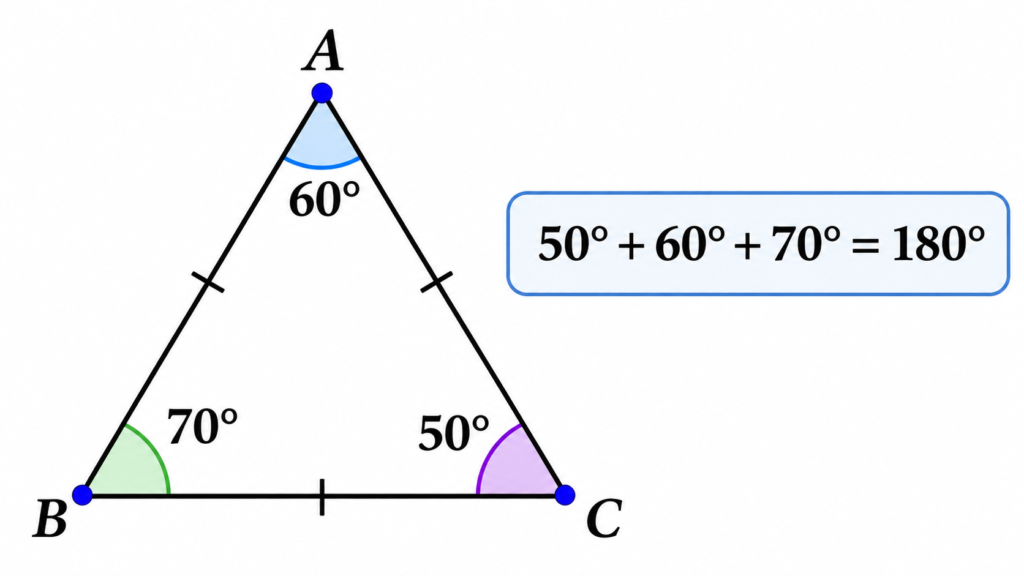
Let’s consider a common middle school and high school geometry topic: the interior angles of a triangle.
Example student input
“Teach me why the interior angles of a triangle always add up to 180 degrees. Explain it using a simple diagram and give me a practice question.”
Suggested learning workflow
Step 1: Understand the rule
The student learns that the interior angles of a triangle have a total measure of 180 degrees.
Step 2: Explore the triangle
Open GeoGebra and construct a triangle.
Measure its three interior angles.
Step 3: Change the shape
Move one vertex to create a different triangle.
Observe how the individual angle measurements change.
Step 4: Examine the relationship
Compare the three measurements again.
The total remains 180 degrees.
Step 5: Try a practice problem
Suppose two interior angles measure 55 degrees and 65 degrees.
Find the third angle.
The missing angle is 60 degrees.
Expected learning outcome
The student should understand that the individual angles can change while their combined measure remains constant.
This example shows how AI tools for geometry learning can complement interactive mathematics software. The AI tutor explains the idea, while the geometry platform helps students investigate it visually.
Free vs. Paid Geometry Learning Tools
Not every student needs a paid subscription.
For many school-level geometry topics, free resources are sufficient.
| Tool | Free Option | Paid Considerations |
|---|---|---|
| ChatGPT Study Mode | Available across plans | Paid plans have different limits and features |
| Khanmigo | Free Khan Academy courses | Paid learner access |
| GeoGebra | Free noncommercial educational tools | Commercial licensing is separate |
| Desmos Geometry | Free web tool | Separate professional and organizational services |
| CanFigureIt | Public sample activities | Check current teacher and institutional access |
| Polypad | Free learning resources | Check additional classroom arrangements |
When is a free tool enough?
Free options can be sufficient for:
• Understanding basic shapes.
• Learning angle relationships.
• Practicing geometric constructions.
• Exploring transformations.
• Visualizing triangles and circles.
• Reviewing basic geometry concepts.
When might a paid option help?
A paid subscription may be useful when a family or school needs additional tutoring access, expanded services, structured classroom arrangements or other premium features.
Before purchasing anything, check the current official pricing page, billing conditions and student-access requirements.
Prices can change, and availability may differ between individual and school accounts.
Alternatives to AI Geometry Learning Tools
Sometimes a conventional learning resource is a better fit than an AI product.
1. Khan Academy Geometry
Khan Academy provides structured geometry lessons, instructional materials, exercises and assessments. It is useful for students who want to follow a course rather than explore individual questions.
Educational Videos
Video lessons can help students understand concepts through demonstrations and visual explanations. They are especially useful when a textbook explanation feels too abstract.
Traditional Textbooks
Textbooks provide definitions, theorems, worked examples and practice exercises. They also help students learn the notation and proof-writing methods expected in school.
Teacher-Guided Learning
A teacher can identify misunderstandings, correct faulty reasoning and explain why a particular mathematical approach works.
Physical Geometry Materials
Compasses, rulers, protractors and paper shapes can provide valuable hands-on learning experiences. These resources are particularly useful when students are first learning geometric constructions.
Pros, Cons and Limitations
AI tools for geometry learning can make abstract mathematical concepts easier to explore, but they also have limitations.
Advantages
Visual understanding
Interactive platforms make it easier to observe how shapes and measurements relate to each other.
Personalized explanations
AI tutors can explain the same concept in different ways.
Independent practice
Students can generate additional questions and check their understanding.
Flexible learning
Digital resources can support study at home, in school and during revision.
Support for difficult concepts
Students can revisit a topic without needing to wait for the next classroom lesson.
Disadvantages and limitations
Incorrect explanations
AI-generated responses can contain mathematical errors.
Diagram interpretation problems
An AI system may misunderstand a complex or unclear geometric diagram.
Overdependence
Students who copy completed answers may fail to develop their own mathematical reasoning.
Limited proof support
A numerical answer does not necessarily establish that a geometric statement has been proven.
Privacy considerations
Some tools collect account information, uploaded material or other usage data. Families and schools should review privacy policies.
Different learning experiences
An interactive construction tool and an AI tutor solve different educational problems. One cannot always replace the other.
The best approach is to use technology as support for understanding, not as a replacement for mathematical thinking.
Who Should Use Which Geometry Tool?
The most suitable option depends on the student’s current learning goal.
| Student or Learner | Recommended Tool | Reason |
|---|---|---|
| Beginners | ChatGPT Study Mode | Guided explanations |
| Middle school students | GeoGebra | Visual exploration |
| High school students | GeoGebra and Desmos | Constructions and transformations |
| Students struggling with proofs | CanFigureIt | Structured proof practice |
| Visual learners | Polypad | Interactive manipulatives |
| Students needing tutoring | Khanmigo | Guided academic support with adult access |
For middle school students
Start with simple geometry concepts such as shapes, angles, area and perimeter.
GeoGebra and Polypad are useful options for visual exploration.
For high school students
Students studying transformations, congruence, similarity and coordinate geometry can benefit from GeoGebra and Desmos.
CanFigureIt is worth considering when proof-writing becomes a major part of the course.
For parents
Look for tools that support understanding rather than merely completing assignments.
Check age requirements, privacy policies and account arrangements before allowing independent use.
For educators
Interactive platforms can supplement classroom instruction, particularly when a lesson involves constructions, geometric relationships or proof exercises.
The selected resource should match the curriculum and school technology policies.
Frequently Asked Questions
1. What are the best AI tools for learning geometry?
ChatGPT Study Mode and Khanmigo are AI-powered tutoring options. GeoGebra, Desmos Geometry, CanFigureIt and Mathigon Polypad provide complementary interactive learning experiences.
The best choice depends on whether a student needs explanations, constructions, visual exploration or proof practice.
2. Can AI explain geometry step by step?
Yes. AI tutors can break down concepts, explain mathematical relationships and provide guided examples.
However, students should verify important calculations and reasoning.
3. Are there free AI tools for geometry?
ChatGPT provides access to Study Mode across its plans, subject to usage limits. Khan Academy offers free geometry learning resources, while its Khanmigo learner service has separate paid access arrangements.
GeoGebra, Desmos and Polypad also offer useful free interactive learning resources, although they are not AI tutors.
4. Can AI help students understand geometric proofs?
Yes. An AI tutor can explain the logic behind statements, definitions and theorems.
However, students should learn how to construct a valid proof themselves. CanFigureIt is another option for structured proof practice.
5. Which tools help visualize 2D and 3D shapes?
GeoGebra is particularly useful because its mathematics suite includes geometry and 3D tools.
Desmos Geometry is useful for interactive plane geometry, while Polypad supports visual manipulation of mathematical objects.
6. Are geometry learning tools suitable for middle school students?
Many interactive geometry resources are suitable for school learning.
Parents and educators should still check individual account requirements, age restrictions and classroom policies.
7. Can AI solve geometry problems accurately?
AI can solve many routine geometry problems, but it can also make mistakes, particularly when interpreting diagrams or constructing proofs.
Students should verify the answer and understand the mathematical reasoning.
8. Is GeoGebra an AI tool?
No. GeoGebra is primarily dynamic mathematics software.
It provides interactive geometry constructions, graphing and mathematical exploration rather than functioning as a conversational AI tutor.
9. Should students use AI instead of traditional geometry textbooks?
No. AI can supplement traditional learning, but textbooks, classroom instruction and independent practice remain important.
Combining these resources can provide a more balanced learning experience.
Conclusion
Geometry becomes easier to explore when students can see how mathematical relationships work rather than simply memorize formulas.
The best AI tools for geometry learning combine guided explanations with opportunities to investigate shapes, measurements and geometric reasoning.
ChatGPT Study Mode and Khanmigo provide AI-powered learning assistance. GeoGebra and Desmos help students explore geometric constructions, while CanFigureIt supports proof practice. Polypad provides another useful option for visual learning.
There is no single platform that does everything.
Choose a tool according to the concept you want to understand, use its explanations and visual features carefully, and practice independently afterward.
The real purpose of technology in mathematics education is not to produce answers faster. It is to help students understand why those answers make sense.
Continue Learning
Explore these related IndiaAITools.com guides to discover more educational AI tools and learning resources.
Best AI Learning Tools for Middle School Students (Grades 6–8) in 2026
Explore educational AI tools that can support students across different school subjects and learning needs.
AI Tools for Students Struggling With Math Homework
Discover mathematics problem-solving resources and ways to use them to understand homework rather than simply copy answers.
7 Free AI Math Solvers for High School Students USA
Explore broader mathematics problem-solving options for high school students.
These guides cover related learning needs, but this article focuses specifically on geometry visualization, construction and understanding.
sources
The following sources were used to verify product descriptions, educational features, access conditions and privacy information.