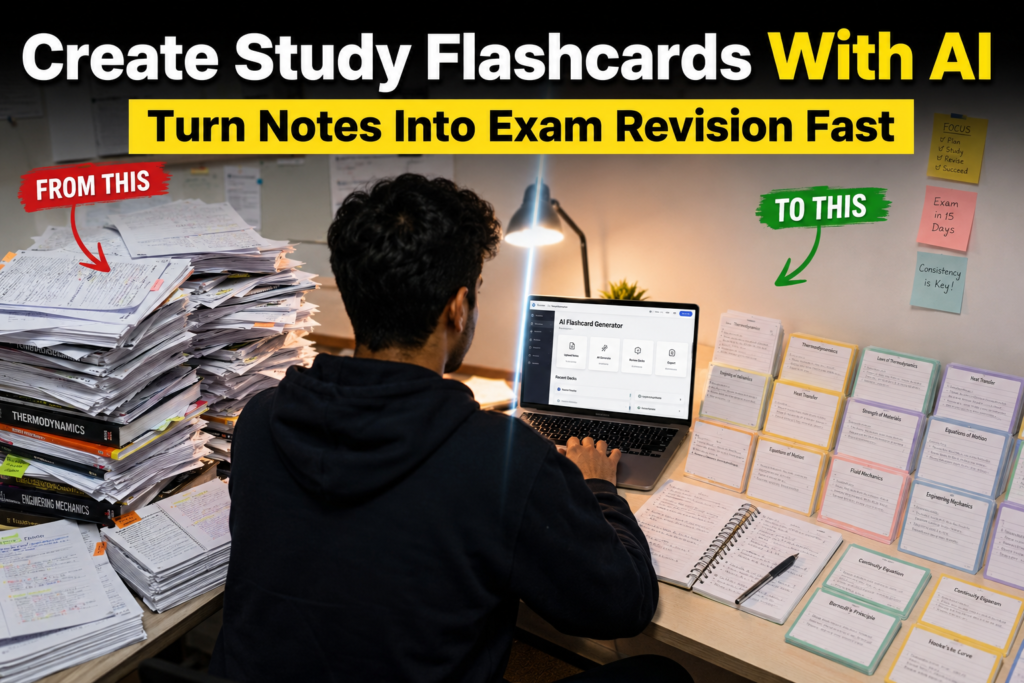
Quick Answer
If you are wondering how to use AI tools to create study flashcards for students, the process is much simpler than most learners expect.
AI tools can help students turn class notes, lecture notes, textbook chapters, PDFs, screenshots, and study materials into organized study flashcards in minutes. Instead of spending hours manually creating cards, students can use AI study tools to generate question-and-answer flashcards, improve active recall, and build a more effective exam revision system.
Table of Contents
Introduction
Why Students Forget What They Study
Most students do not forget information because they are lazy.
They forget because their study methods are often passive.
A common situation looks like this:
• Read a chapter
• Highlight important sections
• Read it again
• Feel confident
• Forget most of it a few days later
This happens because reading creates familiarity, not necessarily memory.
Students often struggle with:
• Information overload
• Long textbook chapters
• Poor revision habits
• Passive note review
• Last-minute cramming before exams
The problem is not always understanding the material.
The problem is remembering it when the exam arrives.
This is where AI flashcards become useful.
Instead of repeatedly reading notes, students can create AI study flashcards that force them to actively recall information, which is one of the most effective learning techniques available. Learning how to use AI tools to create study flashcards for students can help transform passive studying into an active revision system.
Who This Guide Is For
This guide is designed for:
• High school students preparing for exams
• College students managing multiple subjects
• University students studying large volumes of content
• Students with messy class notes
• Students using lecture recordings
• Students studying from PDFs and textbooks
• Students who struggle with memory retention
• Students looking for faster revision methods
If you spend hours rereading notes but still forget important concepts, this guide is for you.
What Are AI Study Flashcards?
AI study flashcards are digital learning cards automatically generated by AI tools from study materials.
Instead of manually writing hundreds of cards, students can upload:
• Notes
• PDFs
• Textbooks
• Lecture transcripts
• Screenshots
• Research documents
The AI then converts information into:
• Questions
• Answers
• Definitions
• Fill-in-the-blank cards
• Concept review cards
The result is a ready-made revision system that supports active recall and spaced repetition.
Understanding how to use AI tools to create study flashcards for students starts with knowing how AI converts study materials into active recall questions.
Why Flashcards Work Better Than Re-Reading Notes
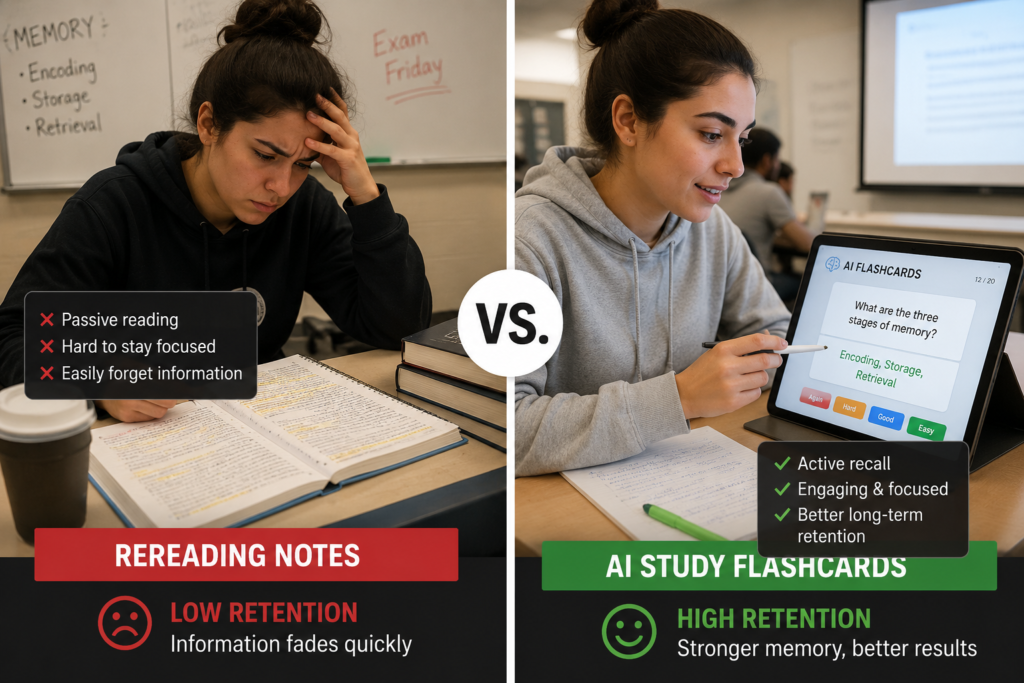
Many students spend most of their study time reading.
The problem is that reading feels productive even when memory retention is weak.
A better process looks like this:
Reading
↓
Understanding
↓
Active Recall
↓
Memory Retention
When students answer flashcards, the brain must retrieve information rather than simply recognize it.
That retrieval process strengthens memory.
This is why flashcards are widely used in:
• Medical school
• Law school
• Language learning
• Competitive exam preparation
• University courses
How AI Tools Create Flashcards
The process is surprisingly simple.
Notes
↓
AI Processing
↓
Question and Answer Cards
↓
Revision System
For example:
A student uploads biology notes.
The AI identifies:
• Definitions
• Processes
• Key concepts
• Important terms
Then converts them into study flashcards automatically.
What once required several hours can often be completed in minutes.
30-Second Quick Start Guide
Need the fastest possible workflow?
1. Collect your study materials
2. Upload them to an AI tool
3. Generate flashcards automatically
4. Remove weak cards
5. Organize cards by topic
6. Review using active recall
7. Repeat before exams
This simple system works for most students.
Benefits of AI Flashcards for Students
A key part of understanding how to use AI tools to create study flashcards for students is knowing which study materials can be converted into flashcards.
Faster Revision
Students spend less time creating study materials and more time reviewing them.
Better Retention
Flashcards support active recall, which improves memory retention.
Reduced Study Time
AI removes much of the manual work involved in flashcard creation.
Easier Exam Preparation
Students can focus on reviewing key concepts instead of organizing information.
Improved Recall
Frequent testing strengthens memory and reduces forgetting.
Step-by-Step Workflow for Creating Study Flashcards With AI
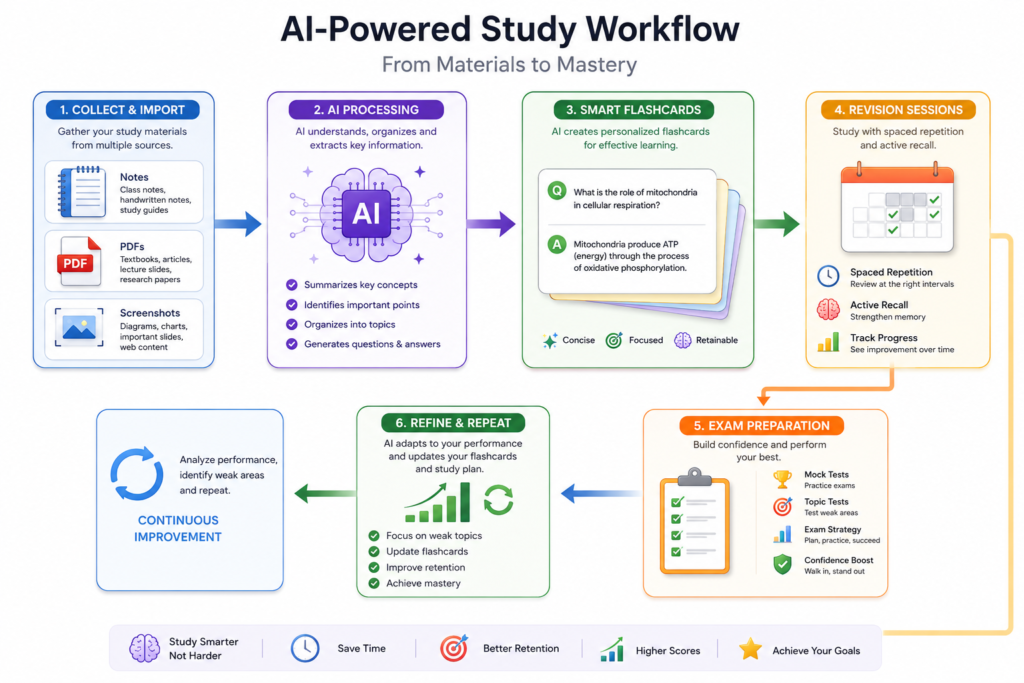
The following workflow shows exactly how to use AI tools to create study flashcards for students from notes, textbooks, PDFs, and lecture materials.
Step 1: Gather Study Materials
Collect:
• Class notes
• Lecture notes
• Textbook pages
• PDFs
• Screenshots
• Research notes
Keep everything in one place.
Step 2: Upload Notes, PDFs, or Textbook Pages
Use an AI flashcard generator or AI study tool.
Upload the content directly.
Many tools accept:
• PDFs
• Images
• Documents
• Copied text
Step 3: Generate Flashcards
Ask the AI to create:
• Definitions
• Question
• answer pairs
• Concept reviews
• Exam-style flashcards
Step 4: Remove Weak Cards
Not every generated flashcard is useful.
Delete cards that:
• Are too obvious
• Are too long
• Contain unnecessary details
Step 5: Organize by Topic
Examples:
Biology
• Cell Structure
• Photosynthesis
• Genetics
History
• Civil War
• Industrial Revolution
• World War II
Organization improves revision speed.
Step 6: Create Revision Sessions
Study smaller groups of cards rather than everything at once.
Example:
Monday
• Chapter 1
Tuesday
• Chapter 2
Wednesday
• Chapter 3
Step 7: Test Yourself
Do not simply read flashcards.
Try to answer before revealing the solution.
This is where active recall happens.
Different Sources Students Can Turn Into Flashcards
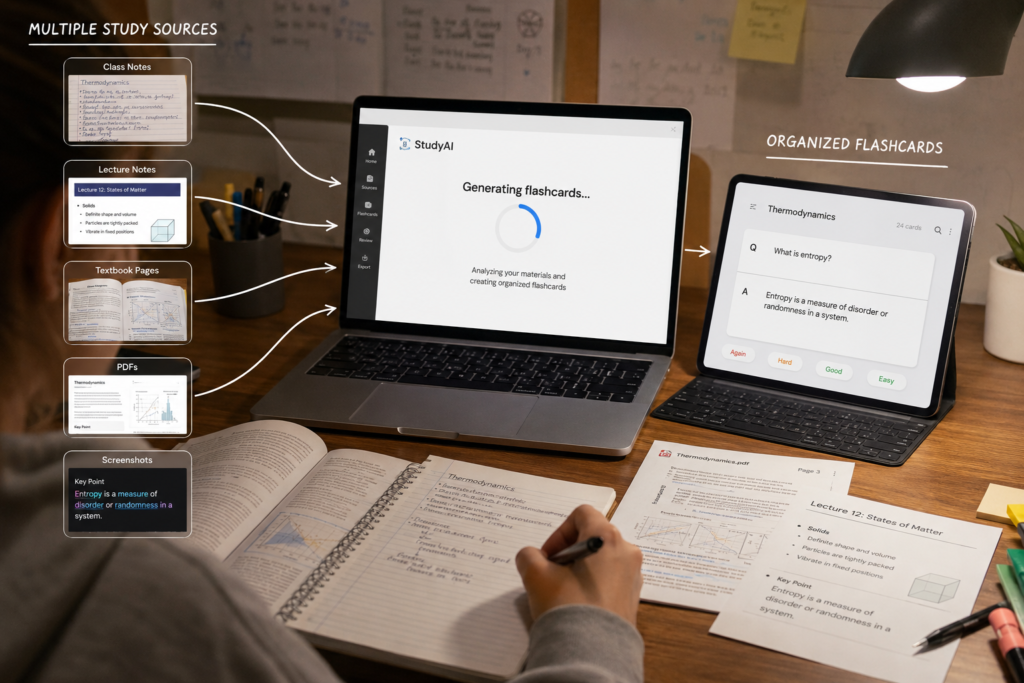
A key part of understanding how to use AI tools to create study flashcards for students is knowing which study materials can be converted into flashcards.
Class Notes
Messy notebooks can become organized flashcards.
This works especially well when students have incomplete notes.
If your notes are disorganized, our article on Best AI Tools for Students With Messy Class Notes explains how to organize study materials before turning them into flashcards.
Lecture Notes
Lecture transcripts can be converted into:
• Definitions
• Key concepts
• Exam questions
This pairs naturally with lecture note-taking workflows.
Students who first need organized lecture notes may also find our guide on Best AI Tools for Students to Take Notes From Lectures Automatically helpful before creating flashcards.
Textbook Chapters
Large chapters can become hundreds of targeted flashcards.
This helps students focus on important information.
PDF Study Guides
Many students receive:
• Study packets
• Course PDFs
• Reading materials
AI can convert these directly into study flashcards.
Screenshots
Screenshots often contain:
• Slides
• Online lessons
• Key diagrams
These can be converted into flashcards after text extraction.
Research Notes
University students frequently collect information from multiple sources.
AI helps organize those notes into structured review cards.
How a Student Can Turn a 20-Page Chapter Into Flashcards
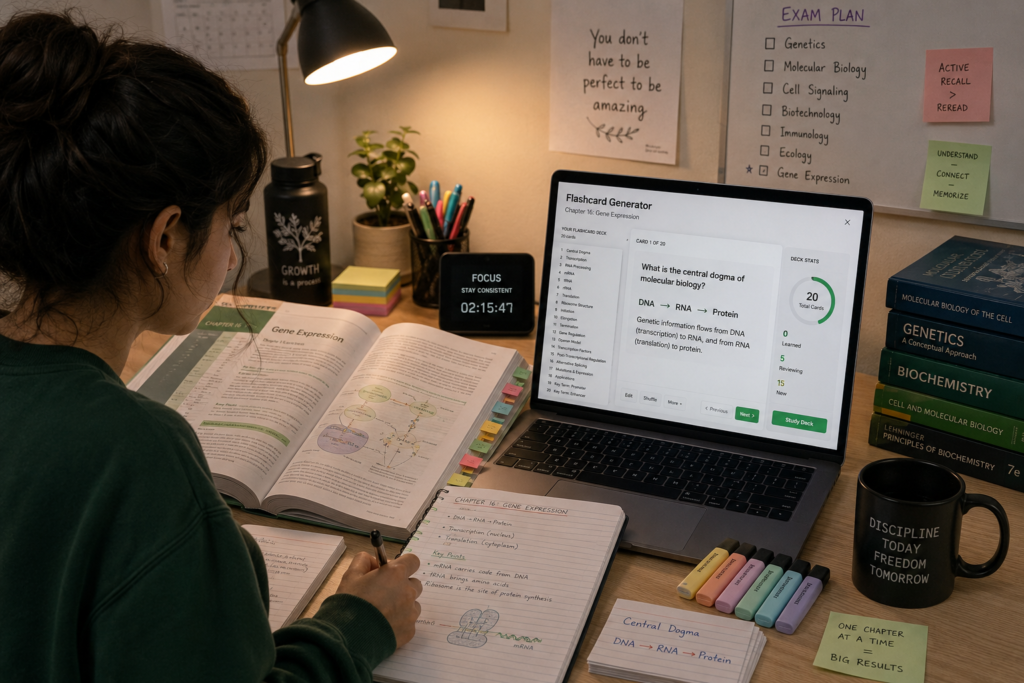
Imagine a biology student preparing for an exam.
The chapter contains:
• 20 pages
• Multiple diagrams
• Technical vocabulary
• Detailed processes
Traditional approach:
• Read chapter
• Highlight
• Re-read
• Forget information
AI flashcard approach:
1. Upload chapter
2. Generate 80–100 flashcards
3. Organize by topic
4. Review daily
The result:
• Faster revision
• Better recall
• Less overwhelm
This example demonstrates how to use AI tools to create study flashcards for students without spending hours creating cards manually.
Students working with long chapters can also read How to Use AI Tools to Turn Textbook Pages Into Short Study Notes before generating flashcards.
Before and After Example
Traditional Study Method
Student reads a chapter three times.
After two days:
• Many details forgotten
• Weak recall
• Difficult revision
AI Flashcard Workflow
Student uploads chapter.
AI generates:
• Definitions
• Key concepts
• Question-answer pairs
Student reviews cards daily.
Result Comparison
Traditional Method:
• High reading time
• Low testing
• Passive learning
AI Flashcards:
• Lower preparation time
• Active recall
• Better memory retention
Different Types of Study Flashcards Students Can Create
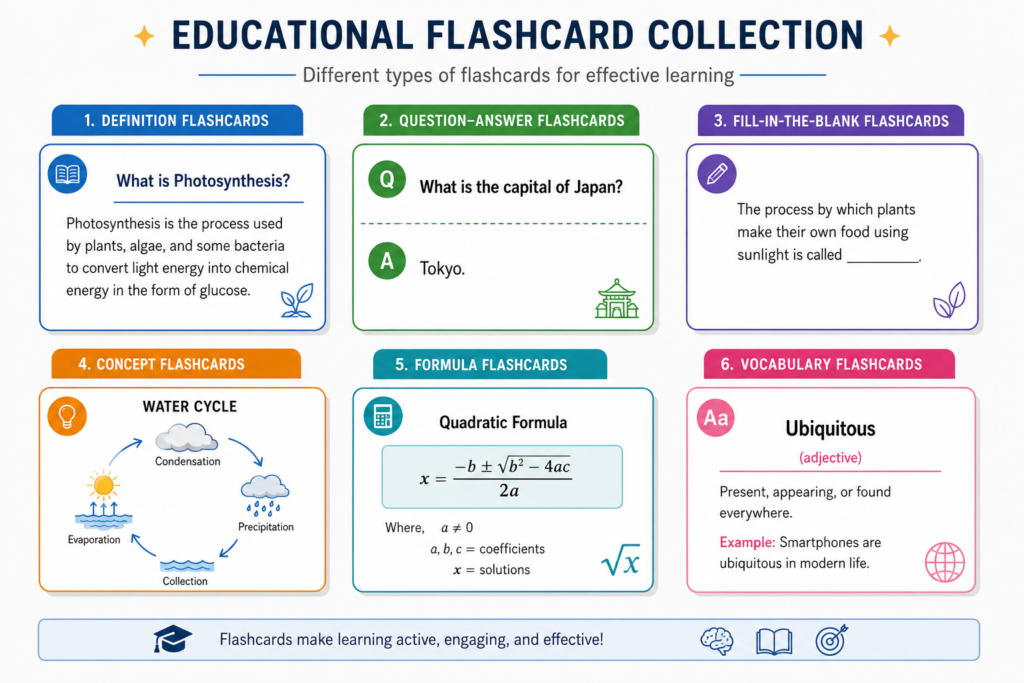
Definition Flashcards
Best for:
• Vocabulary
• Biology terms
• Psychology concepts
Example:
Q: What is photosynthesis?
A: The process plants use to convert light into chemical energy.
Question and Answer Flashcards
Best for:
• Most school subjects
Example:
Q: What caused the Industrial Revolution?
A: Technological innovations and economic changes.
Fill-in-the-Blank Flashcards
Best for:
• Memorization-heavy courses
Example:
The powerhouse of the cell is the ______.
Answer: Mitochondria
True or False Flashcards
Best for:
• Quick review sessions
Example:
Photosynthesis occurs in mitochondria.
Answer: False
Concept Flashcards
Best for:
• Deep understanding
Example:
Explain how supply and demand affect prices.
Formula Flashcards
Best for:
• Math
• Physics
• Economics
Example:
Q: What is Newton’s Second Law?
A: F = ma
Vocabulary Flashcards
Best for:
• Language learning
Example:
Word: Benevolent
Meaning: Kind and generous
What Makes a Good Flashcard?
Knowing how to use AI tools to create study flashcards for students is only useful if the flashcards themselves are effective.
Weak Flashcard Example
Q: Explain everything about photosynthesis.
Problems:
• Too broad
• Hard to answer
• Difficult to review
Strong Flashcard Example
Q: Where does photosynthesis occur?
A: Chloroplasts
Why it works:
• Specific
• Clear
• Easy to review
Good flashcards focus on one idea at a time.
How to Create Flashcards From Images and Screenshots
Many students learning how to use AI tools to create study flashcards for students use screenshots and photos instead of typed notes.
Many students store information as images.
Examples:
• Whiteboard photos
• Lecture screenshots
• Textbook photos
• Handwritten notes
• Mobile camera captures
Workflow:
Image
↓
Text Extraction
↓
AI Processing
↓
Flashcard Generation
↓
Revision Deck
This method is especially useful when students do not have digital notes.
Best AI Tools for Creating Study Flashcards
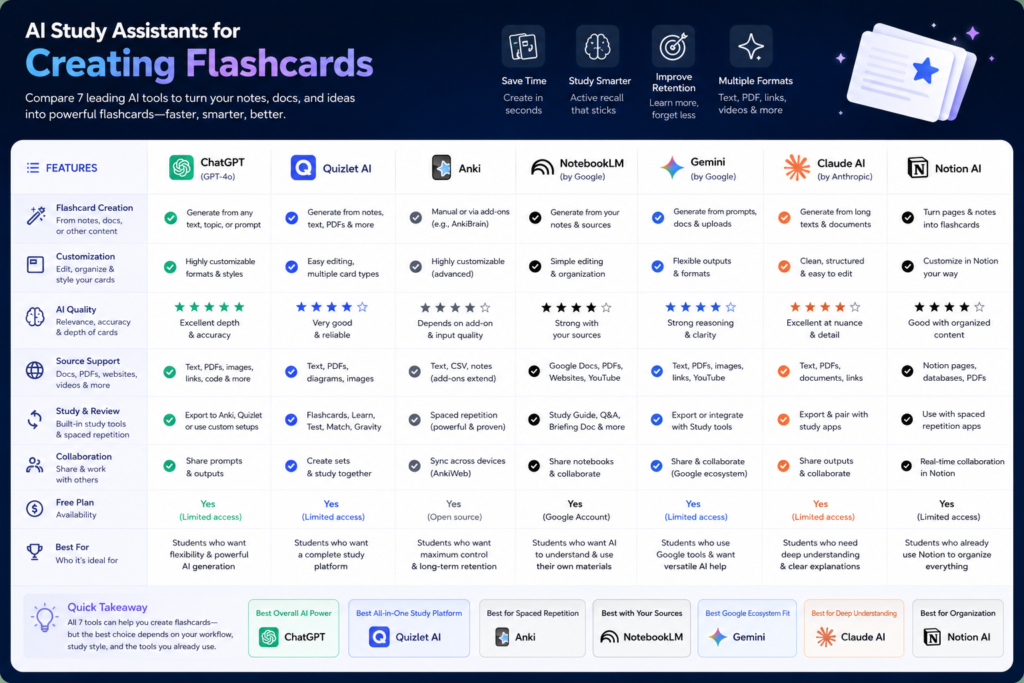
Choosing the right platform is an important part of learning how to use AI tools to create study flashcards for students effectively.
ChatGPT
Best Use Case
Creating customized AI study flashcards from notes, PDFs, summaries, and lecture materials.
Strengths
• Highly flexible
• Works with almost any subject
• Creates multiple flashcard formats
• Excellent for concept explanations
Weaknesses
• Requires good prompts
• Needs manual organization
Free or Paid
Free + Paid
Best For
Students who want complete control over flashcard creation.
Quizlet AI
Best Use Case
Automatic flashcard generation and revision.
Strengths
• Fast flashcard creation
• Built-in study modes
• Popular among students
Weaknesses
• Limited customization
Free or Paid
Freemium
Best For
Quick exam revision.
Anki
Best Use Case
Spaced repetition learning.
Strengths
• Powerful memory system
• Excellent long-term retention
• Huge student community
Weaknesses
• Learning curve
• Older interface
Free or Paid
Mostly free
Best For
Medical students and heavy memorization subjects.
NotebookLM
Best Use Case
Converting large study materials into organized flashcards.
Strengths
• Excellent source grounding
• Handles long documents well
Weaknesses
• Less flexible than ChatGPT
Free or Paid
Free
Best For
Textbook-heavy courses.
Google Gemini
Best Use Case
Quick flashcard generation from notes.
Strengths
• Fast
• Easy to use
Weaknesses
• Sometimes creates generic cards
Free or Paid
Free + Paid
Best For
Everyday study sessions.
Claude AI
Best Use Case
Large document summarization and flashcard creation.
Strengths
• Handles long inputs
• Strong explanations
Weaknesses
• Fewer integrations
Free or Paid
Free + Paid
Best For
College and university students.
Notion AI
Best Use Case
Combining notes and flashcards in one workspace.
Strengths
• Excellent organization
• Long-term study system
Weaknesses
• Setup time required
Free or Paid
Freemium
Best For
Students who like structured study systems.
Comparison Table
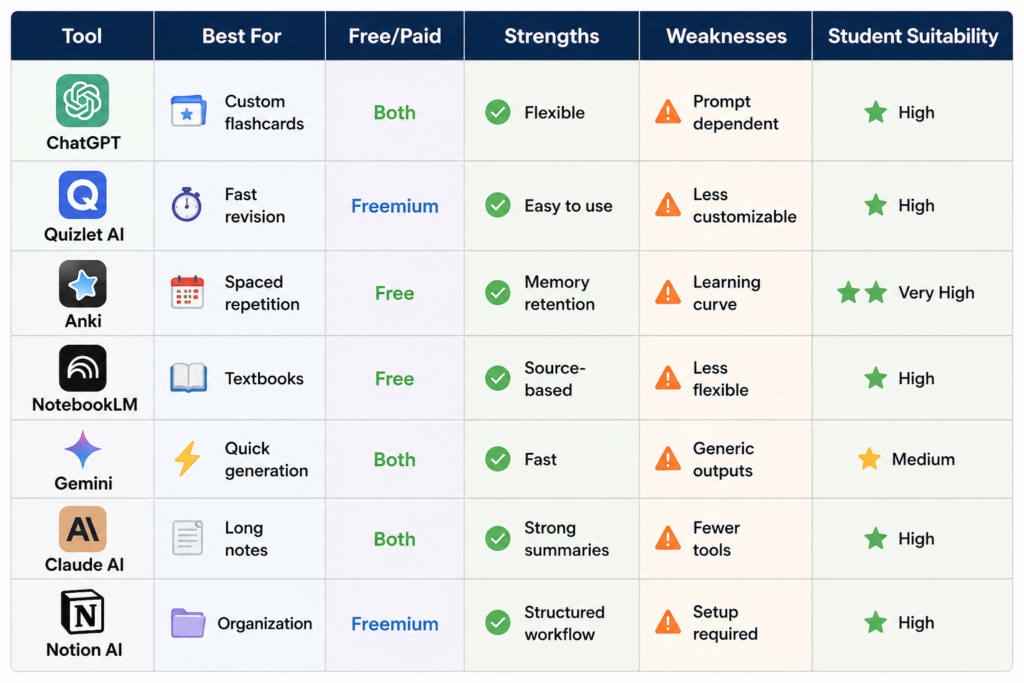
| Tool | Best For | Free/Paid | Strengths | Weaknesses | Student Suitability |
| ChatGPT | Custom flashcards | Both | Flexible | Prompt dependent | High |
| Quizlet AI | Fast revision | Freemium | Easy to use | Less customizable | High |
| Anki | Spaced repetition | Free | Memory retention | Learning curve | Very High |
| NotebookLM | Textbooks | Free | Source-based | Less flexible | High |
| Gemini | Quick generation | Both | Fast | Generic outputs | Medium |
| Claude AI | Long notes | Both | Strong summaries | Fewer tools | High |
| Notion AI | Organization | Freemium | Structured workflow | Setup required | High |
Visual Comparison Image Data
Compare tools using:
• Flashcard Quality
• Ease of Use
• Revision Support
• Spaced Repetition
• PDF Support- Student Friendliness
Best AI Tool Based on Student Situation
Students learning how to use AI tools to create study flashcards for students often choose different tools depending on their academic needs.
Exam Preparation
Best Choice:
ChatGPT + Quizlet AI
Medical Students
Best Choice:
Anki
Law Students
Best Choice:
ChatGPT + Claude AI
High School Students
Best Choice:
Quizlet AI
College Students
Best Choice:
NotebookLM + ChatGPT
Free Users
Best Choice:
ChatGPT Free + NotebookLM
Best Flashcard Strategy for Different Subjects
Biology
Use:
• Definition flashcards
• Process flashcards
• Diagram review cards
History
Use:
• Event flashcards
• Date flashcards
• Cause-and-effect cards
Economics
Use:
• Concept flashcards
• Formula flashcards
• Application questions
Psychology
Use:
• Theory flashcards
• Research study cards
• Vocabulary cards
Computer Science
Use:
• Concept cards
• Code explanation cards
• Terminology cards
Language Learning
Use:
• Vocabulary cards
• Translation cards
• Grammar cards
How Students Can Use Flashcards With Spaced Repetition
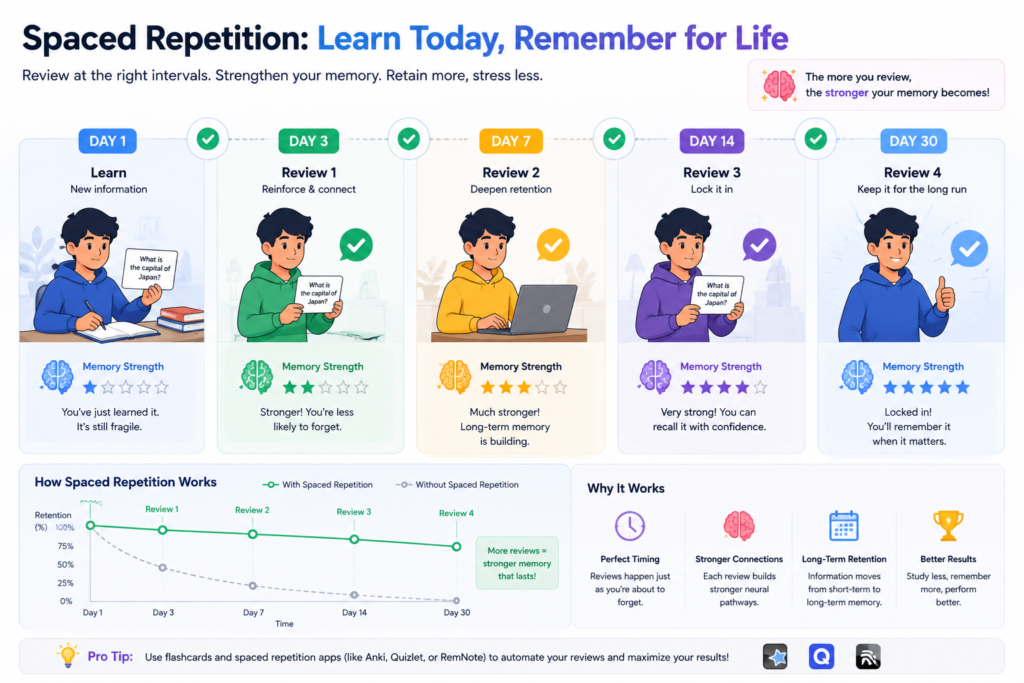
Study
↓
Review
↓
Repeat
↓
Long-Term Memory
Example:
Day 1 → Learn cards
Day 3 → Review
Day 7 → Review
Day 14 → Review
Day 30 → Review
This repeated exposure improves retention significantly.
How AI Flashcards Help During Exam Revision
One major advantage of understanding how to use AI tools to create study flashcards for students is the ability to build faster revision systems before exams.
Exam workflow:
Notes
↓
AI Flashcards
↓
Active Recall
↓
Weak Areas Identified
↓
Focused Revision
↓
Exam Preparation
Instead of reviewing everything equally, students can spend more time on difficult concepts.
Common Mistakes Students Make With AI Flashcards
Even after learning how to use AI tools to create study flashcards for students, many learners still make avoidable revision mistakes.
• Creating hundreds of cards immediately
• Writing long answers
• Reviewing cards passively
• Memorizing without understanding
• Never deleting weak cards
• Poor organization
• Ignoring spaced repetition
When Students Should Not Depend Only on Flashcards
Flashcards are helpful but not sufficient for everything.
Use additional study methods for:
• Diagrams
• Mathematical derivations
• Scientific formulas
• Engineering calculations
• Case studies
• Practical subjects
• Essay-based exams
How to Use AI Responsibly While Studying
• Verify information
• Review source material
• Understand concepts before memorizing
• Use AI as a study assistant
• Do not rely entirely on generated answers
The goal is learning, not shortcutting learning.
Best ChatGPT Prompts for Creating Study Flashcards
1. Create 30 flashcards from these biology notes.
2. Turn this chapter into question-and-answer flashcards.
3. Create active recall flashcards from this PDF summary.
4. Generate exam revision flashcards from these lecture notes.
5. Create vocabulary flashcards from this text.
6. Build fill-in-the-blank flashcards from these notes.
7. Generate difficult flashcards only.
8. Create beginner-level flashcards from this chapter.
9. Create advanced flashcards for university exams.
10. Turn these screenshots into flashcards.
11. Generate flashcards grouped by topic.
12. Convert these textbook notes into Quizlet-style cards.
13. Create true-or-false flashcards from this content.
14. Build flashcards and practice questions from these notes.
15. Identify weak concepts and create flashcards for them.
Real Student Examples
Example 1: Biology Student
A biology student uploads lecture notes covering genetics.
AI creates:
• Vocabulary cards
• Process cards
• Concept cards
Result:
Faster exam revision.
Example 2: History Student
A history student uploads a 15-page chapter.
AI generates:
• Date flashcards
• Event flashcards
• Cause-and-effect questions
Result:
Improved recall before exams.
Example 3: College Student Preparing for Finals
The student combines:
– Lecture notes
– PDFs
– Textbook summaries
AI generates hundreds of organized study flashcards.
Result:
More structured revision process.
Flashcards vs Traditional Revision Methods
| Revision Method | Active Recall | Time Efficient | Memory Retention |
| Re-reading Notes | Low | Medium | Low |
| Highlighting | Low | Medium | Low |
| Summaries | Medium | Medium | Medium |
| AI Flashcards | High | High | High |
| Practice Testing | Very High | High | Very High |
How Much Time Can AI Flashcards Save?
Realistic example:
Traditional Method:
20-page chapter
• Reading: 2 hours
• Manual flashcards: 2 hours
Total: ~4 hours
AI Workflow:
• Upload content
• Generate cards
• Review cards
Total setup: ~20–40 minutes
Students still need review time, but preparation becomes much faster.
Internal Learning Workflow
Lecture Notes
↓
Study Notes
↓
Flashcards
↓
Practice Questions
↓
Exam Revision
This is one of the most effective student workflows.Internal linking opportunities
Internal linking opportunities naturally fit topics such as:
• Best AI Tools for Students With Messy Class Notes
• Best AI Tools for Students to Take Notes From Lectures Automatically
• How to Use AI Tools to Turn Textbook Pages Into Short Study Notes
• Future guides about practice questions and exam revision
7-Day Flashcard Revision Plan Before an Exam
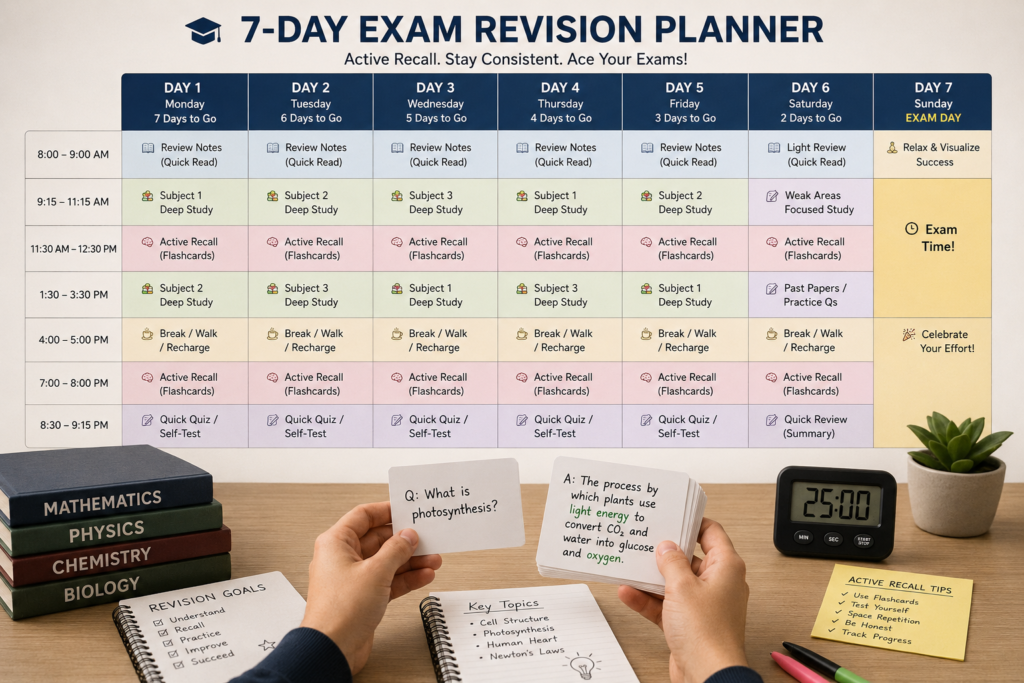
This revision schedule works especially well for students who have already learned how to use AI tools to create study flashcards for students.
Day 1
Create flashcards.
Day 2
Complete first review.
Day 3
Active recall session.
Day 4
Review difficult cards.
Day 5
Mixed-topic revision.
Day 6
Practice testing.
Day 7
Final exam review.
This combines active recall and spaced repetition.
FAQ
Can AI create flashcards from notes?
Yes. Most AI study tools can generate flashcards from class notes and lecture notes.
Can AI create flashcards from PDFs?
Yes. Many tools support PDF uploads.
What is the best AI flashcard tool?
ChatGPT, Quizlet AI, and Anki are among the most popular options.
Are AI flashcards effective?
Yes, especially when combined with active recall and spaced repetition.
Can ChatGPT create flashcards?
Yes. ChatGPT can create customized study flashcards from almost any learning material.
Are flashcards useful for exams?
Yes. They are widely used for exam revision because they improve memory retention and recall.
Conclusion
Learning how to use AI tools to create study flashcards for students is not really about finding the perfect app.
It is about building a better revision system.
AI flashcards help students transform notes, textbooks, PDFs, lecture materials, and screenshots into organized learning tools.
When combined with active recall and spaced repetition, flashcards become one of the most effective methods for exam preparation.
Use AI to save time.
Use flashcards to strengthen memory.
And use consistent review sessions to turn information into long-term knowledge.
Pingback: AI Tools to Help Students Review and Revise Long Chapters Quickly (Complete 2026 Guide)
Pingback: How to Use AI Tools to Remember What You Study Longer (Complete Student Guide 2026) - “AI Tools Hub India & USA”
Thank you sir 😊