The Best AI Tools for Students to Improve Public Speaking depend on the specific speaking skill you want to improve.
• Yoodli — a strong choice for AI-assisted speech practice, with feedback on areas such as pacing, filler words, clarity, and presentation delivery.
• Microsoft Speaker Coach — useful for rehearsing presentations while getting feedback on pacing, filler words, pitch, and slide reading.
• Orai — focused on speech coaching, including live feedback on filler words, pace, clarity, and energy.
• ELSA Speak — particularly useful when pronunciation, sounds, stress, and intonation are the main concerns.
• ChatGPT, Google Gemini, and Claude — flexible options for conversation practice, impromptu questions, explanations, and mock audience sessions, but they should not be treated as dedicated speech-analysis tools.
The key is to match the tool to the problem. If you speak too quickly, use pacing feedback. If you rely on “um” or “like,” use filler-word analysis. If pronunciation is your main issue, a pronunciation-focused tool makes more sense.
The strongest routine is:
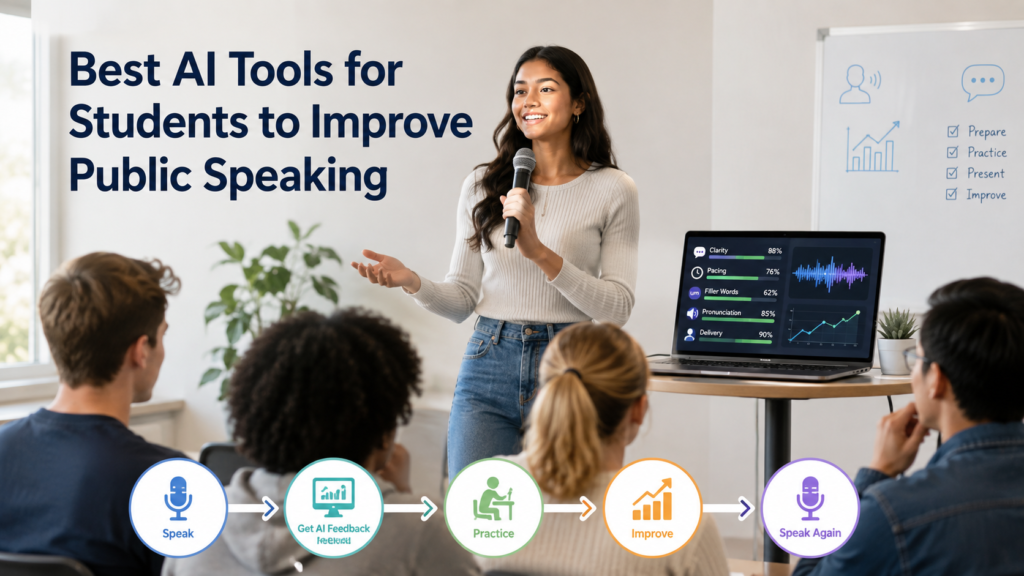
Speak → Get Feedback → Fix One Weakness → Speak Again → Practice Questions → Get Human Feedback
AI can make practice more consistent, but it cannot reproduce every part of speaking to a real audience.
Introduction
Public speaking is a skill that improves through practice, but simply speaking more is not always enough.
A student may give the same practice speech five times and still not notice that they rush through important points, repeat the same filler words, use overly complicated vocabulary, or pause in awkward places.
That is where AI-assisted practice can help.
An AI speaking tool can turn a practice session into something more specific:
“You spoke too quickly here.”
“You repeated this phrase several times.”
“This explanation could be clearer.”
“Try answering this audience question without preparation.”
That type of feedback gives students something concrete to work on during the next rehearsal.
The Best AI Tools for Students to Improve Public Speaking are therefore not simply the tools with the most features. A useful tool should help solve a genuine speaking problem and make repeated practice easier.
It is also important to separate public speaking practice from presentation creation. Making better slides can support a presentation, but public speaking involves much more: voice, pacing, clarity, word choice, spontaneous responses, audience interaction, and the ability to communicate an idea naturally.
AI can help students practice those skills, but it should remain a practice assistant rather than a replacement for real human interaction.
What Are AI Tools for Public Speaking?
AI public-speaking tools use speech recognition, conversational AI, or other forms of artificial intelligence to help people practice and review spoken communication.
Depending on the tool, students may receive feedback about:
• Speaking pace
• Filler words
• Clarity
• Pronunciation
• Pitch and delivery
• Repetitive language
• Word choice
• Presentation structure
• Audience questions
• Conversational responses
For example, Microsoft Speaker Coach can evaluate pacing, pitch, filler words, informal speech, and whether a speaker is reading slide text. It also provides a rehearsal report after practice.
Orai focuses directly on speech coaching and currently describes feedback around filler words, pace, clarity, and energy.
ELSA Speak takes a different approach. Its pronunciation feedback uses speech recognition and AI to analyze sounds, stress, and intonation.
This difference matters.
A student who already speaks clearly but struggles with pronunciation may benefit more from a pronunciation-focused tool than from a general speaking coach.
Likewise, a student who speaks too quickly needs pacing feedback—not another slide-generation tool.
How We Selected These AI Tools
The tools in this guide are selected according to their usefulness for actual speaking improvement, not simply because they are popular AI products.
Speaking Feedback
Does the tool provide feedback about spoken delivery rather than only written content?
Pacing and Pauses
Can it help students recognize when they are speaking too quickly or need more deliberate pauses?
Filler Words
Can it identify repeated fillers or repetitive language?
Pronunciation
Where relevant, does the tool provide meaningful pronunciation, sound, stress, or intonation feedback?
Conversation Practice
Can students use the tool to practice spontaneous responses and audience questions?
Student Usefulness
Can a student realistically fit the tool into a regular practice routine?
Free Access
Free options can make a tool easier for students to try, but plans and limits can change. Pricing should therefore be checked at the time of use.
Limitations and Privacy
A useful recommendation should also explain what the tool cannot do and what students should consider before uploading recordings or other information.
We do not treat a general chatbot as equivalent to a specialized speech analyzer. Those tools can still be useful, but their role is different.
Best AI Tools for Students to Improve Public Speaking
Yoodli is designed around public-speaking practice. Its workflow
lets students practice a speech, receive structured feedback, and
use AI follow-up questions as part of the rehearsal process.
Yoodli describes feedback around areas including pacing, clarity,
filler words, structure, and overall presence.
Best For
Yoodli is particularly useful for students who want to improve
how they actually deliver a presentation or speech.
Speaking practice
Presentation rehearsal
Delivery feedback
Filler-word awareness
Pacing improvement
Follow-up questions
How It Helps Public Speaking
A student can practice a speech privately, review the feedback,
choose one or two weaknesses, and repeat the speech.
Practice→Feedback→Correction→Rehearsal
Yoodli can also be useful when preparing for questions because its
practice workflow can generate follow-up questions after a speaking
session.
Key Strengths
Designed specifically around speaking practice
Useful for repeated rehearsal
Provides structured delivery feedback
Supports follow-up-question practice
Useful for presentations and other speaking situations
Limitation
AI feedback cannot fully reproduce the reactions of a real audience.
A student should still practice with classmates, teachers, or other
real listeners when possible.
Best Student Use Case
Use Yoodli when your main problem is how you speak, rather than
how you design your slides.
Microsoft Speaker Coach is integrated into PowerPoint and is
particularly useful for students who already have their presentation
prepared as a slide deck.
Students who already use PowerPoint and want delivery feedback while
rehearsing their actual presentation.
PowerPoint rehearsal
Speaking pace
Filler-word awareness
Slide-reading feedback
Pitch and delivery
Rehearsal reports
How It Helps Public Speaking
Instead of practicing your speech separately from your presentation,
you can rehearse the actual deck. This helps reveal problems such as
reading too much from slides, rushing through sections, repeated
filler words, monotone delivery, and weak pacing.
Microsoft’s documentation also explains that Speaker Coach provides
pacing feedback and recommendations for using pauses and transitions.
Key Strengths
Integrated with PowerPoint
Useful for rehearsal
Provides pacing feedback
Identifies filler words
Can identify slide reading
Produces a rehearsal report
Limitation
Speaker Coach is closely connected to presentation rehearsal, so it
is less suitable if your goal is purely conversational or impromptu
speaking without a prepared deck.
Speaker Coach is also a cloud-enhanced Microsoft 365 feature.
Microsoft states that speech utterances are sent to Microsoft to
provide the service.
Best Student Use Case
Use Microsoft Speaker Coach when you already have a PowerPoint
presentation and want to improve delivery rather than slide creation.
ELSA Speak is different from a general public-speaking coach.
Its main strength is pronunciation-focused practice, making it
useful for students who want clearer spoken English.
Pronunciation, individual sounds, word stress, and intonation.
Pronunciation practice
Difficult sounds
Word stress
Intonation
Spoken-English clarity
Technical terminology
How It Helps Public Speaking
Clear pronunciation matters when an audience needs to understand
unfamiliar names, technical terms, or important vocabulary.
Students can use pronunciation practice before giving a speech that
contains difficult terminology.
For example, an engineering student could practice technical terms
before a project presentation rather than discovering during the
presentation that certain words are difficult to pronounce.
Key Strengths
Pronunciation-focused
Feedback on sounds
Stress and intonation practice
Useful for students working on spoken English
Limitation
Pronunciation is only one part of public speaking. ELSA should not
be treated as a complete substitute for practicing pacing, audience
questions, structure, and overall delivery.
Best Student Use Case
Use ELSA when the main barrier is pronunciation or spoken-English
clarity, not general presentation structure.
Conversation practice, spontaneous speaking, audience questions,
and flexible coaching.
Conversation practice
Audience questions
Follow-up questions
Impromptu speaking
Explanation practice
Transcript review
How It Helps Public Speaking
ChatGPT’s main strength is interaction. Students can ask it to give
an unexpected topic, ask one question at a time, challenge an answer,
create follow-up questions, simplify explanations, or act as a
skeptical audience member.
Instead of practicing a memorized speech every time, ask ChatGPT to
give you a topic you have not prepared for. You can then speak for
60 seconds, transcribe your response, and ask for feedback on clarity,
structure, repetition, and word choice.
A general chatbot should not be treated as equivalent to a dedicated
speech-analysis system. Its feedback depends heavily on the information
you provide and the way you structure the practice.
Best Student Use Case
Use ChatGPT when you want to practice thinking and speaking on the
spot, especially when you want unpredictable questions and interactive
follow-up practice.
Conversational practice, explanations, and spontaneous questions.
Conversation practice
Spontaneous questions
Follow-up questions
Explanation practice
Unfamiliar topics
Transcript review
How It Helps Public Speaking
Students can ask Gemini to give an unfamiliar topic, ask follow-up
questions, challenge an explanation, identify unclear wording in a
transcript, or simulate a classmate or instructor.
This makes it useful for practicing responses rather than simply
memorizing a prepared speech.
New Topic→Speak→Challenge→Respond
Key Strengths
Flexible conversation
Useful for spontaneous questions
Can adapt practice topics
Helpful for explanation practice
Limitation
Do not assume Gemini provides the same delivery metrics as a dedicated
speech coach. For measurable pacing or filler-word feedback, use a
tool designed specifically for that purpose.
Best Student Use Case
Gemini is useful when you need to improve how quickly and clearly
you can think while speaking.
Claude can help students turn complex ideas into clearer explanations,
improve vocabulary and wording, and practice communicating difficult
topics in a more understandable way.
Clear explanations, reasoning, vocabulary, and conversational practice.
Clear explanations
Complex topics
Vocabulary improvement
Reasoning practice
Transcript review
Conversational practice
How It Helps Public Speaking
Claude can be particularly useful for students who understand a topic
but struggle to communicate complex ideas simply.
Give Claude a transcript or explanation and ask it to identify
unnecessarily complicated wording, repeated ideas, long sentences,
missing context, and places where a listener may become confused.
Give Transcript→Find Confusion→Simplify→Speak Again
You can then practice saying the revised explanation aloud in your
own words rather than simply memorizing an AI-generated version.
Key Strengths
Useful for content clarity
Good for complex explanations
Can challenge reasoning
Useful for transcript review
Limitation
Claude is not a dedicated speech-analysis tool. Students should use
specialized tools when they need detailed delivery measurements such
as speaking pace, filler-word frequency, or other measurable speaking
patterns.
Best Student Use Case
Use Claude when your biggest issue is:
“I understand this topic, but I struggle to explain it simply.”
Orai or Another Dedicated Speech Coach
If a student wants a tool specifically focused on speech habits, a dedicated coach can make more sense than a general AI assistant.
Orai, for example, currently emphasizes filler words, pace, clarity, energy, and short speaking scenarios.
The important principle is not to collect as many AI tools as possible.
Choose one primary speaking-feedback tool, then add a conversational AI only if you need Q&A or spontaneous-speaking practice.
Best AI Tools for Public Speaking Compared
QUICK COMPARISON
AI Tools for Public Speaking Practice
Compare these tools by the type of speaking practice and feedback
they are best suited to provide.
Important: these tools should not be treated as interchangeable. Yoodli, Speaker Coach, and Orai are much closer to dedicated speech coaching, while ChatGPT, Gemini, and Claude are more flexible conversation and content-practice tools.
Which AI Public Speaking Tool Is Best for Different Student Needs?
There is no single winner among the Best AI Tools for Students to Improve Public Speaking because students usually have different speaking problems.
Someone who struggles with pronunciation needs different practice from someone who speaks too quickly. A student who already delivers clearly may need more spontaneous Q&A practice instead of additional speech analysis.
Best for overall speaking feedback
For students who want structured feedback across several aspects of spoken delivery, a dedicated AI speaking coach is generally the most appropriate category.
The important factor is not the number of metrics a tool displays. Choose a tool that helps you identify a specific weakness and gives you an opportunity to practice that weakness again.
Best for filler words
Choose a speaking-analysis tool when repeated words such as “um,” “uh,” or “like” are distracting from your message.
The useful workflow is simple:
Record → identify repeated fillers → practice deliberate pauses → record again.
The goal is not to remove every natural pause. A short pause can make speech sound more deliberate and give the audience time to process an idea.
Best for pacing
Students who rush should prioritize a tool that provides useful pacing feedback.
Instead of trying to speak slowly throughout the entire speech, learn where your delivery needs more control. Important definitions, technical concepts, statistics, and conclusions may benefit from a slower pace and intentional pauses.
Best for pronunciation
A pronunciation-focused AI tool is more appropriate when individual sounds, word stress, or difficult vocabulary are affecting clarity.
This can be especially useful before a speech containing:
• Technical terminology
• Scientific names
• Unfamiliar words
• Names of people or places
• Subject-specific vocabulary
Best for conversation practice
General conversational AI is useful when you need to practice responding rather than repeating a prepared speech.
You can ask for one question at a time, answer aloud, and then request a follow-up question.
This helps shift practice from memorization to communication.
Best for impromptu speaking
For spontaneous speaking, use an AI assistant to provide unfamiliar topics and unexpected questions.
Give yourself a short preparation period, speak without a script, and then review your response.
This is useful because real audiences do not always follow the questions you prepared beforehand.
Best for free option
There is no permanent “best free” AI public-speaking tool because plans, usage limits, and available features can change.
Instead, choose a tool based on the skill you need to practice and check its current access terms before relying on it for regular practice.
Best for overall
The Best AI Tools for Students to Improve Public Speaking work best when they are treated as practice assistants rather than replacements for actual speaking experience.
A simple combination is enough:
AI speech feedback → conversational practice → human feedback
You do not need five different subscriptions to improve your speaking.
What Public Speaking Skills Can AI Help Students Improve?
AI is most useful when students turn “I need to become a better speaker” into a specific practice goal.
Speaking Clearly
Clear speaking means making your message easy to understand without unnecessary complexity.
AI can review a transcript and identify:
• Long or confusing sentences
• Repeated ideas
• Unnecessary jargon
• Vague statements
• Explanations that lack context
For example, instead of asking:
“Is my speech good?”
ask:
“Identify three places where a college student unfamiliar with this topic might become confused. Explain why and suggest a clearer way to communicate each idea.”
Then practice the explanation aloud in your own words.
The purpose is not to make every sentence sound formal. Good public speaking often sounds conversational.
Pacing and Pauses
Pacing affects how easily an audience can follow your ideas.
Speaking too quickly can make important information difficult to process. Speaking too slowly can make a simple explanation feel unnecessarily long.
Instead of trying to maintain one constant speed, vary your pace intentionally.
Slow down when:
• Introducing an important concept
• Explaining technical information
• Giving a key result
• Making an important transition
• Delivering your conclusion
Use short pauses after important points rather than filling every silence with words.
A useful practice exercise is to record a one-minute explanation and ask AI to identify sections where your wording or information density may encourage rushed delivery.
Filler Words
Filler words are not automatically a problem. Everyone uses pauses and conversational fillers sometimes.
The issue is excessive repetition.
Common examples include:
• Um
• Uh
• Like
• You know
• Basically
• Actually
The first goal is awareness.
Once you know which fillers you use most often, practice replacing unnecessary ones with a brief silent pause.
This can make your speech sound more controlled without making it robotic.
Pronunciation
Pronunciation matters when listeners need to understand specific words accurately.
Students can use AI pronunciation tools to practice difficult vocabulary before speaking in class, presenting research, or participating in academic discussions.
A useful exercise is:
Identify difficult words → practice individually → use them in sentences → say the complete explanation aloud.
Do not practice words only in isolation. A word that sounds correct by itself can still feel difficult when used inside a complete sentence.
For students speaking English as an additional language, the goal should be clear and understandable communication, not copying another person’s accent.
Vocabulary and Word Choice
Good public speaking does not require complicated vocabulary.
In many situations, simpler words are easier for an audience to understand.
For example:
“Utilize” may simply become “use.”
“Commence” may become “begin.”
That does not mean technical vocabulary should always be removed. Technical terms are necessary when they communicate precise meanings.
The goal is to choose words that are:
• Accurate
• Appropriate for the audience
• Easy to understand
• Natural to say aloud
Ask AI to identify unnecessarily complicated wording, then decide which suggestions actually fit your subject.
Voice and Delivery
Delivery involves how you communicate an idea, not just the words themselves.
Relevant elements include:
• Emphasis
• Pauses
• Vocal variation
• Energy
• Rhythm
• Speaking volume
AI can provide useful feedback on some measurable characteristics, but it cannot completely determine whether your delivery feels natural to a real audience.
That is why students should combine AI practice with occasional human observation.
Ask a listener:
“Did any part of my delivery make the explanation difficult to follow?”
That answer may reveal something a numerical score does not.
Spontaneous Speaking
Prepared speeches allow you to choose your exact words beforehand. Real conversations are less predictable.
A teacher may ask:
“Why do you think that?”
A classmate may challenge your conclusion.
An audience member may ask for an example.
Spontaneous speaking practice helps you respond without depending entirely on memorized sentences.
AI can create these situations repeatedly by giving you unfamiliar topics and follow-up questions.
Q&A Skills
Q&A requires a slightly different communication skill from delivering a prepared speech.
A useful answer structure is:
Direct answer → explanation → example or evidence if needed
Do not immediately give a five-minute response to a simple question.
Answer what was asked first.
If the audience wants more detail, they can ask another question.
This is one area where the Best AI Tools for Students to Improve Public Speaking can be especially useful because conversational practice can create questions you might not have prepared yourself.
How to Use AI to Improve Public Speaking Step by Step
The goal is not to ask AI for a score and move on.
A better system is:
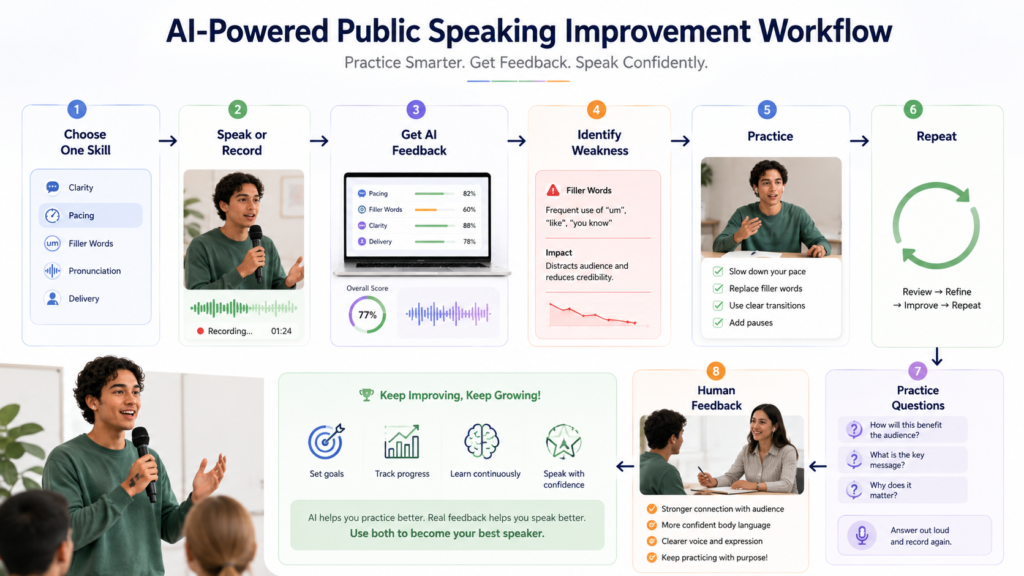
Choose one skill → Speak → Get feedback → Fix the weakness → Speak again → Add spontaneous questions → Get human feedback
Step 1: Choose One Skill
Start with the problem that has the biggest effect on your communication.
For example:
“I speak too quickly.”
That is a better practice goal than:
“I need better public-speaking skills.”
Step 2: Speak or Record
Choose a short topic and speak for one to three minutes.
Do not write a perfect script first.
You can explain:
• A class concept
• Your research topic
• A project idea
• A news topic
• A subject you understand well
Recording gives you something concrete to review.
Step 3: Get AI Feedback
Give the AI your transcript or use a suitable speech-analysis tool.
Ask for focused feedback.
For example:
“Analyze this speech only for pacing, filler words, and clarity. Identify the two most important issues I should work on next.”
Avoid asking for ten different types of feedback during every rehearsal.
Step 4: Identify Weaknesses
Look for patterns instead of isolated mistakes.
If you used one filler word once, that does not necessarily mean it is a major problem.
If you repeatedly rushed whenever you explained technical information, that is a stronger practice target.
Step 5: Practice
Repeat the same exercise while focusing on one weakness.
If pacing is the problem, concentrate on deliberate pauses.
If clarity is the problem, simplify complicated explanations.
If filler words are the problem, pause before responding.
Step 6: Repeat
Run another short rehearsal.
Compare the new recording with the previous one.
Ask:
• Did I slow down?
• Did I pause more naturally?
• Did I explain the idea more clearly?
• Did I reduce repetitive fillers?
This creates a measurable practice cycle without becoming dependent on a single AI score.
Step 7: Practice Spontaneous Questions
Once the prepared speech feels comfortable, introduce uncertainty.
Ask AI to give you one unexpected question.
Answer aloud without looking at notes.
Then request a follow-up question.
This changes the exercise from speech rehearsal into real communication practice.
Step 8: Get Human Feedback
Finish with a real listener whenever possible.
A classmate, teacher, friend, or family member can notice:
• Whether your message was understandable
• Whether you sounded natural
• Whether your explanation held attention
• Whether your answer actually addressed the question
The strongest AI tools for students to improve public speaking therefore work as one part of a broader practice routine—not the entire routine.
Best AI Prompts for Improving Public Speaking
The quality of AI feedback depends heavily on the instructions you provide.
Instead of:
“Improve my speaking.”
give the AI a specific skill, audience, and objective.
COPY & PRACTICE
AI Prompts for Public Speaking Practice
Copy any prompt below into your AI tool and adapt it to your
presentation, speech, or speaking goal.
01
Clarity Prompt
“Review the following speech transcript for clarity. Identify up to
three places where a college audience might become confused. Explain
the problem briefly and suggest a clearer way to express the same
idea without removing important information.”
02
Filler Words Prompt
“Analyze this speaking transcript for repeated filler words and
phrases. Identify the most frequent ones and show where they appear.
Then suggest practical ways to replace unnecessary fillers with
natural pauses.”
03
Pacing Prompt
“Review this speech transcript for pacing problems. Identify sections
that may be difficult to follow because I am likely to speak too
quickly or include too much information at once. Suggest where
deliberate pauses would improve clarity.”
04
Pronunciation Prompt
“Review this speech and identify technical, uncommon, or potentially
difficult words that I should practice pronouncing. Explain which
words deserve extra attention and why. Do not change the meaning of
my speech.”
05
Concise Speaking Prompt
“Review this spoken answer and identify unnecessary repetition or
wording. Help me make it more concise while preserving the important
meaning. The result should sound natural when spoken aloud, not like
formal written text.”
06
Impromptu Speaking Prompt
“Give me one unfamiliar public-speaking topic. Give me 20 seconds
to prepare, then ask me to speak about it for 60 seconds. After I
finish, evaluate my clarity, structure, pacing, filler words, and
conciseness. Then give me one challenging follow-up question.”
07
Audience Questions Prompt
“Read the presentation or speech material I provide. Generate
realistic audience questions based only on that material. Ask one
question at a time and wait for my answer. Include basic, moderate,
and challenging questions.”
08
Mock Speaking-Coach Prompt
“Act as my public-speaking coach. Give me one speaking exercise at
a time. After each response, identify my most important improvement
opportunity and give me a short exercise to practice it. Focus on
clarity, pacing, pauses, filler words, concise answers, and
spontaneous speaking.”
How to Practice Impromptu Speaking With AI
Impromptu practice is one of the easiest ways to make AI more useful for public speaking.
Instead of repeating a prepared speech, you practice handling information you did not expect.
Step 1: Choose an Unexpected Topic
Ask AI to give you a topic without providing preparation material.
For example:
• Should college students use AI for studying?
• What makes a good leader?
• Should schools change homework policies?
• Is remote learning effective?
• What is the biggest challenge facing college students?
The topic itself is less important than the unpredictability.
Step 2: Limit Preparation Time
Give yourself approximately 20–30 seconds.
Write only a few keywords:
Main idea → Reason → Example → Closing point
Do not write a complete script.
Step 3: Speak for a Fixed Time
Choose a short limit such as 60 or 90 seconds.
Start speaking and continue even if you make a small mistake.
If you lose your place, pause, collect your thought, and continue.
The purpose is to become comfortable recovering rather than restarting every time something goes wrong.
Step 4: Review the Response
After speaking, use AI to review a transcript or your notes.
Ask it to focus on:
• Clarity
• Organization
• Repetition
• Filler words
• Conciseness
• Strength of the main point
Do not ask AI to rewrite the entire answer unless you specifically need help understanding how it could be improved.
Step 5: Add Follow-Up Questions
Now increase the difficulty.
Ask:
“Challenge my answer with one realistic follow-up question.”
Answer that question aloud.
Then ask for another.
This creates a simple simulation of an unpredictable conversation.
Step 6: Increase Difficulty Gradually
Once basic topics become comfortable, introduce:
• Less familiar subjects
• Shorter preparation time
• Opposing viewpoints
• Technical topics
• Audience objections
• Multiple follow-up questions
The aim is not to make the exercise unnecessarily stressful.
The aim is to make spontaneous speaking feel increasingly familiar.
Strong Impromptu Speaking Prompt
“Act as my impromptu public-speaking coach. Give me one unexpected topic and allow me 20 seconds to prepare. Then ask me to speak for 60 seconds. After my response, evaluate clarity, structure, pacing, filler words, and conciseness. Ask one challenging follow-up question based on my answer. Continue one question at a time and gradually increase the difficulty. Do not give me an answer before I respond.”
For this exercise to actually improve speaking, say your answer aloud before entering it into the AI.
Typing a response gives you writing practice. Speaking it gives you public-speaking practice.
AI Feedback vs Human Feedback for Public Speaking
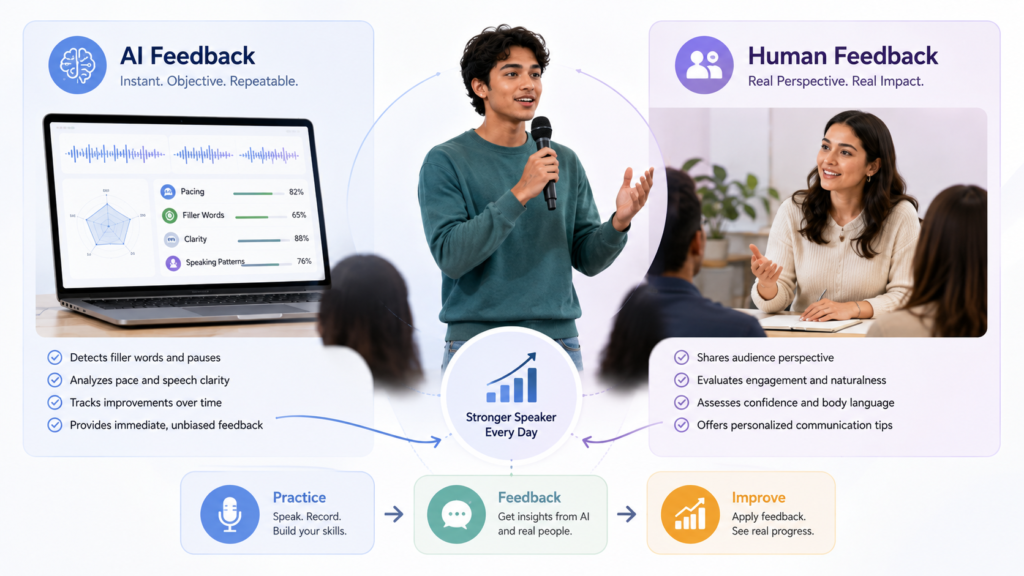
The Best AI Tools for Students to Improve Public Speaking can provide fast, repeatable feedback, but AI and human feedback serve different purposes.
SMART PRACTICE COMPARISON
AI Feedback vs Human Feedback
Both can improve presentation practice, but they provide different
kinds of feedback and should ideally be used together.
Feedback Area
AI Feedback
Human Feedback
Speed
Immediate
May require scheduling
Practice
Repeatable
Based on real observation
Measurable patterns
Useful for measurable patterns
Less focused on automated measurement
Audience reaction
Limited
Useful for audience reaction
Speaking habits
Can identify repeated fillers or pacing patterns
Can judge naturalness and engagement
Availability
Available for frequent practice
Depends on another person’s availability
Real interaction
Simulated interaction
Provides real social interaction
Best approach:
Use AI for frequent, repeatable practice and measurable delivery
patterns, then combine it with human feedback to understand audience
reaction, naturalness, and real-world engagement.
AI is particularly useful for repetition. You can practice the same speech several times and review specific patterns.
Human feedback is better for questions such as:
• Did I seem confident?
• Was I engaging?
• Did my explanation feel natural?
• Did the audience understand my main point?
• Did my delivery fit the situation?
The best approach is simple:
AI practice → Self-review → Human feedback → Rehearse again
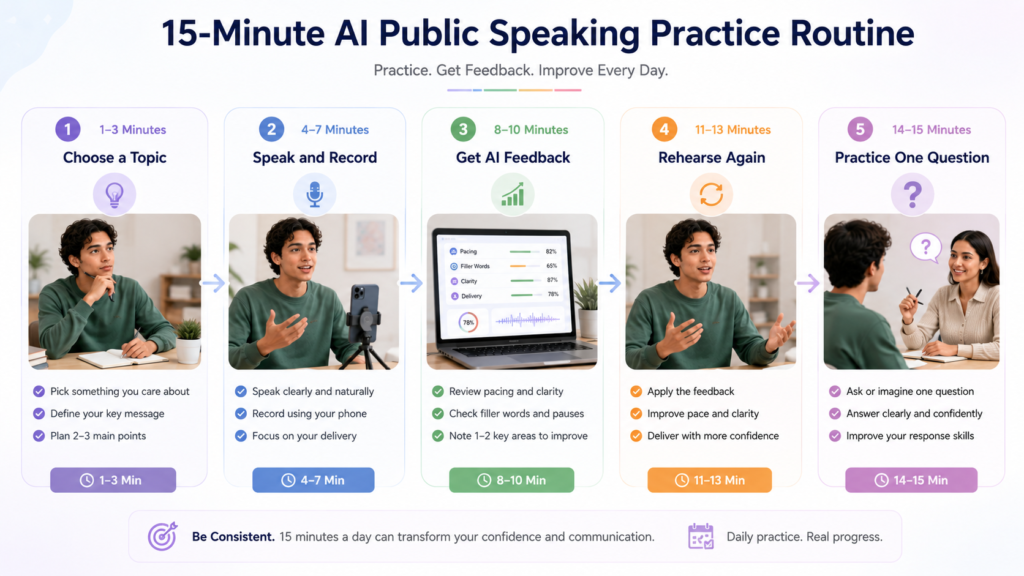
A 15-Minute AI Public Speaking Practice Routine
You do not need an hour-long rehearsal every day. A focused 15-minute session can be enough to work on one speaking weakness.
Minute 1–3: Choose One Topic
Pick a familiar topic and decide on one speaking goal.
For example:
Goal: Reduce filler words.
Minute 4–7: Speak
Give a three-minute explanation without reading a script.
Record yourself if possible.
Minute 8–10: Get AI Feedback
Ask an appropriate AI tool to focus only on your selected skill.
For example:
“Review my transcript for unnecessary filler words. Identify the repeated patterns and give me one practical exercise for reducing them.”
Minute 11–13: Repeat
Give the explanation again while applying the feedback.
Do not try to fix everything at once.
Minute 14–15: Add One Question
Ask AI for an unexpected audience question.
Answer aloud in a concise way.
This routine makes the Best AI Tools for Students to Improve Public Speaking more useful because the tool becomes part of an actual practice cycle rather than something you use once before an assignment.
Public Speaking vs Presentation Practice: What’s the Difference?
Public speaking and presentation practice overlap, but they are not identical.
Presentation practice usually focuses on delivering prepared material, often with slides.
Public speaking practice is broader. It can include:
• Speaking clearly
• Pacing
• Pronunciation
• Impromptu responses
• Conversation
• Q&A
• Audience interaction
• Vocal delivery
A student can have excellent slides and still struggle to communicate naturally.
For students specifically working on presentation rehearsal, see Best AI Tools for Students to Practice Presentations:
What AI Cannot Fully Replace in Public Speaking Practice
AI can provide useful practice, but some parts of public speaking require real people.
Real Audience Reaction
A real audience may look confused, become interested, laugh, interrupt, or ask an unexpected question.
Human Interaction
Speaking to a real person requires adapting to facial expressions, questions, interruptions, and changing attention.
Stage Presence
AI can analyze some aspects of delivery, but human observers can provide more contextual feedback about presence and engagement.
Context
A classroom speech, research seminar, job interview, and business pitch all have different expectations.
The strongest AI tools for students to improve public speaking should therefore supplement—not replace—practice with real listeners.
Is It Okay for Students to Use AI to Improve Public Speaking?
Yes, when AI is being used for legitimate practice and your school or university permits it.
Appropriate uses include:
• Speech rehearsal
• Question practice
• Feedback
• Pronunciation exercises
• Impromptu speaking
• Structure review
Students should still understand and deliver their own material.
Do not use AI during an actual presentation or assessment unless your instructor explicitly permits it.
If your institution requires disclosure of AI assistance, follow its policy.
Student Privacy When Using AI Speaking Tools
Before uploading recordings, transcripts, or school materials, consider what information the tool actually needs.
Protect Personal Information
Remove unnecessary:
• Student IDs
• Phone numbers
• Email addresses
• Private records
• Other identifying information
Be Careful With Research
Unpublished research, confidential project information, participant information, and institutional material may require additional protection.
Review Current Privacy Information
AI services can have different approaches to recordings, transcripts, uploaded files, and data retention.
Check the tool’s current privacy documentation before submitting sensitive material.
Use the minimum information necessary for the practice exercise.
Common Mistakes Students Make When Using AI for Public Speaking
Practicing Only Once
One feedback report cannot replace repeated rehearsal.
Asking Generic Questions
“Make me a better speaker” is less useful than asking AI to analyze one specific skill.
Trusting Every AI Suggestion
AI feedback can be incomplete or unsuitable for your particular audience.
Practicing Silently
Public speaking requires speaking. Reading feedback without actually rehearsing will not build delivery skills.
Ignoring Timing
Always practice within the actual time limit when preparing for an assignment.
Overusing AI Scripts
A student who memorizes every AI-generated sentence may sound less natural and become less prepared for unexpected questions.
Skipping Human Feedback
AI is useful for repetition, but real listeners provide information AI cannot fully reproduce.
AI Public Speaking Myths vs Reality
AI PUBLIC SPEAKING
Common Myths About AI Speaking Practice
AI can make practice easier and more structured, but it does not
replace the real experience of becoming a better speaker.
Myth
Reality
AI can make a student confident without practice.
AI can support practice, but confidence develops through
repeated speaking experience.
AI can perfectly judge public speaking.
AI can analyze certain speaking patterns, but human feedback
remains important for understanding audience reaction and
natural delivery.
A perfect script creates a great speaker.
Understanding, delivery, adaptability, and audience awareness
matter more than memorization.
More difficult practice is always better.
Effective practice should gradually increase difficulty while
addressing the weaknesses that actually need improvement.
One AI session is enough.
Regular short sessions are more useful for developing speaking
habits and making gradual improvements.
💡
Remember:
AI works best as a practice partner. Real confidence comes from
repeatedly speaking, learning from feedback, and gradually becoming
comfortable communicating with actual people.
Expert Tips for Better AI-Assisted Public Speaking Practice
1. Practice One Skill at a Time
Focus on pacing, clarity, fillers, pronunciation, or spontaneous speaking instead of everything simultaneously.
2. Record Yourself
A recording gives you an opportunity to notice habits that are difficult to recognize while speaking.
3. Practice Without a Full Script
Use keywords rather than memorizing every sentence.
4. Ask for Specific Feedback
Specific instructions produce more actionable feedback than broad requests.
5. Practice “Why?” Questions
After answering a question, ask yourself what would happen if someone challenged your reasoning.
6. Use Short Rehearsals
A focused 10–15 minute session can be easier to repeat consistently than an occasional long practice session.
7. Practice Recovery
If you lose your place, pause and continue instead of immediately restarting.
8. Use Real Listeners
Ask a friend, classmate, teacher, or family member to listen when possible.
9. Keep Important Information Verified
AI can help with communication, but important facts and subject-specific claims should come from reliable sources.
10. Measure Improvement, Not Perfection
The goal is not to achieve a perfect AI score.
The goal is to become clearer, more controlled, and more comfortable speaking.
Conclusion
The Best AI Tools for Students to Improve Public Speaking are most valuable when they turn practice into a repeatable process.
Students can use specialized tools for speaking feedback, pronunciation practice, and delivery analysis, while general AI assistants can help with spontaneous questions, explanations, and mock conversations.
The most practical routine is:
Choose a skill → Speak → Get feedback → Improve → Speak again → Practice questions → Get human feedback
AI cannot replace real audience experience, but it can make practice easier to repeat and easier to focus.
Use it to identify weaknesses—not to avoid developing your own speaking ability.
The goal is simple: understand your message, communicate it clearly, respond naturally, and keep improving through practice.
Continue Learning
KEEP LEARNING
Related AI Tools for Students
Explore these related guides when your presentation or speaking
practice involves viva questions, research, data, or laboratory work.
Frequently Asked Questions About AI Tools for Public Speaking
QUICK ANSWERS
AI Public Speaking FAQs
Common questions about using AI tools to practice speaking,
improve delivery, and prepare for real audiences.
The best choice depends on the skill. Dedicated speaking coaches
are useful for delivery feedback, while conversational AI is useful
for spontaneous speaking and Q&A practice.
Yes. Students can use AI for speech rehearsal, feedback,
pronunciation exercises, spontaneous questions, and mock
conversations. The practice should involve speaking aloud.
Yes, depending on the tool. Some systems can analyze measurable
speaking patterns such as pacing or filler words, while others
can review transcripts and provide communication feedback.
Yes. Some dedicated speaking tools can identify repeated filler
words. Students can then practice replacing unnecessary fillers
with deliberate pauses.
Pronunciation-focused tools can provide targeted practice for
sounds, stress, and intonation. They are particularly useful when
pronunciation is interfering with clear communication.
Yes. A conversational AI can provide unexpected topics, impose
short preparation limits, and ask follow-up questions after the
student responds.
AI can provide repeated, low-pressure practice, which may help
students become more familiar with speaking situations. However,
real confidence also develops through actual experience with people.
AI can make solo practice more interactive, but it does not
replace real listeners. Combining AI practice with human feedback
provides broader preparation.
AI can help improve wording or organize ideas, but students should
avoid depending on a script they do not understand. Speaking
naturally from understood ideas is usually more useful.
Yes. AI can provide immediate and repeatable feedback, while
people can evaluate audience engagement, naturalness, context,
and real-world communication.
Bottom line:
AI is most useful when it makes practice easier to repeat and gives
you specific weaknesses to work on. Combine that practice with real
speaking experience whenever possible.