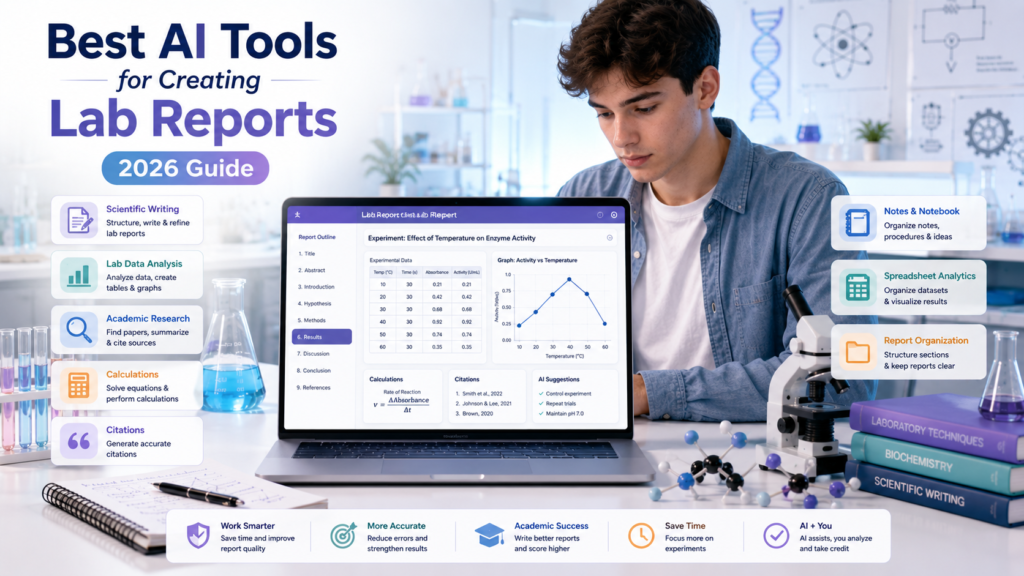
Quick Answer
The best AI tools for creating lab reports help students organize real experimental data, understand scientific concepts, improve writing, research sources, check calculations, and interpret results. Tools such as ChatGPT, Gemini, NotebookLM, Perplexity, SciSpace, Grammarly, and scientific computing platforms can support different stages of the workflow. The key limitation is simple: AI should assist with your actual laboratory work, never invent measurements, observations, results, or conclusions.
Introduction
You finish the experiment, close your lab notebook, and then realize the difficult part may not be over.
Now you have measurements to organize, calculations to check, graphs to create, scientific concepts to explain, sources to find, and a lab report to structure correctly.
And unlike a regular essay, a lab report has to stay connected to what actually happened during the experiment.
Your Results section needs to reflect your actual measurements. Your Discussion needs to explain those results rather than replace them with what you expected to happen. Your calculations need to use the correct values and units. Your graphs need to represent your data accurately. Your citations need to point to real sources.
That combination makes laboratory reports challenging for many students.
A single report may require you to handle:
• Experimental observations
• Raw measurements
• Calculations
• Tables
• Graphs and figures
• Scientific terminology
• Background research
• Citations
• Results
• Discussion
• Conclusions
• Instructor-specific formatting requirements
This is where AI tools for lab reports can become useful.
The right AI tool can help you organize information, explain difficult scientific concepts, improve the clarity of your writing, explore a dataset, locate potential sources, or identify areas of your report that need further review.
Research and classroom experience also show why students need to use these tools carefully. A study published in the Journal of Chemical Education examined ChatGPT use across chemistry courses and found that students could benefit from critically evaluating AI-generated laboratory reports and using AI for writing assistance, while also recognizing limitations such as errors and hallucinated references.
That distinction is important.
AI assistance is not the same thing as AI-generated scientific work.
If you measured 18.4 mL during your experiment, the AI tool should work with 18.4 mL.
It should not invent 20.1 mL because that number produces a cleaner result.
If your experiment produced an unexpected outcome, AI can help you investigate possible explanations. It should not rewrite your data so the experiment appears to support your hypothesis.
The same principle applies to scientific writing.
You can ask an AI assistant to explain why a particular scientific concept might relate to your findings. You can ask it to improve the grammar of a paragraph you wrote. You can ask it to help organize your notes into the report structure required by your instructor.
But you remain responsible for determining whether the explanation is scientifically accurate and whether it actually applies to your experiment.
This guide takes a workflow-first approach to the Best AI Tools for Creating Lab Reports for Students.
Instead of treating AI platforms as interchangeable writing machines, we will examine what each type of tool is actually useful for.
You will learn how to use AI for:
• Understanding lab instructions
• Organizing experimental information
• Researching scientific background
• Improving scientific writing
• Checking calculations
• Working with student-provided data
• Creating and interpreting graphs
• Finding and organizing sources
• Developing stronger Discussions
• Reviewing conclusions
• Checking the final report
You will also learn where AI can become unreliable, how to protect research information, and how to use AI without compromising academic integrity.
The goal is not to make AI perform your laboratory work.
The goal is to build a responsible system in which AI reduces unnecessary organizational and writing effort while your actual experiment, evidence, scientific reasoning, and final judgment remain yours.
What Are AI Tools for Lab Reports?
Definition
AI tools for lab reports are software platforms that use artificial intelligence to assist with one or more stages of preparing a laboratory report.
Depending on the tool, that assistance may include explaining scientific concepts, organizing notes, analyzing student-provided data, improving writing, researching background information, checking calculations, creating visualizations, or helping students review their work.
The important point is that AI lab-report tools are not all designed to do the same job.
A general-purpose AI assistant may be useful for explaining a difficult concept or organizing a report outline.
An AI research assistant may be more useful for discovering scientific literature.
A data-analysis platform may be better suited to spreadsheets, calculations, trends, and charts.
A writing assistant may be most useful when your scientific content is already complete and you need help improving grammar and clarity.
A scientific computing platform may be better for mathematical calculations, formulas, units, or technical problems.
That means there is rarely one tool that perfectly handles the entire lab-report process.
Instead, students can think about AI tools in several categories.
AI writing assistants can help with grammar, clarity, sentence structure, organization, and revision.
AI research assistants can help students discover and understand scientific literature.
AI data-analysis tools can help students work with structured experimental data, calculations, trends, and visualizations.
AI note-taking tools can help organize laboratory instructions, lecture material, and source documents.
AI citation tools can help with source discovery, reference organization, or formatting.
AI general-purpose assistants can support multiple stages of the workflow, including explanations, brainstorming, organization, writing assistance, and data exploration.
Scientific and technical computing tools can support mathematical calculations, equations, unit conversions, and other quantitative work.
The best choice therefore depends on the task.
For example, a student struggling to understand the theory behind a chemistry experiment may need a conversational AI assistant.
A student researching the scientific background may need a literature-focused platform.
A student working with hundreds of experimental measurements may benefit more from a spreadsheet or data-analysis workflow.
A student whose scientific content is already complete may simply need grammar and clarity assistance.
This task-based approach is also more consistent with how AI is being explored in science education. Research involving chemistry students has found that AI can be useful for activities such as examining report structure and improving writing, while students also need to recognize where human judgment remains necessary.
So instead of asking:
“What is the best AI lab report generator?”
a better question is:
“Which AI tool is appropriate for this specific part of my laboratory-report workflow?”
That question leads to safer and more useful decisions.
And it helps prevent one of the biggest mistakes students can make: expecting a single AI system to understand the experiment, generate the scientific reasoning, interpret the evidence, and produce a submission-ready report without meaningful student involvement.
A good AI-assisted workflow works differently.
Your experiment creates the evidence.
You preserve and understand the evidence.
AI helps you work with that evidence.
You verify what AI produces.
You make the final scientific judgment.
That distinction will remain important throughout this guide.
What Parts of a Lab Report Can AI Help With?
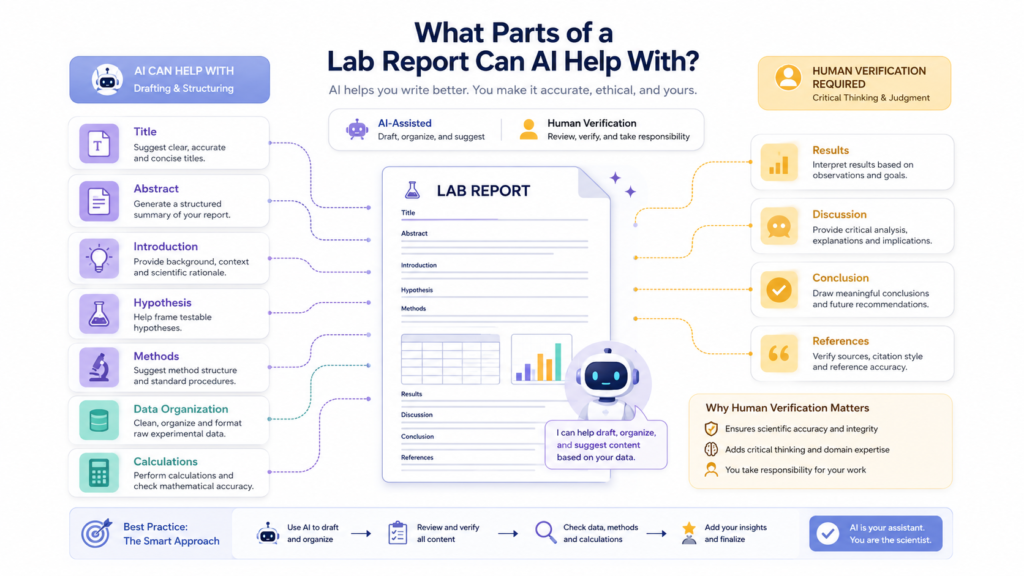
A laboratory report contains several different types of work, and AI is not equally useful for all of them.
The safest approach is to divide the report into individual tasks and decide what AI can reasonably assist with at each stage.
The table below gives a practical framework.
| 🧪 Lab Report Task | 🤖 How AI Can Help | 🔍 Human Verification Needed |
|---|---|---|
| Title | Improve clarity | Yes |
| Abstract | Summarize verified work | Yes |
| Introduction | Explain background concepts | Yes |
| Hypothesis | Clarify wording | Yes |
| Methods | Organize student-provided procedure | Yes |
| Data | Organize/analyze supplied data | Absolutely |
| Calculations | Explain/check calculations | Absolutely |
| Tables | Structure information | Yes |
| Graphs | Assist with interpretation | Yes |
| Results | Explain actual results | Yes |
| Discussion | Connect results to concepts | Yes |
| Conclusion | Summarize actual findings | Yes |
| References | Find/format sources | Yes |
AI can help organize, explain, and improve different parts of a lab report, but students must verify their actual data, calculations, results, sources, and scientific conclusions before submitting the report.
The pattern is intentional.
The closer a task gets to your actual experimental evidence, the more carefully the output needs to be checked.
For example, AI can usually help improve the wording of a title without changing the scientific meaning.
It can also help turn your own procedure notes into a clearer Methods section.
But when you reach the Data, Calculations, Results, and Discussion sections, the standard becomes much stricter.
Those sections depend directly on what happened during your experiment.
Data
AI can help organize a dataset that you provide.
Modern AI data-analysis tools can work with uploaded spreadsheets and tables, explore patterns, clean data, generate visualizations, and summarize findings. OpenAI’s current documentation, for example, describes uploading CSV or Excel files to ChatGPT for analysis and visualization.
But there is an important boundary:
AI may analyze your data; it should not manufacture your data.
Keep an original copy of your raw measurements before using any AI-assisted analysis.
Calculations
AI can explain a formula, walk through a calculation, or provide a second check.
However, a student should verify:
The correct formula was selected
• The correct values were used
• Units are consistent
• Significant figures are appropriate
• The calculation matches the assignment requirements
A mathematically correct answer can still be scientifically inappropriate if the wrong formula or assumptions were used.
Results
AI can help describe patterns that actually appear in your data.
For example, if your measurements show that one variable increased as another increased, AI can help you describe that trend more clearly.
But it should not turn a weak or inconsistent pattern into a strong conclusion simply because the expected result was different.
Discussion
The Discussion section requires more scientific reasoning.
AI can help you identify questions such as:
• Why might the observed result differ from the prediction?
• Which scientific principle could explain the pattern?
• What limitations could have affected the experiment?
• What additional evidence would help explain the result?
The student still needs to determine which explanation is supported by the evidence.
Research on AI-generated laboratory reports has found that AI-generated work can look like a conventional lab report while struggling with specific experimental details and data analysis.
That is exactly why a workflow based on student evidence first is stronger than simply asking an AI tool to generate an entire report.
Why Students Use AI for Lab Reports
Organizing Experimental Information
A completed laboratory experiment can leave students with information scattered across several places.
You might have:
• A lab manual
• Handwritten observations
• A spreadsheet
• Photos of an instrument display
• Calculations
• Instructor notes
• Research articles
• Lecture notes
• Assignment requirements
Before writing, you need to turn all of this into an organized picture of the experiment.
AI can help with that organizational stage.
For example, you can provide your own notes and ask an AI assistant to separate them into categories such as:
Observations → Measurements → Calculations → Results → Questions for Discussion
The important instruction is to preserve the original information.
If the AI cannot determine where something belongs, it should flag the uncertainty rather than invent an answer.
Understanding Difficult Scientific Concepts
Sometimes the problem is not writing.
You simply do not understand the science well enough to explain your results.
A laboratory report may require you to understand concepts such as:
• Reaction rates
• Enzyme activity
• Diffusion
• Momentum
• Electrical resistance
• Equilibrium
• Measurement uncertainty
• Thermodynamics
• Statistical variation
AI can provide explanations at different levels.
You might first ask for a beginner-friendly explanation and then request a more technical explanation.
You can also ask follow-up questions until the concept becomes clearer.
This is one of the more educational uses of AI because the student is using the system as an explanation and learning aid rather than outsourcing the report.
Research in chemistry education has also explored students using ChatGPT to generate, improve, and verify answers during laboratory activities, showing that AI can function as an information source when students critically evaluate its responses.
Improving Scientific Writing
Scientific writing has different expectations from casual writing.
A lab report should generally be precise, evidence-based, and appropriately structured.
Students may understand the experiment but struggle to communicate that understanding clearly.
AI can help identify:
• Repetitive wording
• Awkward sentences
• Unclear transitions
• Grammar problems
• Informal language
• Excessive wordiness
• Ambiguous statements
A useful instruction is:
“Improve the clarity and grammar of this paragraph while preserving the scientific meaning, measurements, units, and conclusions exactly.”
That final condition matters.
You want the AI to improve the communication without silently changing the science.
Checking Grammar and Clarity
Grammar and proofreading are among the more straightforward applications of AI.
If your scientific content is already written, an AI writing assistant can help identify language problems.
However, do not accept every suggested revision automatically.
A grammar improvement can sometimes change technical meaning.
Read the revised sentence yourself.
Ask:
Does this still say exactly what I intended scientifically?
Interpreting Student-Provided Data
AI can be useful when you have a real dataset and need help understanding what is inside it.
For example, a student could ask an AI tool to:
• Identify columns
• Calculate descriptive values
• Look for possible trends
• Identify unusual observations
• Create a visualization
• Explain what a graph appears to show
• Suggest questions for further investigation
Current ChatGPT data-analysis guidance recommends providing the data together with important context such as definitions and column meanings, and encourages asking for an analytical approach rather than simply requesting an answer.
That is a useful principle for laboratory work.
Instead of:
“What is the answer?”
try:
“Here is my actual dataset and the experiment context. Explain what patterns are present, show how you identified them, and separate direct observations from possible explanations.”
This produces a more transparent workflow.
Finding and Organizing Sources
Scientific reports often require background research.
AI can help students discover relevant literature, understand dense papers, and organize research questions.
For example, ChatGPT can help students get oriented within uploaded academic documents, identify major arguments, and highlight areas that deserve closer reading.
Specialized academic-research tools can also help students search scientific literature.
But source discovery is not the same as source verification.
If an AI tool gives you a citation, check the actual source before using it.
This is especially important because research into AI-generated chemistry bibliographies has found substantial citation problems. In one 2026 study, researchers examined 456 AI-generated references and found that the average student essay contained only 51.3% real and correctly cited references.
The practical lesson is simple:
Never treat an AI-generated citation as automatically trustworthy.
Open the source.
Check the title.
Check the authors.
Check the publication.
Read the relevant section.
Then decide whether it actually supports your statement.
Turning Notes Into a Report Structure
Students sometimes know what happened during an experiment but struggle to organize it into the required report format.
AI can help turn existing information into a logical structure.
For example:
Experiment objective
↓
Hypothesis
↓
Methods
↓
Observations
↓
Data
↓
Results
↓
Discussion
↓
Conclusion
↓
References
This does not mean the AI should write all of those sections for you.
It means AI can help you understand where your existing information belongs.
That distinction is particularly valuable for students learning scientific writing for the first time.
Saving Time Without Skipping the Learning
The best reason to use AI is not simply to finish a report faster.
It is to reduce unnecessary work.
For example, if an AI tool helps you organize a messy spreadsheet in a few minutes, the time saved can be used to examine the actual results more carefully.
If AI helps explain a confusing scientific term, you can spend less time searching through several explanations and more time understanding how the concept applies to your experiment.
If an AI writing assistant catches repetitive grammar errors, you can focus your revision on scientific accuracy.
The goal is:
Less administrative friction → more time for scientific thinking.
That is very different from:
Less thinking → more AI-generated text.
The first approach supports learning.
The second can undermine it.
And that distinction becomes even more important in the next section.
Why AI Can Be Risky for Lab Reports
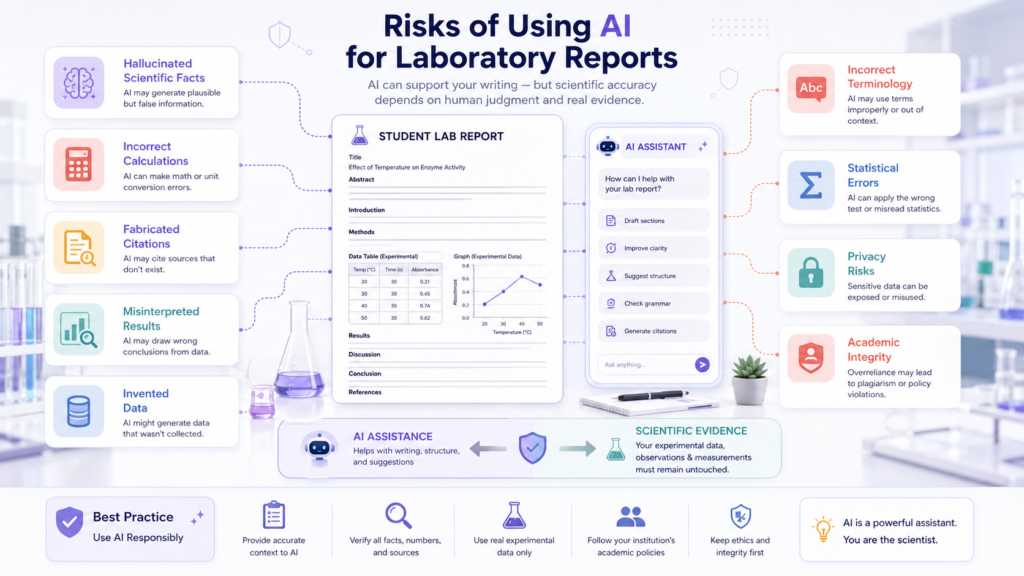
AI can make a laboratory report look polished while still getting important scientific details wrong.
That is why this is one of the most important sections of the entire guide.
A lab report is not judged only by how professional the writing sounds.
It is judged by whether the report accurately represents the experiment and demonstrates appropriate scientific reasoning.
Hallucinated Scientific Facts
AI systems can produce statements that sound authoritative but are incorrect.
A student may not notice the error because the sentence uses appropriate scientific terminology.
Always verify important scientific claims using reliable course materials or authoritative scientific sources.
Incorrect Calculations
AI can make arithmetic mistakes, misunderstand units, or apply an inappropriate formula.
For important calculations, perform an independent check.
Fabricated Citations
AI can produce citations that look real but do not exist or do not support the claim.
Citation verification is therefore essential.
Misinterpretation of Experimental Results
An AI assistant may see a pattern in data and assign an explanation that the experiment does not actually support.
For example, a correlation does not automatically demonstrate causation.
Invented Data
This is the clearest line students should never cross.
Do not use AI to create measurements, observations, experimental results, or other evidence that you did not actually obtain.
If your result is unexpected, report it.
If your experiment failed, explain what happened.
If your measurements are inconsistent, investigate the possible reasons.
Do not replace the evidence with numbers that produce a more attractive conclusion.
Incorrect Terminology
Scientific terms can have specific meanings.
AI may sometimes use a related term that sounds correct but is inappropriate in your experimental context.
Compare terminology with your textbook, lab manual, instructor materials, or authoritative sources.
Incorrect Statistical Conclusions
A statistical result is only meaningful when the method and assumptions are appropriate.
Do not automatically perform a statistical test because an AI system recommends it.
Understand why the test is being used.
Missing Experimental Limitations
AI may generate generic limitations such as “human error” without identifying what actually happened in your experiment.
A stronger Discussion connects limitations to the real procedure.
For example:
• Instrument resolution
• Timing inconsistency
• Sample preparation
• Environmental conditions
• Measurement technique
• Small sample size
Only include limitations that genuinely apply.
Overconfident Explanations
AI often presents answers in a confident tone.
Confidence is not evidence.
A good scientific workflow treats AI output as something to evaluate rather than something to obey.
Privacy Issues
Uploading laboratory information can create privacy or research-data concerns.
Students should think carefully before submitting:
• Student names
• Student IDs
• Research participant information
• Unpublished results
• Institutional data
• Sensitive datasets
Check the tool’s current privacy policies and your institution’s rules before uploading information.
Academic-Integrity Violations
Even technically accurate AI assistance can violate course rules if the instructor prohibits that type of use.
Before using AI, check:
• The syllabus
• Assignment instructions
• Department policy
• Instructor guidance
• Institutional AI policy
The rules for one class may be different from the rules for another.
The Central Rule
The safest principle for this entire article is:
AI should never be used to invent experimental observations, measurements, results, or conclusions that the student did not obtain.
AI can help you work with evidence.
It should not manufacture the evidence.
This distinction is also consistent with research examining AI-generated laboratory reports, where generated reports have been found to struggle particularly with experiment-specific details and data analysis.
How We Selected These AI Tools
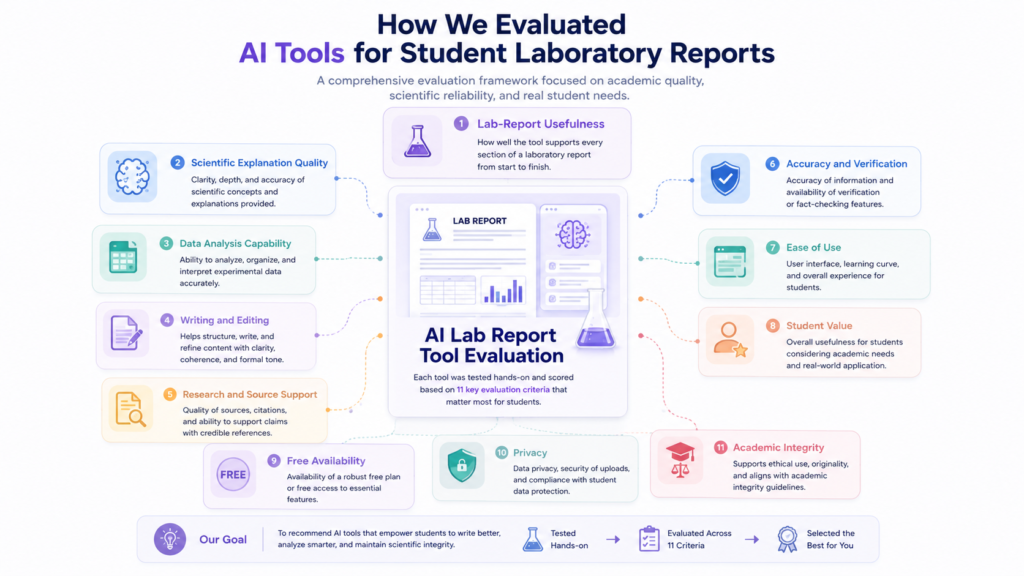
The tools in this guide are selected based on how well they fit into a real student lab-report workflow—not simply because they are popular AI platforms.
A useful laboratory AI tool should solve a specific problem without encouraging students to outsource the scientific work they are responsible for completing.
We therefore evaluate the tools using the following criteria.
Lab-Report Usefulness
The first question is simple:
Does the tool actually help with a meaningful laboratory-report task?
A tool may be excellent for general productivity but provide little value for scientific writing, data analysis, research, or laboratory organization.
Tools included in this guide need a clear role in the lab-report workflow.
Scientific Explanation Quality
Students often use AI because they are struggling to understand the science behind an experiment.
A useful tool should be capable of explaining difficult concepts in accessible language while still requiring students to verify important scientific claims.
The goal is not merely to produce a complicated explanation.
The goal is to help the student understand the concept well enough to evaluate it.
Data Analysis Capability
Laboratory reports frequently involve real experimental datasets.
We consider whether a tool can help students work with supplied data, calculations, trends, tables, charts, or other forms of analysis.
This does not mean the tool is automatically trusted with scientific conclusions.
Data-related outputs require particularly careful verification.
Writing and Editing
A lab report needs clear scientific communication.
We consider whether a tool can help students improve:
• Grammar
• Clarity
• Organization
• Sentence structure
• Concision
• Scientific phrasing
The underlying scientific meaning must remain under student control.
Research and Source Support
Background research is an important part of many laboratory reports.
We look at whether a tool can help students discover, understand, organize, or work with relevant academic sources.
Source discovery is not treated as source verification.
Students still need to inspect important sources before citing them.
Accuracy and Verification
No AI system should receive an automatic accuracy pass simply because it produces a confident answer.
We therefore emphasize tools and workflows that make verification easier.
For scientific work, students should independently check important:
• Calculations
• Measurements
• Sources
• Scientific claims
• Units
• Graphs
• Conclusions
Ease of Use
Students should not need a complicated technology stack to complete a basic laboratory report.
A tool receives greater practical value when its important functions are understandable and accessible to students.
Student Value
A useful tool should provide meaningful assistance relative to the time, effort, or cost required.
A student does not necessarily need five AI platforms.
In many cases, one general-purpose assistant combined with one specialized tool can provide a more manageable workflow.
Free Availability
Free access can be important for students.
However, AI companies frequently change plans, usage limits, and feature availability.
For that reason, pricing information should be treated as current guidance rather than a permanent guarantee.
Privacy
Laboratory information can sometimes include personal, institutional, or unpublished research information.
We therefore consider privacy as part of responsible tool selection.
Students should understand what they are uploading and check the applicable privacy and institutional policies.
Academic-Integrity Considerations
A tool can be technically capable and still be inappropriate for a particular assignment.
The most useful tools are those that can support learning, organization, research, analysis, and revision without encouraging students to fabricate evidence or submit AI-generated work against course rules.
This guide does not claim hands-on testing of every tool unless such testing is explicitly documented.
Instead, current official product documentation and available evidence are used to verify relevant capabilities.
Best AI Tools for Creating Lab Reports for Students
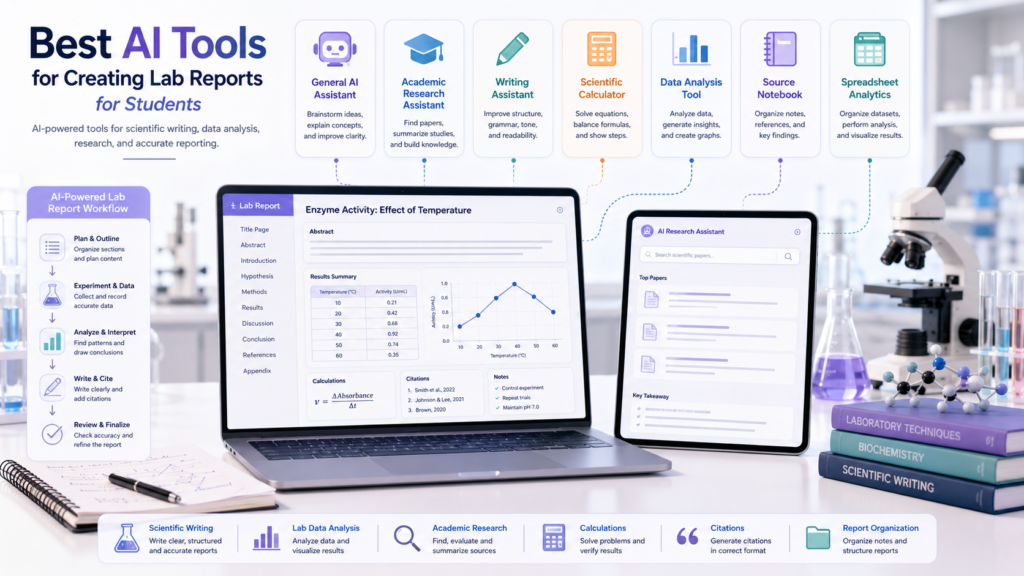
There is no single AI platform that is best at every stage of a laboratory report.
A student may use one tool for general assistance, another for academic research, and a third for calculations or spreadsheet analysis.
The most relevant tools for this workflow include ChatGPT, Google Gemini, Claude, NotebookLM, Perplexity, Grammarly, SciSpace, Wolfram|Alpha, Microsoft Copilot, and spreadsheet-based data-analysis tools.
The final selection should depend on the student’s actual task.
🤖 ChatGPT
🔎 Overview
ChatGPT is a general-purpose AI assistant that can support several stages of the laboratory-report workflow. It can help students understand scientific concepts, organize information, improve writing, review supplied material, and analyze structured datasets.
ChatGPT currently supports common file types including XLSX, XLS, CSV, TSV, DOCX, PPTX, PDF, and TXT. Its data-analysis capabilities can also help students explore datasets, create tables and visualizations, and identify patterns or potential anomalies. 0
That combination makes ChatGPT one of the more flexible options for students who want a single primary assistant across multiple stages of a laboratory-report workflow.
🎯 Best For
- Understanding difficult concepts
- Creating report outlines
- Organizing student-provided information
- Working with structured laboratory data
- Explaining calculations
- Improving scientific writing
- Reviewing a draft for clarity and consistency
⚡ Key Features
A major advantage is its ability to work with uploaded files and structured data. Students can upload supported files and ask questions about their contents. OpenAI’s current documentation lists common formats including XLSX, XLS, CSV, TSV, DOCX, PPTX, PDF, and TXT. 1
For data analysis, ChatGPT can move from raw data toward tables, visualizations, and exploratory insights. OpenAI recommends providing clear context about the dataset and specifying what should be analyzed rather than simply asking for an unexplained conclusion. 2
🧪 How Students Can Use It for Lab Reports
Upload an actual experimental dataset and ask ChatGPT to identify trends, possible anomalies, and questions to investigate in the Discussion without changing the original measurements.
Provide your own paragraph and ask ChatGPT to improve grammar and clarity while preserving measurements, units, scientific claims, and meaning.
Ask ChatGPT to check a calculation using the formula and values you provided, show each step, and identify anything that needs independent verification.
The goal is to keep the student’s actual evidence at the center of the workflow.
💪 Pros
- Broad usefulness across the lab-report workflow
- Supports file-based work
- Useful for structured data analysis
- Can generate visualizations from supported datasets
- Helpful for scientific explanations
- Useful for writing and revision
- Can serve as a primary general-purpose assistant
⚠️ Cons
- Can make scientific mistakes
- Can misunderstand experimental context
- Calculations still need verification
- Generated explanations may require source checking
- A broad AI assistant is not a substitute for specialized scientific judgment
💳 Pricing / Free Option
ChatGPT has free and paid access options. Available features, usage limits, and plan capabilities can change, so students should check the current official plans before relying on a particular feature or usage allowance. 3
🎓 Ideal Student Type
ChatGPT is a strong choice for students who want one flexible assistant that can support several stages of the laboratory-report process. It can be particularly useful for students who need help with both scientific explanation and writing organization.
🎓 Real Student Scenario
A first-year biology student has completed an enzyme experiment and has a spreadsheet containing actual temperature, reaction-time, and calculated-rate measurements.
The student keeps the original dataset unchanged, uploads a working copy, and asks ChatGPT to identify trends and possible anomalies. The student then checks the calculations independently and uses the AI-generated observations only as questions to investigate in the Discussion.
The final scientific interpretation remains the student’s responsibility.
🚨 Important Limitation
ChatGPT should not be treated as an automatic authority on scientific accuracy. A response can be useful and still contain an error. OpenAI’s data-analysis guidance recommends providing relevant context, specifying the analytical approach when needed, and using visualizations appropriately rather than blindly accepting a conclusion. 4
🌐 Official Website
Visit ChatGPT →✨ Google Gemini
🔎 Overview
Google Gemini is a general-purpose AI assistant that can support laboratory-report workflows involving documents, spreadsheets, images, notebooks, and other supported files.
Google’s current documentation states that Gemini Apps can upload and analyze documents, spreadsheets, notebooks, photos, videos, and other supported files to provide answers, summaries, and insights.
This makes Gemini particularly useful for students whose laboratory materials are spread across different file types.
🎯 Best For
- Reviewing laboratory instructions
- Understanding scientific concepts
- Working with uploaded documents
- Exploring spreadsheets
- Organizing information
- Working with multiple file types
⚡ Key Features
Google supports uploading multiple supported files in a Gemini prompt, subject to availability and usage limits.
Gemini can also create charts from uploaded spreadsheet data and allow students to customize aspects such as chart type and labels. This can be particularly useful when laboratory measurements are already stored in spreadsheet form.
Gemini also provides learning-oriented features designed to help users work through educational topics and uploaded materials.
🧪 How Students Can Use It for Lab Reports
Upload a lab handout and ask Gemini to identify every required section and turn the instructions into a checklist without writing the report or inventing requirements.
Use the uploaded measurements exactly as provided, create a chart showing the relationship between two variables, and ask Gemini to explain only what the chart directly demonstrates.
Ask Gemini to explain the scientific principle behind an experiment at an appropriate course level and identify which parts should be verified using your class materials.
Keep actual measurements and experimental evidence unchanged. Use AI to organize and interpret—not invent—your laboratory information.
💪 Pros
- Supports multiple file types
- Useful with documents and spreadsheets
- Can create charts from uploaded spreadsheet data
- Useful for educational explanations
- Helpful for students already using Google’s ecosystem
- Can support multimodal workflows
⚠️ Cons
- File and usage limits vary
- Large files can create interpretation problems
- AI-generated analysis still requires verification
- Access to some features can depend on account or plan
- Large or complex uploads can make it harder to maintain connections between details
💳 Pricing / Free Option
Gemini has free access alongside paid Google AI plans with expanded capabilities and limits. Because Google can change plan features and usage limits, students should check the current official Gemini plan information before relying on a specific capability.
🎓 Ideal Student Type
Gemini is a good option for students who already organize laboratory materials through Google services and frequently work with documents, spreadsheets, images, or other supported files.
🎓 Real Student Scenario
A chemistry student has a PDF lab manual, a spreadsheet containing actual measurements, and several images from the experiment.
The student uses Gemini to organize the instructions and create a visualization from the spreadsheet, then manually verifies the chart, values, units, and scientific interpretation before incorporating anything into the report.
🚨 Important Limitation
Gemini can analyze uploaded material, but that does not mean every interpretation is automatically correct. Google notes that large or complex uploads can cause connections or details to be missed. For scientific work, students should therefore verify important conclusions against the original files and course materials.
🌐 Official Website
Visit Google Gemini →🧠 Claude
🔎 Overview
Claude is a general-purpose AI assistant that can be useful for students who need help understanding, organizing, and revising substantial amounts of text.
For laboratory reports, its strongest potential role is as a reasoning and writing assistant rather than as an authority on experimental science. A student can use it to work through a lab handout, organize a report structure, compare sections of a draft, or improve clarity while preserving the student’s scientific content.
🎯 Best For
- Long-form writing support
- Organizing complex instructions
- Explaining difficult concepts
- Reviewing report drafts
- Improving clarity
- Identifying inconsistencies in written work
⚡ Key Features
Its value in this workflow comes primarily from conversational reasoning and document-oriented writing assistance.
For laboratory work, that means Claude can help students ask questions about their own material rather than simply generating a generic report.
🧪 How Students Can Use It for Lab Reports
Provide the assignment instructions and ask Claude to create a checklist of the required report sections without adding requirements that are not actually present.
Ask Claude to identify places where a Discussion makes claims that are not clearly supported by the reported results, without asking it to rewrite the scientific conclusions.
Ask Claude to improve clarity while preserving every scientific claim, measurement, unit, and conclusion written by the student.
The student remains responsible for deciding whether each scientific claim is actually supported by the experiment.
💪 Pros
- Strong long-form writing assistance
- Useful for document organization
- Helpful for identifying inconsistencies
- Good for revision and explanation
- Can support a careful, evidence-first workflow
⚠️ Cons
- Scientific claims still require verification
- Not a replacement for specialized scientific software
- Generated reasoning can still be wrong
- Students must maintain control over experimental interpretation
💳 Pricing / Free Option
Claude offers free and paid access options, with capabilities and usage limits varying by plan. Students should verify current pricing and feature availability before selecting a plan.
🎓 Ideal Student Type
Claude may be especially useful for students who have lengthy laboratory instructions or substantial written drafts and want help organizing and revising them.
🎓 Real Student Scenario
A graduate student has a long experimental report draft and a detailed set of instructor requirements.
The student asks Claude to identify sections that appear inconsistent with the assignment instructions and to flag claims that need stronger evidence.
The student then reviews each flag manually before making any changes.
🚨 Important Limitation
Claude should not be treated as a scientific fact-checker simply because it provides a detailed explanation. Important scientific claims, calculations, sources, and interpretations still need independent verification against reliable course materials and scientific sources.
🌐 Official Website
Visit Claude →📚 NotebookLM
🔎 Overview
NotebookLM is particularly useful when a student’s laboratory report depends on a defined collection of source material.
Instead of treating every conversation as an open-ended research session, students can build a source collection around materials such as lab manuals, lecture notes, research papers, and other supported documents.
Google’s current documentation lists supported NotebookLM sources including PDFs, Google Docs, Google Slides, spreadsheets, images, audio, text files, websites, URLs, and copied text.
🎯 Best For
- Understanding lab manuals
- Reviewing course material
- Organizing scientific sources
- Comparing supplied documents
- Source-grounded explanations
- Preparing background research
⚡ Key Features
Its source-centered approach can be valuable when students want AI assistance that stays closely connected to a defined collection of documents.
A student can build a notebook around the materials relevant to a particular laboratory assignment and then ask questions about those sources.
🧪 How Students Can Use It for Lab Reports
For a laboratory assignment, a student could upload:
“Using only these sources, explain the scientific principle behind this experiment and identify which source supports each major point.”
This helps separate course-grounded information from general AI knowledge.
💪 Pros
- Strong source-centered workflow
- Useful for course materials
- Supports many source types
- Helpful for comparing documents
- Useful for research preparation
⚠️ Cons
- Quality depends on the sources supplied
- Does not replace experimental analysis
- Source summaries still need review
- Not primarily a complete lab-report writing environment
💳 Pricing / Free Option
NotebookLM offers access with usage limits, while paid Google AI plans can provide expanded limits and capabilities. Students should check the current official NotebookLM limits before planning a large research workflow.
🎓 Ideal Student Type
NotebookLM is particularly useful for students whose laboratory reports require them to work across a lab manual, lecture material, scientific papers, and other approved sources.
🎓 Real Student Scenario
A physics student is preparing a report that requires background information from the lab manual and several instructor-provided papers.
The student puts those sources into NotebookLM and asks questions about the concepts discussed across them. The student then reads the original sources before using any information in the report.
🚨 Important Limitation
NotebookLM can help students understand supplied sources, but it cannot determine whether the student’s experimental measurements are correct. It should therefore support the research and understanding stages—not replace the evidence and analysis stages.
🌐 Official Website
Visit NotebookLM →🔎 Perplexity
🔎 Overview
Perplexity is an AI-powered search and research platform that can be particularly useful during the research stage of a laboratory report.
Instead of treating AI as a replacement for reading scientific literature, students can use Perplexity to discover potentially relevant sources, explore unfamiliar scientific topics, and identify questions worth investigating.
Perplexity describes its service as an AI-powered search engine that searches the web and provides answers with citations and links to sources. That makes it especially useful for the Introduction and Discussion stages of a lab report.
🎯 Best For
- Finding background information
- Discovering scientific sources
- Exploring unfamiliar concepts
- Identifying potential research questions
- Getting an initial overview of a scientific topic
- Finding sources to investigate further
⚡ Key Features
A major advantage is its research-oriented workflow. Instead of receiving only a standalone answer, students can inspect cited sources and continue investigating the underlying material.
Perplexity also provides different search and research modes, with capabilities varying according to the current product and plan.
This workflow is much safer than copying an AI-generated answer directly into a laboratory report.
🧪 How Students Can Use It for Lab Reports
“Write my Introduction about enzyme activity.”
“Find authoritative sources explaining the scientific principles behind enzyme activity and identify the original sources so I can read and verify them myself.”
The student can then open the cited sources, determine which ones are appropriate for the assignment, and use the verified information to develop the Introduction.
“Find scientific literature that may help explain why enzyme activity changes with temperature. Separate established scientific explanations from possible interpretations that I need to investigate further.”
💪 Pros
- Useful for research discovery
- Citations and source links are provided
- Helpful for exploring unfamiliar topics
- Can accelerate initial literature research
- Useful for identifying potential sources for Introduction and Discussion sections
⚠️ Cons
- A citation does not automatically mean the source is appropriate
- Search results still require human evaluation
- Some sources may not meet an instructor’s academic requirements
- AI-generated summaries can oversimplify scientific literature
- It is not a substitute for reading important papers
💳 Pricing / Free Option
Perplexity provides free access alongside paid plans with expanded capabilities. Features, limits, and available research modes can change, so students should verify current pricing and plan details before relying on a specific feature.
🎓 Ideal Student Type
Perplexity is especially useful for students who know the topic of their experiment but need help discovering credible background material efficiently. It can be particularly valuable during the research stage of a lab report.
🎓 Real Student Scenario
A chemistry student needs background research explaining why reaction rate changes with temperature.
The student uses Perplexity to discover potentially relevant scientific sources, opens those sources, checks whether they are appropriate for the assignment, and then uses the verified information to develop the Introduction.
The student does not treat the AI-generated summary itself as the final source.
🚨 Important Limitation
Never assume that an AI-generated citation is automatically correct or appropriate for your assignment.
Before using a source, check:
This is particularly important because research has documented citation and reference problems in AI-generated academic work.
🌐 Official Website
Visit Perplexity →🔬 SciSpace
🔎 Overview
SciSpace is a specialized academic-research platform that can be useful when a laboratory report requires substantial scientific literature.
Unlike a general writing assistant, SciSpace focuses heavily on helping users discover, read, understand, and organize research papers.
Its literature-review tools include paper discovery, filtering, analysis, organization, and AI-assisted interaction with academic papers. This makes it particularly relevant for students writing reports that require peer-reviewed background or research-based Discussion sections.
🎯 Best For
⚡ Key Features
SciSpace’s academic workflow includes tools for searching literature, interacting with papers, organizing research, and working with PDFs.
For a lab report, this can be especially useful when a student needs to understand how existing scientific literature relates to an experiment.
🧪 How Students Can Use It for Lab Reports
“What scientific mechanisms could explain the relationship observed in my experiment?”
The student can then search for relevant papers and investigate the literature.
💪 Pros
- Designed around academic research
- Useful for scientific papers
- Helpful for literature discovery
- Useful for reading and understanding PDFs
- Supports research organization
⚠️ Cons
- More specialized than general-purpose AI assistants
- Students still need to read important papers
- Not designed to replace laboratory data analysis
- Some features may require paid access or have usage limits
💳 Pricing / Free Option
SciSpace offers access options with different capabilities and limits. Students should verify current pricing and available features before relying on a specific research function.
🎓 Ideal Student Type
SciSpace is particularly useful for undergraduate and graduate students whose laboratory reports require substantial academic literature.
🎓 Real Student Scenario
A graduate biology student has an unexpected experimental finding and needs scientific literature that may help explain it.
The student uses SciSpace to discover potentially relevant papers, reads the papers, compares their findings with the experiment, and then develops a Discussion supported by verified evidence.
🚨 Important Limitation
An AI-generated summary of a research paper is not a substitute for reading the paper.
Students should verify:
🌐 Official Website
Visit SciSpace →🧮 Wolfram|Alpha
🔎 Overview
Wolfram|Alpha is a computational knowledge engine that can be particularly useful for the quantitative side of laboratory work.
Its calculators cover mathematics and scientific areas including physics, chemistry, engineering, life sciences, and unit conversions. This makes it different from general-purpose AI assistants.
Its strongest role is not writing a laboratory report. It is helping students work through or check quantitative problems.
🎯 Best For
⚡ Key Features
The platform can handle a broad range of mathematical and scientific computations. For students, that can make it useful as a second-checking tool.
For example, a student may calculate a quantity manually and then use Wolfram|Alpha to compare the numerical result.
The tool can help verify the mathematical side of a problem while the student remains responsible for understanding the scientific context and choosing the correct formula.
🧪 How Students Can Use It for Lab Reports
Suppose a physics student needs to calculate a derived quantity from several measurements. The student should first understand the formula and perform the calculation independently.
For unit conversions, students can similarly use the platform to verify whether the resulting unit is appropriate.
💪 Pros
- Strong computational focus
- Useful for mathematics and science
- Helpful for unit conversions
- Useful for quantitative STEM coursework
- Can provide an independent calculation check
⚠️ Cons
- Not a complete lab-report assistant
- Does not understand the full experimental context automatically
- A correct mathematical answer can still come from an incorrect formula
- Students still need to understand the calculation
💳 Pricing / Free Option
Wolfram|Alpha offers free access alongside paid options with additional capabilities. Students should verify current plan features before relying on a particular step-by-step or advanced computational feature.
🎓 Ideal Student Type
Wolfram|Alpha is especially useful for:
🎓 Real Student Scenario
A physics student calculates acceleration from experimental measurements.
After completing the calculation independently, the student uses Wolfram|Alpha to check the arithmetic and unit relationship.
The student then compares both results rather than automatically assuming the tool is correct.
🚨 Important Limitation
A computational tool can tell you that a mathematical expression produces a particular number. It cannot automatically determine whether that formula was appropriate for your experimental design.
🌐 Official Website
Visit Wolfram|Alpha →💻 Microsoft Copilot
🔎 Overview
Microsoft Copilot can support students who already work heavily inside Microsoft’s productivity ecosystem.
For laboratory reports, one of its most relevant roles is helping students work with structured information and supported Microsoft applications.
When combined with Excel, Copilot can be particularly useful for exploring laboratory datasets, generating formulas, identifying trends or outliers, and creating visualizations. Microsoft documents Copilot in Excel as capable of helping users generate formulas, identify trends and outliers, and create charts and PivotTables from supported data.
🎯 Best For
⚡ Key Features
The most relevant laboratory use case is its integration with supported Microsoft workflows.
A student who already stores experimental data in Excel can use Copilot to ask questions about the structured dataset instead of manually performing every organizational step.
🧪 How Students Can Use It for Lab Reports
“Using the existing data only, identify possible outliers and show which rows contain them. Do not change any values.”
“Create a scatter plot using concentration as the x-axis and absorbance as the y-axis. Preserve the original data and clearly label the axes.”
💪 Pros
- Useful for spreadsheet workflows
- Can assist with formulas
- Can help identify trends and outliers
- Useful for charts and visualization
- Fits naturally into Microsoft-based workflows
⚠️ Cons
- Availability depends on Microsoft 365 configuration and plan
- AI-generated analysis still requires verification
- Not a substitute for scientific reasoning
- Works best when data is properly structured
💳 Pricing / Free Option
Copilot availability and capabilities depend on the current Microsoft 365 plan, product version, account type, and organizational settings. Students should check Microsoft’s current Copilot and Microsoft 365 documentation before relying on a particular feature.
🎓 Ideal Student Type
Microsoft Copilot is especially useful for students who already keep laboratory measurements and calculations in Excel. It can be valuable for STEM students working with structured datasets.
🎓 Real Student Scenario
An engineering student has hundreds of experimental measurements stored in a structured Excel table.
The student uses Copilot to identify possible trends and generate a visualization.
Before using the result in the report, the student checks the original values, variables, units, graph labels, and interpretation.
🚨 Important Limitation
Do not allow an AI spreadsheet workflow to silently change your experimental dataset. Keep an untouched copy of the raw data.
Microsoft recommends reviewing and verifying AI-generated content in Excel before relying on it.
🌐 Official Website
Visit Microsoft Copilot →Best AI Tool for Each Lab Report Task
Different stages of a laboratory report call for different types of assistance.
The table below is designed to answer a more useful question than “Which AI tool is best?”
It answers:
“Which tool should I consider for this particular task?”
This table should not be interpreted as a rule that one tool must be used for every task.
In fact, a smaller combination of tools is often easier to manage.
For example, a student might use:
ChatGPT → primary AI assistant
Perplexity → source discovery
Excel → data organization
That can be enough for many assignments.
A graduate researcher might instead use:
NotebookLM → source-grounded research
SciSpace → academic literature
Excel or scientific software → data
ChatGPT or Claude → writing and reasoning support
The correct combination depends on the experiment and course requirements.
The objective is not to collect the largest number of AI subscriptions.
The objective is to build a workflow in which every tool has a clear purpose.
AI Lab Report Comparison Table
| Tool | Best For | Lab Report Tasks | Data Support | Research Support | Free Option | Biggest Limitation |
|---|---|---|---|---|---|---|
| ChatGPT | General lab-report assistance | Explanation, organization, writing, data analysis | Strong | Strong | Yes, with limits | Can produce incorrect scientific information |
| Google Gemini | Multimodal file assistance | Documents, concepts, spreadsheets, organization | Strong | Strong | Yes, with limits | Large or complex files may require careful checking |
| Claude | Long-form reasoning and writing | Organization, explanations, revision | Useful | Useful | Yes, with limits | Scientific claims still require verification |
| NotebookLM | Source-grounded research | Lab materials, notes, papers, source analysis | Moderate | Strong | Yes, with limits | Depends heavily on supplied sources |
| Perplexity | Research and source discovery | Background research, source discovery | Limited–Moderate | Strong | Yes, with limits | Sources must still be verified |
| Grammarly | Writing quality | Grammar, clarity, proofreading | Limited | Limited | Yes, with limits | Not a scientific-analysis tool |
| SciSpace | Academic literature | Research, paper analysis, literature review | Limited | Strong | Availability varies | More specialized than general AI |
| Wolfram|Alpha | Scientific computation | Calculations, formulas, units | Strong Computational tasks | Limited | Yes, with limits | Cannot determine whether the chosen formula is scientifically appropriate |
| Microsoft Copilot | Microsoft productivity and spreadsheets | Excel analysis, formulas, charts, organization | Strong Supported workflows | Useful | Plan-dependent | Availability and capabilities depend on Microsoft 365 configuration |
The biggest takeaway is that “best” depends on the task.
A tool that is excellent for finding research papers may be a poor choice for checking a physics calculation.
A tool that is excellent at grammar may be almost useless for interpreting an experimental dataset.
A tool that can analyze a spreadsheet may still be unable to determine whether the scientific interpretation is appropriate.
That is why the next step is not to choose one universal winner.
It is to match tools to real student situations.
Best AI Tools by Student Situation
The “best” AI tool depends heavily on what you are struggling with. A first-year biology student who needs help understanding a lab manual has a different problem from a graduate researcher comparing experimental findings with published literature.
Instead of choosing a tool based only on popularity, match the tool to the problem you need to solve.
The Complete AI-Assisted Lab Report Workflow
A strong AI-assisted laboratory report should not begin with:
It should begin with the experiment.
The IndiaAITools workflow is designed around a simple principle:
The laboratory experiment is the foundation of the report.
If the experiment was never performed, an AI-generated report cannot legitimately turn an imagined experiment into a real one.
Bring together the information you genuinely collected.
If you need to clean or reorganize a dataset, create a separate working copy.
This gives you a reliable reference point if something goes wrong later.
Once the evidence is collected, organize it into a structure that makes the experiment easier to understand and the later report-writing stages easier to manage.
Confirm that the cited source can actually be found.
Check the author or organization against the original source.
Verify the publication, date, journal, or other relevant details.
Make sure the original source actually supports the claim you are making.
Check whether the assignment requires APA, MLA, Chicago, or another style.
The final product should represent your scientific work—not simply the capabilities of an AI system.
How to Use AI for Each Section of a Lab Report
What AI can help with → What the student must provide → What must be verified
AI can assist with different parts of a laboratory report in different ways.
The safest approach is to identify three things for every section:
Title
What AI can help with
Improving clarity, specificity, and concision.
What the student must provide
The actual experiment, variables, and scientific focus.
What must be verified
The title accurately describes the experiment and does not claim something the experiment did not investigate.
“Suggest three concise titles for this experiment using the variables and purpose I provide. Do not add claims that are not supported by the experiment.”
Abstract
What AI can help with
Summarizing verified information concisely.
What the student must provide
The objective, method, major results, and actual conclusion.
What must be verified
Every result and conclusion matches the full report.
Important: Do not ask AI to create an abstract before you know what your actual results are.
Introduction
What AI can help with
Explaining background concepts and improving organization.
What the student must provide
The experiment’s purpose, relevant scientific concepts, and assignment requirements.
What must be verified
Scientific claims and sources.
AI should not become the source of unsupported background information simply because the wording sounds academic.
Hypothesis
What AI can help with
Clarifying the wording and logical structure of a hypothesis.
What the student must provide
The expected relationship between variables and the scientific reasoning behind the prediction.
What must be verified
The hypothesis matches the actual experiment and variables.
Materials and Methods
What AI can help with
Organizing student-provided procedural information and improving clarity.
What the student must provide
What was actually done.
What must be verified
No experimental steps, measurements, instruments, or conditions have been invented.
This is particularly important when AI is asked to reconstruct a procedure from incomplete notes.
Results
What AI can help with
Describing patterns, organizing results, and improving clarity.
What the student must provide
Actual measurements, calculated values, observations, tables, and graphs.
What must be verified
Every numerical and descriptive statement matches the data.
The Results section should report what happened. It should not contain a fictional version of what was expected to happen.
Data Tables
What AI can help with
Structuring information and improving table organization.
What the student must provide
Actual measurements and appropriate labels.
What must be verified
Values, units, variable names, significant figures, and data ranges.
Verification tip: Always compare the final table with the original dataset.
Graphs and Figures
What AI can help with
Creating or suggesting visualizations from structured data and helping explain visible patterns.
What the student must provide
Actual data and the correct variables.
What must be verified
Chart type, axes, labels, units, scale, legend, data points, and interpretation.
A visually attractive graph can still be scientifically wrong.
Discussion
What AI can help with
Generating questions, explaining concepts, identifying possible interpretations, and improving writing.
What the student must provide
Actual results and relevant scientific context.
What must be verified
The explanation is supported by evidence and does not overstate what the experiment demonstrated.
Why did I obtain these results?
What result would have made the hypothesis look correct?
Conclusion
What AI can help with
Summarizing verified findings clearly.
What the student must provide
Actual results and the relationship between those results and the hypothesis.
What must be verified
The conclusion accurately reflects the evidence.
Do not introduce a completely new scientific claim in the Conclusion.
References
What AI can help with
Source discovery, organization, and citation formatting.
What the student must provide
Real, appropriate sources.
What must be verified
Every source exists and supports the claim for which it is cited.
A reference list should never be treated as decoration. Each important citation should be traceable to evidence.
The Core Rule for Using AI in Lab Reports
Let AI help with organization, explanation, clarity, and revision—but keep the experiment, evidence, data, interpretation, and verification grounded in what actually happened.
AI for Lab Data Analysis
Laboratory data analysis is one of the areas where AI can provide significant practical value. It is also one of the areas where careless use can create serious scientific problems.
AI-Assisted Analysis
Working with real student-provided data to organize, calculate, check, visualize, or explore experimental results.
AI-Generated Data
Creating measurements, observations, results, or other evidence that did not come from the actual experiment.
Safe Data Analysis Workflow
Organizing Raw Data
AI can help students organize a messy dataset into a more useful structure.
- Variable names
- Measurement columns
- Units
- Repeated trials
- Calculated values
- Missing entries
Calculations
AI can help explain calculations or perform computational checks.
- Formula selection
- Input values
- Arithmetic
- Units
- Significant figures
- Assumptions
Percent Error
AI can help explain how percent error is calculated and substitute your actual values.
Averages
AI can calculate averages from supplied measurements.
- Which measurements were included
- Whether repeated trials were handled correctly
- Whether any values were excluded
- Whether an exclusion has a legitimate scientific reason
Unit Conversions
Unit conversion is a common laboratory task. Computational tools can help students check conversions, but students should still understand the dimensional relationship.
Trends
AI can identify potential trends in a dataset.
“As temperature increased, the measured reaction rate generally increased.”
Graph Interpretation
AI can help identify visible patterns in graphs and guide students toward useful questions.
- Is the relationship increasing or decreasing?
- Does the data appear linear?
- Are there unusual points?
- Does the graph support the expected relationship?
Basic Statistics
AI can explain statistical concepts and help calculate basic measures.
- Mean
- Median
- Range
- Standard deviation
- Percent difference
- Percent error
Identifying Anomalies
AI can help flag unusual values. But an anomaly is not automatically an error.
- Instrument limitations
- Experimental conditions
- Procedural variation
- Genuine biological or physical variation
- Recording mistakes
Explaining Results
AI can help generate possible explanations for patterns in your data.
“Here are my actual experimental results and the relevant scientific background. List plausible explanations for the observed pattern and clearly separate explanations supported by evidence from possibilities that require further verification.”
The Most Important Rule
Never change experimental data simply because the results do not match expectations. Unexpected results are still results.
AI for Biology, Chemistry, Physics, and Engineering Lab Reports
AI can be useful across different laboratory subjects, but the risks are not identical.
A biology student may need to interpret biological mechanisms and experimental variation. A chemistry student may need to manage equations, concentrations, units, and reactions. A physics student may need to connect measurements with formulas, uncertainty, and graphical relationships. An engineering student may need to combine calculations, technical assumptions, diagrams, and experimental data.
The same AI workflow can therefore look different depending on the discipline.
Biology Lab Reports
Biology laboratory reports often require students to connect observations and measurements with biological mechanisms.
- Cell biology
- Genetics
- Microbiology
- Ecology
- Enzyme activity
- Plant biology
- Physiology
- Molecular biology
AI can help students understand terminology, organize observations, compare scientific explanations, and improve writing.
AI can assist at several points, but the evidence comes from the experiment and the scientific literature.
Chemistry Lab Reports
Chemistry laboratory reports require especially careful attention to quantitative information.
- Chemical equations
- Concentrations
- Molarity
- Stoichiometry
- Reaction rates
- pH
- Temperature
- Mass and volume
- Significant figures and units
- Experimental observations
AI can help explain chemistry concepts and organize calculations, but numerical errors can quickly affect the rest of the report.
- Measurement uncertainty
- Instrument limitations
- Procedural variation
- Sample preparation
- Contamination
- Timing
- Environmental conditions
Only include explanations that are relevant to the actual experiment.
Physics Lab Reports
Physics laboratory reports frequently connect measurements with mathematical models.
- Force
- Mass
- Acceleration
- Velocity
- Momentum
- Energy
- Electrical quantities
- Waves
- Pressure
- Temperature
AI can help explain formulas and identify patterns in experimental data. It can also help students understand what a graph appears to show.
- Formula selection
- Units
- Significant figures
- Measurement uncertainty
- Experimental assumptions
- Sign conventions
- Graph interpretation
An AI assistant may correctly calculate a value after receiving a formula. That does not mean the formula was the correct one for the experiment. The student must make that judgment.
Engineering Lab Reports
Engineering laboratory reports often combine scientific measurement with technical analysis.
- Experimental measurements
- Engineering calculations
- Technical assumptions
- Tables
- Graphs
- Diagrams
- Design considerations
- Error analysis
- Performance comparisons
AI can help organize technical information, explain formulas, improve writing, and explore structured datasets.
- The governing equation
- Units
- Input values
- Assumptions
- Boundary conditions where relevant
- Data range
- Graph interpretation
- Final conclusion
The more consequential the technical decision, the more important independent verification becomes.
One AI Workflow, Four Different Scientific Contexts
AI can support laboratory work across biology, chemistry, physics, and engineering, but the student remains responsible for choosing appropriate methods, checking evidence, verifying calculations, and making scientifically justified conclusions.
How to Write a Lab Report With AI Step by Step
Using AI responsibly does not mean starting with a blank chatbot and asking it to produce a complete report.
A better process starts with the experiment and moves through the report one stage at a time.
Consider a student who has completed a physics laboratory experiment measuring the relationship between force and acceleration.
Complete and Preserve the Experiment Record
Start With EvidenceThe student begins with the actual laboratory record.
Student provides
Measurements, experimental conditions, observations, instrument readings, relevant calculations, and notes about anything unusual.
AI role
AI should not replace or recreate the original experimental record. Organization comes after the evidence has been preserved.
Verification principle
Preserve the original record before beginning any AI-assisted organization.
Organize the Data
StructureThe student places the actual measurements into a structured spreadsheet.
| Trial | Force | Mass | Acceleration |
|---|---|---|---|
| 1 | Actual value | Actual value | Actual value |
| 2 | Actual value | Actual value | Actual value |
| 3 | Actual value | Actual value | Actual value |
Important
The values should come directly from the experiment. AI can help organize the table, but it should not generate missing measurements.
Verify Calculations
CheckThe student performs the required calculations. A computational tool or AI assistant can then be used as a second check.
Investigate disagreements
- Formula
- Inputs
- Units
- Arithmetic
- Significant figures
Do not choose the “nicer” answer
If two results disagree, investigate the reason instead of simply choosing the value that looks more reasonable.
Research the Scientific Background
ResearchThe student researches the relevant physical principle using appropriate sources.
AI can help
Accelerate source discovery and explain difficult concepts.
Student verifies
Read and verify important sources before using them in the report.
Build the Report Structure
PlanThe student checks the instructor’s required structure before drafting.
Title → Abstract → Introduction → Hypothesis → Materials and Methods → Results → Discussion → Conclusion → References
Instructor requirements come first
If the instructor requires a different structure, that structure takes priority. AI can convert the instructions into a checklist.
Draft From the Student’s Own Work
DraftThe student writes the initial scientific content using the evidence and requirements already established.
- Actual measurements
- Actual observations
- Verified calculations
- Verified research
- Course requirements
AI’s role
AI can help identify unclear areas after the student’s scientific content has been established.
Analyze the Results
AnalyzeThe student examines the actual data before deciding what the evidence demonstrates.
AI can assist with
Identifying trends, explaining calculations, creating visualizations, and generating questions for further analysis.
Student decides
What the evidence actually demonstrates and how the results should be scientifically interpreted.
Develop the Discussion
InterpretThe Discussion connects the experimental results with scientific concepts.
“Based on these actual results, what scientific questions should I consider in my Discussion? Do not invent explanations or change my results.”
Next step
The student researches and evaluates the possible explanations rather than accepting AI-generated interpretations automatically.
Prepare the References
CitationsThe student verifies the sources used in the Introduction and Discussion.
AI may assist with
Organization or citation formatting where permitted.
Student verifies
Every important source and the claims it actually supports.
Perform Final Verification
Before SubmissionBefore submission, review the complete report against the experiment and the assignment requirements.
AI Prompts for Lab Reports
The quality of AI assistance depends heavily on how the student frames the request.
The prompts below are designed around one principle: AI works from student-provided information and does not fabricate scientific evidence.
Understanding the Lab Assignment
Best used before writing“Read the lab instructions I provide and create a checklist of every required report section, formatting requirement, calculation, graph, and submission requirement. Do not add requirements that are not present in the instructions.”
This helps students understand what the instructor actually expects before writing anything.
Creating a Report Outline
Best used during planning“Using the laboratory instructions and information I provide, create a structured outline for my report. Use only the requirements and information I provide. Do not invent experimental findings, observations, measurements, or conclusions.”
The outline organizes the student’s work rather than replacing it.
Explaining a Scientific Concept
Best used for learning“Explain [scientific concept] at a beginner-friendly college level. Start with a simple explanation, then provide the technical explanation. Identify any claims that I should verify using my textbook, lab manual, or scientific sources.”
This encourages understanding rather than simply copying AI-generated wording.
Organizing Student-Provided Observations
Best used with messy notes“Organize these observations into logical categories that could help me prepare my Results section. Preserve every observation and measurement exactly as provided. Do not invent missing information or change the meaning of any observation.”
This can be especially helpful when laboratory notes are messy or difficult to structure.
Checking Calculations
Best used as a second check“Check the following laboratory calculation step by step using only the formula and values I provide. Show the substitution, units, arithmetic, and final result. If information is missing or the formula may be inappropriate, clearly tell me instead of guessing.”
Interpreting a Student-Provided Graph
Best used during Results analysis“Analyze this graph using only what is visibly supported by the data. Describe the main trends, unusual points, and relationships. Clearly separate direct observations from possible explanations. Do not invent causes.”
The prompt helps prevent speculation from being presented as an established fact.
Improving Scientific Writing
Best used after drafting“Improve the grammar, clarity, and organization of this paragraph while preserving every scientific claim, measurement, unit, technical term, and conclusion. Do not add new scientific information.”
It keeps AI focused on communication instead of allowing it to introduce new scientific content.
Improving the Discussion Section
Best used during interpretation“Review my Discussion and identify scientific questions I should address based on my actual results. Flag unsupported claims and suggest what evidence I should look for. Do not invent results or rewrite my experimental findings.”
This turns AI into a review assistant that helps identify gaps instead of generating unsupported conclusions.
Checking Logical Consistency
Best used during final revision“Review this lab report for contradictions between my hypothesis, methods, data, Results, Discussion, and Conclusion. Do not change my findings. Identify statements that appear inconsistent or require verification.”
This helps identify internal contradictions without allowing AI to rewrite the experimental evidence.
Reviewing the Final Report
Best used before submission“Review my final laboratory report against the assignment instructions I provide. Create a list of missing requirements, unclear scientific claims, calculation checks, citation checks, graph issues, and writing problems. Do not invent information or rewrite my scientific findings.”
It creates a final quality-control pass before submission.
Prompt AI to Assist — Not to Fabricate
The strongest lab-report prompts give AI real student-provided information, define the task clearly, and explicitly prevent the tool from inventing measurements, observations, findings, or conclusions.
Academic Integrity: What AI Should and Should Not Do
Academic integrity is one of the most important considerations when using AI for laboratory reports.
The exact rules vary by instructor, course, department, and institution. Therefore, there is no universal statement that “AI is always allowed” or “AI is always prohibited.”
Students need to follow the rules that apply to their specific assignment. The safest approach is to understand the difference between assistance and substitution.
An instructor may permit one type of AI assistance while restricting another. Always check the policy that applies to your assignment before using an AI tool.
AI Can Generally Help With
- Brainstorming
- Explanation
- Organization
- Grammar
- Formatting
- Understanding concepts
- Reviewing student-written work
- Explaining student-provided calculations
- Identifying areas that need verification
- Helping organize research
AI Should NOT Be Used To
- Invent data
- Invent observations
- Fake experimental results
- Create fake citations
- Pretend an experiment was performed
- Replace required individual work
- Circumvent instructor rules
- Change measurements to produce a desired conclusion
- Manufacture evidence for a Discussion section
AI can help you explain your experiment. It cannot legitimately create the experiment for you.
Follow Your Instructor’s AI Policy
Before using an AI tool, check the sources that define the rules for your specific course and assignment.
One instructor may permit grammar assistance. Another may allow brainstorming but prohibit generative drafting. Another may require students to disclose AI use. The course-specific policy takes priority.
Keep Evidence of AI Assistance When Required
If your instructor requires disclosure, follow the specified process. Depending on the policy, you may need to identify the tool, how it was used, and the type of assistance it provided.
Possible information to disclose
The tool used, how it was used, and what type of assistance it provided.
Prompts or outputs
Relevant prompts or outputs may need to be retained when required by the applicable policy.
Requirements can differ between courses and institutions. Follow the specific instructions you have been given.
The “Would I Be Comfortable Explaining This?” Test
A useful personal check is whether you genuinely understand the scientific content that appears in your report.
Use AI as a support tool, not a substitute for scientific responsibility. Your data, evidence, understanding, and conclusions must remain grounded in the actual experiment and the rules governing your assignment.
Privacy and Research Data
Laboratory data is not always ordinary homework information. Depending on the course or research environment, it may contain personal information, institutional information, unpublished results, or sensitive datasets.
Student Names
Names may not be necessary for an AI-assisted task.
IDs
Student IDs, employee IDs, research identifiers, and similar information can be identifying.
Personal Information
Remove unnecessary personal information before using an AI service.
- Email addresses
- Phone numbers
- Home addresses
- Personal identifiers
- Other sensitive information
Research Data
Graduate students and researchers should be particularly cautious with experimental datasets.
- Unpublished data
- Proprietary information
- Research agreements
- Institutional requirements
- Potential intellectual property
- Ongoing studies
Unpublished Experimental Results
Results that have not yet been published may require additional protection.
Institutional Information
Laboratory documents may contain information that belongs to a university, department, course, or research group.
- University names
- Course identifiers
- Instructor information
- Internal procedures
- Research project information
- Institutional systems or credentials
Sensitive Datasets
Some laboratory and health-science datasets can contain information that requires additional protection.
Check Privacy Settings and Institutional Policies
Privacy controls and data-handling practices vary between AI services and can change over time.
When Laboratory Data Becomes Research Data
The level of caution should increase when laboratory information is connected to ongoing research, unpublished findings, proprietary work, or institutional obligations.
Before You Upload: A Simple Privacy Check
Ask two questions before giving laboratory information to an AI tool.
1. Does the AI need this information?
If the task can be completed without a particular identifier, personal detail, or institutional detail, leave it out.
2. Is this information sensitive?
If it may be sensitive, unpublished, proprietary, or institutionally protected, check the applicable policy before uploading it.
The Safest General Principle
If the AI does not need the information, do not upload it. And if the information is sensitive, check the applicable policy before using it at all.
Common Mistakes Students Make When Using AI for Lab Reports
AI becomes much more useful when students understand its limits.
Many problems happen when students treat an AI assistant as the author, scientist, calculator, and fact-checker at the same time.
Asking AI to Write the Entire Report
Start with your actual data, observations, and assignment requirements.
Uploading Sensitive Information
Remove unnecessary personal, institutional, or research information before using an AI tool.
Trusting Calculations Blindly
Check formulas, values, units, arithmetic, and significant figures independently.
Accepting Fabricated Citations
Open important sources and verify that they exist and actually support the claim.
Inventing Data
Never create measurements or observations to make an experiment appear successful.
Ignoring Instructor Instructions
Course-specific AI rules always take priority.
Using AI Explanations Without Verification
Compare important scientific claims with reliable course or research sources.
Confusing Correlation With Causation
A relationship between variables does not automatically prove that one caused the other.
Ignoring Units
A numerically correct calculation can still be scientifically incorrect if the units are wrong.
Ignoring Significant Figures
Report measurements and calculated values according to the requirements of the experiment or course.
Writing a Discussion That Does Not Match the Actual Results
Your explanation should address what the experiment actually showed, including unexpected findings.
Treating AI Output as Evidence
Your experiment provides the evidence. AI can help you work with it.
Measurements • Observations • Results
Organize • Explain • Check • Review
Myth vs Reality
AI can be extremely useful in laboratory work, but several common assumptions can lead students to use it incorrectly.
AI can write the entire lab report accurately.
AI still requires student input, scientific judgment, and verification.
AI calculations are always correct.
Calculations should be independently checked.
AI can fix bad experimental data.
It should not alter or fabricate experimental results.
More AI tools means better results.
A simple workflow with clearly defined tools is often more effective.
AI-generated citations are always reliable.
Sources must be opened and verified.
AI replaces scientific reasoning.
Students still need to interpret evidence and make the final judgment.
Use AI Where It Provides Genuine Assistance
The goal is not to avoid AI completely. The goal is to use it where it provides genuine assistance while keeping scientific responsibility with the student.
Expert Tips for Better AI-Assisted Lab Reports
A responsible AI workflow becomes easier when a few habits are built into the process.
Start With Your Actual Experiment Data
Your measurements and observations should remain the foundation of the report.
Keep Raw Data Separate
Preserve an untouched copy before performing AI-assisted organization or analysis.
Verify Calculations Independently
Use a second method when practical, especially for important results.
Use AI for Explanation, Not Fabrication
Ask AI to clarify evidence you already have rather than create evidence you do not.
Check Every Scientific Claim
Confident wording does not guarantee scientific accuracy. Important claims should be checked against reliable evidence.
Verify Every Important Source
Read the original source before relying on a significant claim.
Follow Instructor AI Policies
Permission and disclosure requirements can differ between courses. Always follow the policy that applies to your assignment.
Keep a Record of Significant AI Assistance When Required
Follow your instructor’s specific disclosure instructions when documentation of AI use is required.
Use One Primary AI Assistant Plus Specialized Tools When Necessary
You usually do not need a large collection of overlapping AI platforms. A clearly defined workflow is often more effective.
Read the Final Report as a Scientist, Not Just as a Writer
Ask whether the evidence actually supports each important conclusion, rather than focusing only on whether the writing sounds polished.
Move Beyond “Does This Sound Good?”
A strong final review asks whether the report is scientifically defensible, not simply whether it reads smoothly.
“Is this scientifically accurate?”
“Does this match my actual experiment?”
“Can I explain why this conclusion follows from my evidence?”
This mindset turns AI from a report generator into a practical assistant within a responsible scientific workflow.
AI Lab Report Workflow for a Busy Student
When a deadline is approaching, students often make the mistake of asking AI to produce the entire report at once.
A better approach is to use a short, structured workflow that keeps the actual experiment at the center.
Organize Data
Review your actual measurements, observations, calculations, and assignment requirements.
Research Background
Use reliable sources and appropriate research tools to understand the scientific concepts relevant to the experiment.
Build Structure
Create the report structure from your instructor’s requirements. Identify what evidence belongs in each section.
Draft
Write from your actual experiment, verified calculations, and research.
Analyze and Discuss
Review trends, calculations, graphs, unexpected results, and possible scientific explanations.
Verify
Check data, calculations, units, citations, scientific claims, and conclusions.
Final Proofreading
Review grammar, formatting, consistency, and assignment requirements before submission.
Use AI to reduce unnecessary work — not to remove the scientific thinking your assignment is designed to assess.
A faster workflow is useful only when the evidence, reasoning, verification, and final scientific judgment remain with the student.
Traditional Lab Report Workflow vs AI-Assisted Workflow
AI does not make the traditional laboratory workflow useless.
The strongest approach is usually a hybrid workflow in which students continue performing the scientific work while AI assists with selected organizational, research, analytical, and writing tasks.
It is where AI is used — and whether the student remains responsible for evidence, scientific reasoning, verification, and final judgment.
Keep the Scientific Work With the Student
Final step: Student Judgment. The student decides what the evidence actually demonstrates and whether the conclusion is scientifically justified.
AI can make certain steps faster, but it does not automatically make the scientific reasoning better.
AI Lab Report Quality Checklist
Before submitting your report, use this final checklist to verify the evidence, calculations, scientific reasoning, sources, AI use, and your own understanding of the experiment.
Evidence
- ✓ Did I use my actual experimental data?
- ✓ Did I preserve my original raw data?
- ✓ Did I report observations accurately?
- ✓ Did I avoid inventing or changing measurements?
Calculations
- ✓ Are calculations verified?
- ✓ Are the formulas appropriate?
- ✓ Are units correct?
- ✓ Are significant figures handled appropriately?
Tables and Graphs
- ✓ Are tables based on the actual dataset?
- ✓ Are graphs labeled correctly?
- ✓ Are axes and units clear?
- ✓ Does the visualization accurately represent the data?
Scientific Reasoning
- ✓ Does the Discussion match my actual results?
- ✓ Have I separated observations from possible explanations?
- ✓ Have I avoided claiming causation without sufficient evidence?
- ✓ Have I explained unexpected results honestly?
Sources
- ✓ Are my sources real?
- ✓ Did I verify important citations?
- ✓ Does each source actually support the claim I attached to it?
- ✓ Did I follow the required citation style?
AI Use
- ✓ Did I review every important AI-generated claim?
- ✓ Did I follow my instructor’s AI policy?
- ✓ Did I disclose AI use if required?
- ✓ Did I avoid using AI to fabricate scientific work?
Final Understanding
Is This an AI-Written Report — or an Accurate Laboratory Report?
If the answer to all of these checks is yes, the report has gone through a much stronger quality-control process than simply asking an AI tool to “write a lab report.”
FAQ
Common questions about using AI tools for laboratory reports, data analysis, scientific writing, citations, and academic integrity.
What is the best AI tool for writing lab reports?
ToolsThere is no single best tool for every laboratory report. ChatGPT, Gemini, and Claude can help with explanations, organization, and writing, while tools such as SciSpace, Perplexity, and Wolfram|Alpha are better suited to specific research or computational tasks. The best choice depends on the student’s workflow and course requirements.
Can AI create a lab report from my data?
DataAI can help organize, analyze, explain, and edit a report based on student-provided data. However, students should verify all calculations and interpretations and remain responsible for the final report. AI should never invent missing measurements, observations, or experimental results.
Can ChatGPT help with a lab report?
ChatGPTYes. ChatGPT can assist with tasks such as understanding concepts, organizing notes, analyzing supported datasets, explaining calculations, improving writing, and reviewing a draft. Students should verify scientific claims, calculations, sources, and conclusions before using the output.
Can AI analyze laboratory data?
AnalysisYes. Some AI tools can analyze student-provided datasets, identify patterns, perform calculations, and create or explain visualizations. The results still require human verification, particularly when calculations, statistical methods, anomalies, or scientific conclusions are involved.
Can AI write a chemistry lab report?
ChemistryAI can assist with parts of a chemistry lab report, including explanations, organization, writing improvement, calculations, and research. Students must provide their actual experimental evidence and independently verify equations, units, concentrations, significant figures, calculations, and conclusions.
Can AI help with biology lab reports?
BiologyYes. AI can help biology students understand concepts, organize observations, research scientific background, improve writing, and explore student-provided data. Biological interpretations should be checked against course materials and reliable scientific sources.
Can AI create graphs from lab data?
GraphsSome AI and spreadsheet tools can create graphs from structured laboratory datasets. Students should verify the selected variables, data range, axis labels, units, scale, and chart type before including a graph in the report.
Can AI help write the discussion section?
DiscussionYes, but it should be used as a reasoning and revision assistant rather than an automatic Discussion writer. Students can provide their actual results and ask AI to identify possible explanations or questions to investigate. The final interpretation must be supported by evidence.
Is using AI for a lab report allowed?
PolicyIt depends on the instructor, course, department, and institution. Some courses may permit limited assistance, while others may restrict or prohibit generative AI. Always follow the specific AI-use policy for the assignment and disclose AI assistance when required.
Can AI generate fake experimental results?
IntegrityAI systems can generate fictional numbers, but students should never use fabricated measurements, observations, or results as if they came from a real experiment. Unexpected or unsuccessful experimental results should be reported honestly and discussed scientifically.
AI Can Assist the Workflow — Not Replace the Evidence
The strongest laboratory reports remain grounded in the student’s actual experiment, verified evidence, scientific reasoning, and course requirements.
Continue Learning
Creating a strong lab report is only one part of becoming more effective at academic research and productivity.
Students who want to build a broader AI-assisted academic workflow can continue with closely related IndiaAITools resources such as:
AI Tools for Reading PDFs for Students
Understand textbooks, research papers, and academic PDFs more efficiently.
AI Tools for Group Project Collaboration for Students
Manage group assignments, shared tasks, research, and project workflows.
Best AI Tools for Academic Research for Students
Find and organize academic information while building a smarter research workflow.
Best AI Tools for Literature Review for Students
Work through research papers, identify themes, and organize literature more efficiently.
Best AI Note-Taking Apps for College Students
Build a better system for capturing, organizing, and reviewing academic notes.
AI Tools for Scholarship Search for Students
Discover AI-assisted ways to find scholarship opportunities and manage your search.
The AI Lab Report Blueprint
The IndiaAITools AI Lab Report Blueprint brings the entire workflow together into seven connected stages.
AI can support the laboratory-report process, but the experiment, evidence, scientific reasoning, and final judgment remain with the student.
Stage 1 — Evidence
Start with the student’s real experiment, observations, measurements, and raw data.
This is the foundation of the report.
AI should never replace experimental evidence.
Stage 2 — Understanding
Use AI to explain difficult scientific concepts and clarify the laboratory instructions.
Improve understanding — not avoid learning the underlying science.
Stage 3 — Organization
Turn verified information into a structured laboratory-report framework.
- Observations
- Measurements
- Calculations
- Research
- Results
- Discussion points
- References
The structure should follow the instructor’s requirements.
Stage 4 — Analysis
Use appropriate tools to calculate, visualize, and interpret student-provided data.
AI can assist with analysis, but it should not manufacture evidence.
Stage 5 — Scientific Writing
Use AI to improve clarity while preserving the student’s actual findings and reasoning.
Better scientific communication — not replacing the student’s understanding with automatically generated text.
Stage 6 — Verification
Check the important scientific details before accepting the report.
This stage separates responsible AI assistance from blind dependence on AI output.
Stage 7 — Human Review
The student makes the final scientific judgment.
Does this report accurately represent what happened in my experiment?
Are my conclusions supported by my evidence?
Can I explain the science, calculations, and reasoning in the report?
If the answer is yes, AI has served its proper role.
If the answer is no, more verification and understanding are needed.
The Seven-Stage IndiaAITools Workflow
AI can assist the laboratory-report process, but the experiment, evidence, scientific reasoning, and final judgment remain the student’s responsibility.
The best report is not the one with the most AI-generated content.
A good AI-assisted lab report is one in which AI has been used purposefully, transparently, and responsibly to help the student communicate and understand genuine scientific work.
That is the real value of the Best AI Tools for Creating Lab Reports for Students. ❤️