Quick Answer
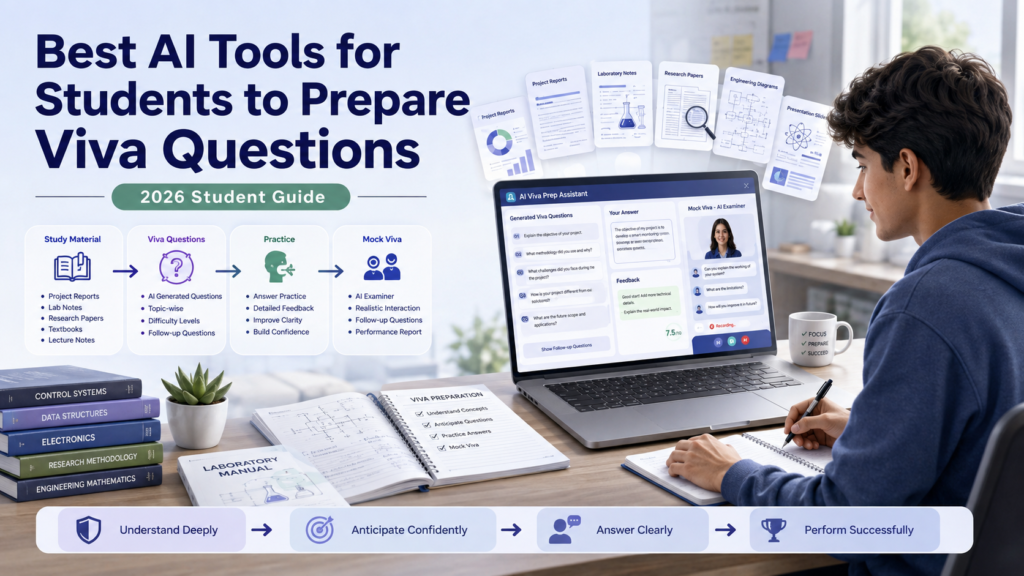
The best AI tools for students to prepare viva questions are the ones that can understand your actual study material, generate realistic questions, ask follow-ups, explain difficult concepts, and let you practice answering in your own words.
For most students, ChatGPT is a strong all-purpose option because it can work with uploaded documents and its Study Mode can quiz students, create practice questions, and provide feedback.Google Gemini is particularly useful when students want to work with uploaded documents, spreadsheets, images, notebooks, or other study material.
The important point is that no AI tool can know exactly what an examiner will ask. Use AI to create a range of realistic practice questions, including basic, technical, methodology, limitation, and follow-up questions.
A useful viva-preparation cycle is:
Understand → Generate → Practice → Challenge → Verify → Repeat
AI should make your preparation more systematic—not replace your understanding of the subject or project.
Introduction
A viva can feel very different from a written exam.
You may understand your project, lab experiment, research paper, or course material reasonably well and still struggle when someone suddenly asks:
“Why did you choose this method?”
Or:
“What would happen if you changed this variable?”
Or:
“What is the main limitation of your approach?”
These questions are difficult because a viva is not simply a test of whether you can remember information. It can require you to explain your reasoning, defend a choice, interpret results, and respond to follow-up questions.
That is where AI can become useful.
Instead of asking an AI tool to simply give you a list of questions, you can provide relevant study material and build a structured practice session around it. For example, you can ask the AI to start with basic questions, gradually increase the difficulty, challenge your answers, and identify areas where your explanation is unclear.
This approach is much more useful than memorizing a long list of generic questions.
The Best AI Tools for Students to Prepare Viva Questions should therefore be judged by more than their ability to generate questions. A useful tool should help you move from knowing the material to explaining the material under questioning.
What a Good Viva Preparation Session Should Cover
Depending on your subject, your preparation may include:
• Basic definitions
• Core concepts
• Why you selected your topic
• Methodology
• Technical decisions
• Data and results
• Limitations
• Applications
• Unexpected questions
• Follow-up questions
• Challenges to your reasoning
For a project viva, for example, an examiner may move from a simple question such as:
“What is the objective of your project?”
to a deeper question:
“Why did you choose this approach instead of the alternative?”
Then the examiner may follow with:
“What would happen if your main assumption was incorrect?”
A good AI-assisted workflow should prepare you for that progression.
The goal is not to predict the exact questions. The goal is to become comfortable answering different types of questions about the same subject.
What Are AI Tools for Viva Preparation?
AI tools for viva preparation are general-purpose AI assistants, study platforms, and document-based learning tools that students can use to prepare for oral examinations.
They can support several parts of the preparation process.
Generate Possible Viva Questions
AI can turn your notes, project report, lab material, or topic outline into practice questions.
For example:
“Generate 15 viva questions from this project report. Start with basic concepts and gradually move toward technical and application-based questions.”
This is more useful than simply asking:
“Give me viva questions.”
The more context you provide, the more closely the questions can relate to your actual material.
Explain Difficult Concepts
If you cannot confidently answer a question, AI can explain the underlying concept in simpler language.
You can then ask for:
• A beginner explanation
• A technical explanation
• An exampleA comparison
• A practical application
• A follow-up question
This helps turn a weak answer into an opportunity to learn.
Create Follow-Up Questions
Follow-up questions are particularly important in viva preparation.
An examiner may not stop after your first answer.
For example:
Question: Why did you choose this method?
Your answer: Because it was suitable for our project.
Follow-up: What makes it more suitable than the alternative method?
Second follow-up: What limitation does your chosen method have?
AI can simulate this progression and make practice more challenging.
Simulate Oral Questioning
A conversational AI tool can be instructed to ask one question at a time and wait for your response.
You can also tell it to:
• Increase difficulty gradually
• Ask follow-up questions
• Challenge unsupported claims
• Point out unclear explanations
• Give feedback after several questions
This creates a more realistic practice environment than reading questions silently.
Identify Weak Areas
After a practice session, ask the AI to categorize your mistakes.
For example:
• Conceptual gaps
• Weak methodology explanations
• Incorrect technical details
• Poor understanding of results
• Unclear communication
• Missing limitations
You can then study those areas instead of spending equal time on everything.
How We Selected These AI Tools
The tools in this guide are selected based on how useful they can be for the actual viva-preparation workflow—not simply because they are popular AI products.
• Project reports
• Notes
• PDFs
• Presentations
• Study material
• Research documents
• Other supported files
For example, ChatGPT supports document and file uploads, while Gemini can work with uploaded documents, spreadsheets, notebooks, images, and other supported files.
Quality of Question Generation
The tool should be capable of producing more than simple definition questions.
A stronger preparation session includes:
• Basic questions
• Conceptual questions
• Technical questions
• Methodology questions
• Application questions
• Limitation questions
• Follow-up questions
Follow-Up and Conversational Practice
Viva preparation is fundamentally interactive.
A tool becomes more useful when you can instruct it to ask one question, wait for your response, and then continue based on what you said.
Explanation Quality
If you get a question wrong, the tool should help you understand the concept instead of simply providing an answer to memorize.
Technical Subject Usefulness
The tool should be reasonably useful across subjects such as:
• Engineering
• Computer science
• Science
• Business
• Research
• Laboratory work
However, students should independently verify technical answers when accuracy matters.
Ease of Use
Students should be able to start a practice session without spending more time learning the AI platform than studying the actual subject.
Free Access
Free access can matter for students, but features, usage limits, and availability can change. A tool should not be described as permanently free simply because it currently has a free option.
Privacy Considerations
Students may be working with unpublished research, project data, or personal information.
A useful tool should therefore be evaluated alongside its current privacy and data-handling options. Students should upload only the material they are permitted to share.
Best AI Tools for Students to Prepare Viva Questions
The strongest tools for this use case are not necessarily dedicated “viva generators.” General AI assistants can often be more useful because they can understand your material, generate questions, explain concepts, and continue a conversation.
For this guide, the focused tool set includes:
• ChatGPT
• Google Gemini
• Claude
• Microsoft Copilot
• Perplexity
• NotebookLM
Each has a different role in the viva-preparation workflow.
Best For
ChatGPT is best for all-around viva preparation, question generation, answer feedback, and interactive practice. Its Study Mode is specifically designed for learning and can quiz students, create practice questions, explain missed concepts, and work with uploaded files or images when uploads are available.
Why It Helps With Viva Preparation
ChatGPT can support nearly every stage of a viva workflow, from understanding study material to practicing questions and identifying weak areas.
You can provide a project report or other relevant material and ask ChatGPT to generate questions based on the content instead of relying on generic questions. Its Study Mode can also guide students through Socratic-style questions and check understanding rather than simply presenting an answer.
What Students Can Use It For
- Generate basic viva questions
- Create difficult questions
- Explain technical concepts
- Ask methodology questions
- Create examiner follow-ups
- Evaluate practice answers
- Run mock viva sessions
- Identify weak topics
- Simplify difficult material
ChatGPT also supports working with uploaded documents, including PDFs, presentations, and other supported file types.
Strengths
Limitations
Students should compare important technical answers with their course materials, textbooks, official documentation, or other authoritative sources.
Best Viva Use Case
Example Prompt
Best For
Google Gemini is best for document-based viva preparation, especially when students already organize their study material within Google’s ecosystem. Gemini Apps currently support uploading documents, spreadsheets, notebooks, images, videos, and other supported files for answers, summaries, and insights.
Why It Helps With Viva Preparation
A viva usually depends heavily on the material you have actually studied. Instead of asking Gemini for generic questions about a subject, you can provide your project report or relevant notes and ask it to identify areas that an examiner could question.
This creates a preparation set based on your actual material.
What Students Can Use It For
- Project-report questions
- Notes-based questions
- Concept explanations
- Follow-up questions
- Research preparation
- Document summaries
- Practice questions
- Difficult-topic identification
Google also documents support for adding files from Google Drive and NotebookLM in supported Gemini experiences, subject to account and feature availability.
Strengths
Limitations
As with any AI assistant, generated questions and answers still need human review.
Best Viva Use Case
Example Prompt
Best For
Claude is useful for detailed document-based preparation and structured reasoning practice. Students can use a conversational AI assistant like Claude to work through lengthy project material, identify important concepts, and turn those concepts into possible viva questions.
Why It Helps With Viva Preparation
A strong viva preparation session needs context. If you give the AI a project summary without explaining the actual methodology, results, or limitations, the questions may remain generic.
Claude can be used as a discussion partner for breaking down your material into:
- Main concepts
- Technical decisions
- Assumptions
- Methodology
- Results
- Limitations
- Possible examiner challenges
What Students Can Use It For
- Question generation
- Document analysis
- Concept explanations
- Follow-up questioning
- Answer review
- Identifying unclear reasoning
- Mock viva practice
Strengths
Limitations
Feature availability and limits can also change, so students should check Claude’s current plan and capabilities before relying on a specific feature.
Best Viva Use Case
Example Prompt
Best For
Microsoft Copilot is useful for students whose viva material is already organized in Microsoft’s productivity ecosystem. For example, a student may have a project report in Word, supporting presentation material in PowerPoint, or other coursework documents that can provide context for preparation.
Why It Helps With Viva Preparation
The value of an AI assistant in viva preparation comes from connecting questions to your actual material. Rather than asking for generic questions, you can provide context and ask the tool to focus on the specific project.
Try: “Create questions based on the methodology and results in this project.”
This makes the preparation more relevant to the project you are actually presenting.
What Students Can Use It For
- Question brainstorming
- Document-based preparation
- Concept explanations
- Practice answers
- Presentation-based preparation
- Follow-up questions
Strengths
Limitations
As with other AI tools, generated technical information should be verified before being treated as authoritative.
Best Viva Use Case
Example Prompt
Best For
Perplexity is particularly useful for researching and verifying concepts that come up during viva preparation. It can be valuable when a practice question exposes a gap in your knowledge and you need to investigate that topic using external sources.
Why It Helps With Viva Preparation
Suppose an AI-generated question asks:
You realize you cannot explain the reasoning confidently. Instead of memorizing an AI-generated response, use a research-oriented tool to investigate the concept and locate supporting information.
That makes Perplexity more useful for the verify and strengthen stage of the viva workflow than simply generating a large list of questions.
What Students Can Use It For
- Research unfamiliar concepts
- Investigate technical terminology
- Find supporting sources
- Compare explanations
- Check factual claims
- Prepare for research-oriented questions
Strengths
Limitations
For academic preparation, prioritize textbooks, official documentation, research papers, and instructor-provided material where appropriate.
Best Viva Use Case
Example Prompt
Best For
NotebookLM is particularly useful for source-grounded preparation when your viva material consists of a defined collection of documents. Instead of treating the entire internet as the knowledge base, students can organize relevant source material and use the tool to study from those sources.
Why It Helps With Viva Preparation
Viva preparation is often most useful when it stays close to the material you are actually expected to know. You can organize the documents that form the foundation of your preparation and use them to generate study questions and investigate concepts.
What Students Can Use It For
- Source-based question generation
- Reviewing project material
- Understanding a collection of documents
- Finding important concepts
- Creating study material
- Identifying areas that deserve more revision
Strengths
Limitations
If an important section of your project or course material is missing, the resulting questions may also miss an important area.
Students should also verify important information against the original source documents.
Best Viva Use Case
Example Prompt
Best AI Tools for Viva Preparation Compared
The tools above overlap in some areas, but they are not equally useful for every stage of viva preparation.
| AI Tool | Best For | Question Generation | Follow-Up Questions | Practice / Conversation | Document / Notes Support | Best Viva Use |
|---|---|---|---|---|---|---|
| ChatGPT | All-around preparation | Strong | Strong | Strong | Strong | Complete mock viva |
| Google Gemini | Document-based preparation | Strong | Strong | Strong | Strong | Project/report questions |
| Claude | Detailed reasoning | Strong | Strong | Strong | Strong | Technical/project discussion |
| Microsoft Copilot | Microsoft-based coursework | Strong | Good | Good | Good | Word/PowerPoint-based preparation |
| Perplexity | Research and verification | Good | Good | Good | Good | Strengthening weak areas |
| NotebookLM | Source-grounded study | Strong | Good | Good | Strong | Research/project material |
These should not be treated as a universal ranking.
A student preparing for a short class viva may only need a conversational AI assistant. A graduate student defending a research project may benefit from combining a question-generation tool with a source-focused research workflow.
The strongest approach is usually:
Use one tool to practice → use reliable sources to verify → practice again.
That is more effective than collecting a large number of AI tools and using none of them deeply.
Which AI Tool Is Best for Different Viva Situations?
There is no single AI tool that is automatically best for every viva. Your choice should depend on what you are trying to improve.
Best for Generating Basic Viva Questions
ChatGPT is a strong option for creating a starting question set from your notes, project report, or topic. Ask it to create questions in increasing difficulty rather than generating 50 random questions at once.
This gives you a foundation before moving toward difficult questions.
Best for Technical or Project Viva
ChatGPT, Claude, and Google Gemini can all be useful when your viva depends on technical decisions, methodology, implementation, or project-specific details.
This approach can help you practice explaining why you made a decision, not just what you did.
Best for Understanding Difficult Concepts
ChatGPT, Gemini, and Claude can help explain concepts at different levels. If an examiner might ask about a difficult topic, use AI to move from a simple explanation toward deeper technical understanding.
Best for Document-Based Preparation
Google Gemini and NotebookLM can be useful when your preparation depends heavily on a defined collection of documents.
For example, you could work from:
Best for Mock Viva Practice
ChatGPT is a strong choice for interactive mock-viva practice. Tell it to ask one question at a time and wait for your answer. You can also instruct it not to correct you immediately so the session feels more like an actual examination.
Best for Follow-Up Questions
Conversational tools such as ChatGPT, Gemini, and Claude can be instructed to continue questioning based on your previous answer. This matters because examiners often explore your reasoning rather than simply moving from one unrelated question to another.
Best for Free Viva Preparation
For students who want to avoid paying for a dedicated preparation service, general-purpose AI tools with available free access can be enough for many basic viva-preparation tasks.
Best Overall
For an all-purpose workflow, ChatGPT is a strong overall choice, particularly when you want to combine question generation, explanations, answer feedback, and mock-viva practice.
But “best overall” does not mean “best for every student.” The right choice can change depending on how you study and what material your viva is based on.
What Questions Can AI Generate for a Viva?
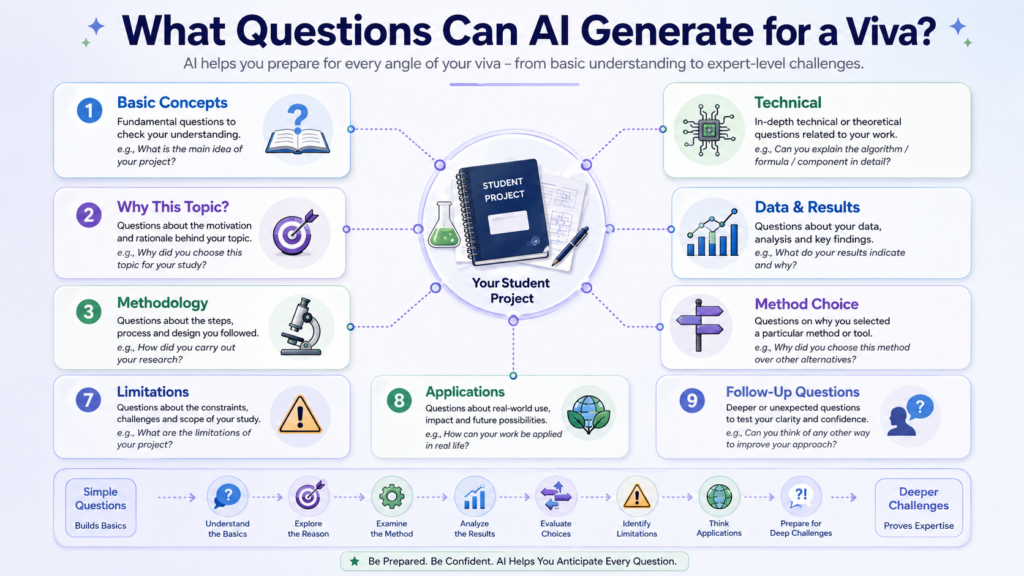
One of the biggest advantages of AI-assisted viva preparation is that you can deliberately create different question categories instead of preparing only obvious definitions.
A strong preparation set should move from basic understanding toward reasoning, application, and challenge.
Basic Concept Questions
These test whether you understand the fundamental terminology and principles behind your topic.
Examples:
• What is the main concept behind your project?
• What does this term mean?
• What is the purpose of this component?
• What principle does this method use?
These questions are usually the starting point.
Why Did You Choose This Topic?
Examiners may want to know whether you understand the motivation behind your work.
Possible questions include:
• Why did you select this topic?
• What problem were you trying to solve?
• Why is this problem important?
• What motivated your project?
• Who could benefit from the result?
Your answer should demonstrate understanding rather than sound like a memorized introduction.
Methodology Questions
These focus on how you completed the project, experiment, or research.
AI can generate questions such as:
• Why did you choose this methodology?
• What were the major steps?
• What alternatives did you consider?
• What assumptions did you make?
• Why was this method appropriate for your objective?
These questions are particularly important for project and research vivas.
Technical Questions
Technical questions depend heavily on the subject.
For a computer science project, an examiner might ask about an algorithm, architecture, database, programming language, or implementation decision.
For an engineering project, questions may focus on components, calculations, design choices, or operating principles.
For science students, questions may involve mechanisms, variables, measurements, or experimental principles.
The best prompt is therefore specific to your actual material.
Data and Results Questions
If your project includes data, expect questions about what the results actually mean.
Examples:
• What does this result indicate?
• Why did this value change?
• Which result was most significant?
• Were any results unexpected?
• How did you process the data?
• What evidence supports your conclusion?
Do not prepare only the numerical result. Understand why the result matters.
Why Did You Choose This Method?
This deserves special attention because it tests reasoning.
An examiner may ask:
“Why did you use Method A instead of Method B?”
A strong answer should explain the relevant trade-offs, assumptions, constraints, or objectives.
AI can help you prepare by asking it to generate alternative-method questions.
Limitations and Weaknesses
Students sometimes prepare only the strengths of their project.
Examiners can also ask:
• What is the biggest limitation?
• What would you change?
• What could reduce the reliability of your result?
• What assumptions could affect the outcome?
• What would you do differently with more time?
Being able to explain limitations does not mean your project failed. It shows that you understand its boundaries.
Application-Based Questions
These questions move from theory to practical use.
Examples:
• Where could this approach be used?
• How could your project be improved for real-world use?
• What would happen if the project were scaled?
• Could the same method work in another environment?
• What practical problem does this solve?
Application questions are useful because they test whether you can transfer knowledge beyond the exact example you studied.
Unexpected Follow-Up Questions
AI can also generate questions designed to test whether you genuinely understand the material.
For example:
“Give me 10 unexpected follow-up questions that an examiner could ask after my answer. Base every question on information in my project.”
This is more useful than asking AI to generate completely random difficult questions.
Examiner Challenge Questions
These are questions that challenge your reasoning or assumptions.
Examples:
• What evidence supports this decision?
• What would happen if your assumption changed?
• Why should we trust this result?
• What alternative explanation could exist?
• What is the weakest part of your methodology?
Practice these after you are comfortable with basic questions.
How to Use AI to Prepare for a Viva Step by Step
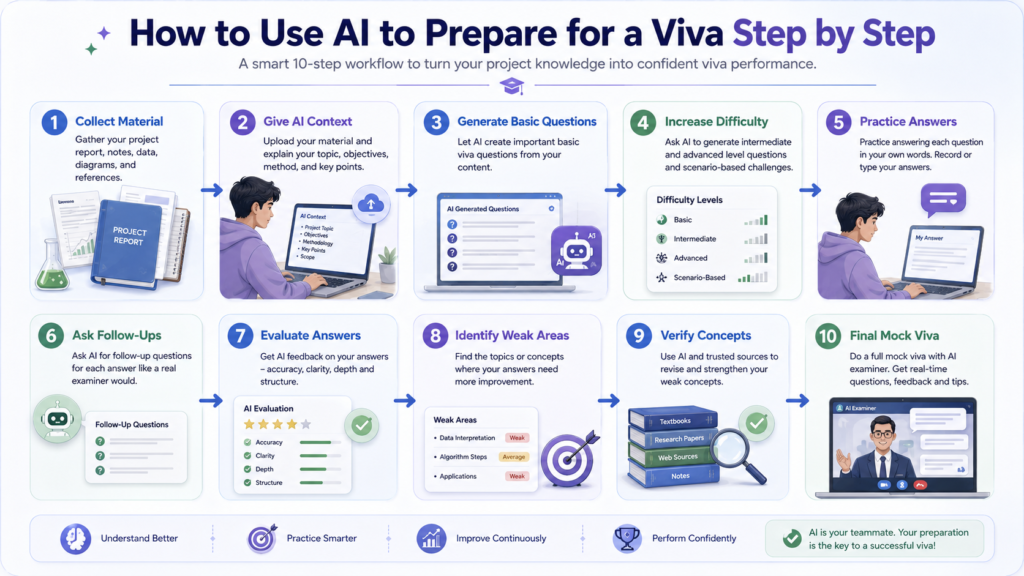
The most effective approach is not:
Upload report → Generate 100 questions → Memorize answers.
Instead, use a repeated preparation cycle.
Step 1 — Collect Your Project or Subject Material
Gather the material you are actually expected to understand.
This might include:
• Project report
• Lab report
• Lecture notes
• Research paper
• Presentation
• Course syllabus
• Relevant textbook sections
Keep the original material available throughout your preparation.
Step 2 — Give AI the Relevant Context
Tell the AI what kind of viva you are preparing for.
For example:
“I am a final-year engineering student preparing for a project viva. The attached report describes my project, methodology, results, and limitations.”
This is much more useful than simply saying:
“Give me viva questions.”
Step 3 — Ask for Basic Viva Questions
Start with fundamental questions.
Ask AI to focus on:
• Definitions
• Objectives
• Key concepts
• Project motivation
• Basic methodology
Answer these without looking at your notes.
Step 4 — Ask for Intermediate and Difficult Questions
Once you can handle basic questions, increase the difficulty.
Ask for questions about:
• Method selection
• Technical decisions
• Data interpretation
• Limitations
• Alternative approaches
• Practical applications
Step 5 — Ask for Examiner-Style Follow-Up Questions
Now make the session conversational.
Tell the AI:
“Ask one question at a time. After I answer, decide whether a follow-up question is appropriate. Challenge incomplete reasoning instead of immediately giving me the answer.”
This is where AI becomes more useful as a practice partner.
Step 6 — Practice Answering Without Looking at Notes
Do not read the AI-generated answer and assume you have learned it.
Instead:
Question → Think → Answer aloud → Check → Improve
Speaking aloud matters because a viva requires you to communicate your understanding, not merely recognize the correct answer on a screen.
Step 7 — Ask AI to Evaluate Your Answer
After answering, ask AI to review your response.
For example:
“Evaluate my answer for accuracy, clarity, completeness, and technical reasoning. Do not rewrite it completely. Tell me what I misunderstood or failed to explain.”
This keeps the focus on improving your own response.
Step 8 — Identify Weak Areas
At the end of several questions, ask AI to categorize your weaknesses.
For example:
| Weak Area | What It May Mean |
|---|---|
| Concepts | You need stronger fundamentals |
| Methodology | You cannot explain why you chose your approach |
| Results | You understand the numbers but not their meaning |
| Technical Details | You need deeper subject revision |
| Communication | Your knowledge is stronger than your explanation |
This gives you a focused revision list.
Step 9 — Study Weak Concepts From Reliable Sources
This step is critical.
If AI tells you that your understanding of a technical concept is weak, do not simply memorize its explanation.
Check the concept using:
• Course materials
• Textbooks
• Official documentation
• Research papers
• Instructor-provided resources
• Reliable academic sources
Then return to your AI practice session.
Step 10 — Run a Final Mock Viva
At the end, simulate the real experience.
Ask the AI to:
• Ask one question at a time
• Mix easy and difficult questions
• Include follow-ups
• Challenge weak answers
• Avoid giving hints
• Maintain an examiner-like tone
• Provide feedback after the session
The objective is not to achieve a perfect AI score. It is to discover what you still cannot explain confidently.
Best AI Prompts for Viva Preparation
Good prompts produce more useful preparation because they tell the AI what material to use, what type of questions to create, and how the practice session should work.
1. Generate Basic Viva Questions
Copy-Paste Prompt“Use only the material I provided. Create 15 basic viva questions about my topic. Focus on definitions, objectives, fundamental concepts, and important terminology. Do not invent information that is not supported by the material.”
2. Generate Difficult Questions
Copy-Paste Prompt“Create 15 difficult viva questions based on my project. Focus on reasoning, assumptions, alternative approaches, limitations, and practical consequences. Make the questions challenging but relevant to the material.”
3. Generate Technical Questions
Copy-Paste Prompt“Analyze the technical aspects of my project and create 15 viva questions. Include questions about implementation decisions, technical principles, components, methods, and possible alternatives. Separate basic technical questions from advanced ones.”
4. Generate Methodology Questions
Copy-Paste Prompt“Create viva questions that examine why I selected this methodology. Ask about alternatives, assumptions, advantages, disadvantages, limitations, and situations where another method might be better.”
5. Generate Questions From a Project Report
Copy-Paste Prompt“Read my project report and identify the sections most likely to be discussed in a viva. Create questions for each section, including basic, conceptual, technical, results, limitations, and application-based questions. Use only information supported by the report.”
6. Generate Examiner Follow-Up Questions
Copy-Paste Prompt“For every answer I give, identify one or two realistic follow-up questions an examiner could ask. Base the follow-ups on my previous answer rather than introducing unrelated topics.”
7. Simulate a Strict Examiner
Copy-Paste Prompt“Act as a strict but fair viva examiner. Ask one question at a time and wait for my answer. Do not provide hints unless I specifically request them. If my answer is vague or unsupported, challenge it with a follow-up question.”
8. Evaluate a Student’s Answer
Copy-Paste Prompt“Evaluate my answer for factual accuracy, conceptual understanding, completeness, clarity, and reasoning. Do not rewrite the entire answer for me. First identify what I got right, then explain what I need to improve.”
9. Identify Weak Areas
Copy-Paste Prompt“Review my answers from this practice session and identify my three biggest weak areas. Group them into conceptual, technical, methodology, results, or communication problems. Then suggest what I should revise.”
10. Conduct a Complete Mock Viva
Copy-Paste Prompt“Conduct a realistic mock viva based only on my provided material. Ask one question at a time. Start with basic questions, then move into conceptual, technical, methodology, results, limitations, application, and challenging follow-up questions. Do not reveal answers before I respond. At the end, give me a concise assessment of my strongest areas and the topics I need to revise.”
How Students Can Use AI for Different Types of Viva
The same AI workflow can be adapted to different academic situations.
Project Viva
Project viva preparation should focus heavily on the decisions and reasoning behind your work, not just memorizing project definitions.
Research Viva
Research-focused preparation should test whether you understand the reasoning behind your research process and can defend your findings.
Lab Viva
For a lab viva, concentrate on the experiment itself and your understanding of how the procedure produces the observed results.
Science Viva
Science students can practice questions that test both scientific principles and their ability to interpret experimental evidence.
Engineering Viva
Engineering students can ask AI to challenge both the technical decisions and practical constraints behind their work.
MBA/Business Project Viva
MBA students may need to defend the assumptions, analysis, and strategic reasoning behind their recommendations.
Computer Science/Programming Viva
Computer science students can practice questions that examine both implementation choices and the technical reasoning behind them.
How to Use AI as a Mock Viva Examiner
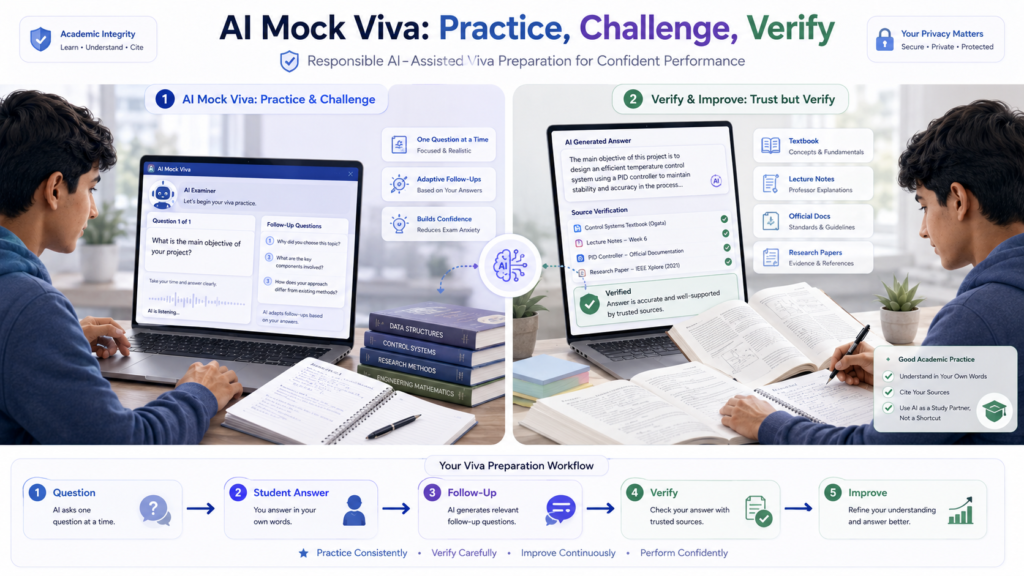
A mock viva works best when the AI does not behave like a search box.
The goal is to create a conversation where you must think before answering.
Set the Rules Before Starting
Tell the AI:
• Ask one question at a time.
• Wait for my answer.
• Do not reveal the answer beforehand.
• Ask follow-ups when appropriate.
• Increase difficulty gradually.
• Challenge vague reasoning.
• Stay within my project or subject.
• Give detailed feedback only after the session.
Complete Mock-Viva Prompt
“Act as my viva examiner for the material I provided. Conduct the session one question at a time. Begin with basic questions about my topic and gradually move to conceptual, technical, methodology, results, limitations, application, and challenging questions. Wait for my complete answer before continuing. If my answer is incomplete, ask a realistic follow-up question. Do not give me the correct answer before I respond. Do not invent facts outside my provided material. After 15 questions, evaluate my preparation and list the five areas I should revise most.”
The best way to use this prompt is to answer aloud, even if you type the response into the AI afterward.
A typed answer can help with accuracy, but speaking forces you to organize your thoughts under pressure.
How to Verify AI-Generated Viva Questions and Answers
AI can be extremely useful for practice, but it can also be confidently wrong.
This matters even more when you are preparing for a technical, scientific, medical, engineering, or research viva.
AI Can Hallucinate Facts
An AI tool may generate:
• Incorrect definitions
• Invented technical details
• Wrong formulas
• Misinterpreted findings
• Unrealistic methodology questions
• Incorrect explanations
Therefore, an answer that sounds polished is not automatically correct.
AI Can Misinterpret Your Project
If your project report is incomplete or unclear, the AI may misunderstand:
• Your methodology
• Variables
• Results
• Project objectives
• Technical implementation
Always compare AI-generated questions with your original material.
AI Can Generate Unrealistic Examiner Questions
A generated question can be academically possible but completely irrelevant to your actual course or project.
Ask:
“Is this question supported by my material or course requirements?”
If not, do not spend hours preparing for it simply because the AI called it “advanced.”
Verify Important Answers
For important technical or factual questions, check:
• Textbooks
• Lecture notes
• Official documentation
• Research papers
• Course materials
• Instructor-provided resources
For research work, return to the original paper or dataset whenever possible.
Never Memorize an Unverified AI Answer
This is one of the most important rules in AI-assisted viva preparation.
If you memorize a wrong answer, you may be able to repeat it confidently—but an examiner’s follow-up question can quickly expose the gap.
Instead:
AI answer → Verify → Understand → Explain in your own words
That is much stronger preparation.
Is It Okay to Use AI for Viva Preparation?
Yes. In most cases, using AI as a study and practice assistant can be a reasonable way to prepare for a viva. The important distinction is between using AI to strengthen your understanding and using it to replace your own preparation.
Your instructor, department, or institution may have specific rules about AI, so always follow the applicable policy.
Appropriate Uses of AI
Students can use AI to:
• Generate practice questions
• Explain difficult concepts
• Create follow-up questions
• Practice answering aloud
• Simulate an examiner
• Review the clarity of an answer
• Identify topics that need more study
• Create revision checklists
These uses keep the student actively involved in the learning process.
Uses That Can Become Problematic
Be careful about:
• Memorizing unverified AI answers
• Presenting AI-generated explanations as your own understanding
• Using AI during an actual viva without permission
• Uploading confidential project or research information
• Ignoring your course material because an AI tool gave a different answer
The goal of AI-assisted preparation is better understanding and practice, not avoiding the work of learning.
A Simple Rule
Use AI before the viva as a practice partner.
During the actual viva, follow your instructor’s rules.
If AI assistance is not explicitly permitted during the examination, do not use it.
Viva Preparation and Student Data Privacy
Your viva material may contain more information than you realize.
A project report, research document, or lab file could include:
• Your name or student ID
• Participant information
• Contact details
• Unpublished research
• Proprietary project information
• Internal university documents
• Sensitive experimental data
Before uploading anything to an AI service, consider whether you are actually allowed to share it.
Remove Unnecessary Personal Information
If your practice session does not require names, IDs, email addresses, or other identifying information, remove them first.
For example, instead of uploading:
Student Name + Student ID + Survey Response
you may only need:
Anonymized Survey Response
Upload Only What You Need
You do not necessarily need to upload your entire project folder.
For a methodology practice session, the methodology section may be enough.
For a results session, provide the relevant results and supporting context.
This reduces unnecessary exposure of information.
Check the AI Tool’s Current Privacy Information
AI services can differ in how they handle uploaded content, account settings, retention, and data use.
Do not assume that an AI tool is completely private simply because you are using it for education.
Before uploading sensitive material, review the current privacy and data-handling information for the specific service and account you are using.
Be Especially Careful With Research Data
Graduate and research students may work with unpublished datasets or information involving research participants.
If the data is confidential, restricted, or covered by institutional requirements, follow your research supervisor’s and institution’s rules before using an external AI service.
Common Mistakes Students Make When Using AI for Viva Preparation
AI can make preparation easier, but poor prompting or overreliance can make the process less effective.
Asking Generic Prompts
A prompt such as:
may produce questions that have little connection to your actual project.
Instead, provide the subject, project context, methodology, and relevant material.
Blindly Memorizing AI Answers
This is one of the biggest mistakes.
A viva is interactive. Even if you memorize an answer to one question, an examiner can ask:
Ignoring Follow-Up Questions
Preparing only standalone questions creates a false sense of readiness.
Ask AI to continue questioning after every answer so you become comfortable defending your reasoning.
Uploading Everything
More information is not automatically better.
Uploading unnecessary files can create privacy concerns and may make it harder to focus the AI on the material that actually matters.
Not Verifying Technical Information
Never assume an AI-generated technical answer is correct.
This is particularly important for:
Check important information against authoritative material.
Practicing Only Easy Questions
If every practice session contains definitions and simple questions, the real viva may feel much harder.
Include:
Skipping Actual Understanding
AI should help you identify what you do not understand. It should not become a shortcut around learning.
Using AI During a Viva When It Is Not Permitted
An actual viva is an assessment of your knowledge and communication.
Unless your instructor or institution explicitly permits AI assistance, do not use an AI tool to generate answers during the examination.
AI Viva Preparation Myths vs Reality
| Myth | Reality |
|---|---|
| AI can predict the exact questions an examiner will ask. | AI can create plausible practice questions, but it cannot know the exact questions an examiner will choose. |
| Memorizing AI answers is enough. | Examiners can ask follow-ups, so genuine understanding matters more than memorized responses. |
| More difficult questions always mean better preparation. | Good preparation should cover basic, conceptual, technical, methodology, application, and challenge questions. |
| The longest AI-generated question list is the best. | A focused set of relevant questions is usually more useful than hundreds of generic questions. |
| If AI sounds confident, the answer must be correct. | AI can produce convincing but incorrect information. Important answers should be verified. |
| AI can replace studying the project. | AI works best as a preparation assistant while the student remains responsible for understanding the material. |
Expert Tips for Better AI-Assisted Viva Preparation
1. Practice Aloud
A viva is spoken communication. Reading answers silently is different from explaining a concept aloud.
Practice answering without looking at your notes.
2. Answer in Your Own Words
Do not try to reproduce an AI-generated paragraph.
A better answer is one you genuinely understand and can explain naturally.
3. Prepare the “Why” Questions
For every major decision in your project, ask:
Why did I choose this?
Then prepare for:
Why this instead of an alternative?
This can reveal gaps that simple definition questions miss.
4. Know Your Methodology
Be able to explain:
• What you did
• Why you did it
• What alternatives existed
• What assumptions you made
• What limitations remain
5. Prepare Your Limitations
Do not avoid weaknesses.
Know the realistic limitations of your project, experiment, research, or methodology and be ready to explain how they could be addressed.
6. Practice Follow-Ups
After answering a question, ask yourself:
“What could the examiner ask next?”
AI can help generate these follow-ups, but you should also practice predicting them yourself.
7. Use Your Own Project Data
If your project contains specific results, calculations, observations, or design decisions, practice explaining those exact details.
Generic AI questions cannot fully replace project-specific preparation.
8. Verify Technical Answers
When AI gives you an answer about an important technical concept, check it against your textbook, notes, official documentation, research paper, or other reliable source.
9. Keep Answers Concise
A good viva answer does not always need to be long.
Practice giving a clear answer first, then adding supporting detail when the examiner asks for it.
10. Finish With a Full Mock Viva
Before the actual examination, run one complete session without looking at your prepared answers.
Use mixed difficulty, follow-up questions, and unexpected but relevant challenges.
The objective is not to make the AI say you are “ready.”
The objective is to discover what you still cannot explain confidently.
Conclusion
The Best AI Tools for Students to Prepare Viva Questions can make preparation more structured, especially when students use them to generate realistic questions, practice answers, simulate follow-ups, and identify weak areas.
But the tool itself is not the preparation.
The strongest approach is:
Understand → Generate → Practice → Challenge → Verify → Repeat
Use AI to turn your project report, notes, research material, or subject content into a realistic practice environment. Then verify important information and return to your original academic sources whenever something is uncertain.
Most importantly, do not prepare only for questions you expect. Prepare to explain your decisions, defend your methodology, interpret your results, discuss limitations, and respond to follow-up questions.
That is what makes AI-assisted viva preparation genuinely useful.
Continue Learning
If you’re preparing for a viva alongside other academic work, these IndiaAITools resources can fit naturally into the same study workflow:
AI Tools for Students to Create Charts From Data
Useful when your project or research viva includes data visualization, survey results, or experimental findings.
Read the guide →AI Tools for Students to Analyze Survey Data
Helpful for understanding survey responses before preparing questions about methodology, results, and interpretation.
Read the guide →AI Tools for Creating Lab Reports for Students
Useful for students whose viva is connected to laboratory experiments and report writing.
Read the guide →AI Tools for Academic Research
Helpful when you need to strengthen your understanding of research concepts, sources, and methodology before a research viva.
Read the guide →Frequently Asked Questions About AI Tools for Viva Preparation
What is the best AI tool for preparing viva questions?
For all-around preparation, ChatGPT is a strong option because it can generate questions, explain concepts, evaluate practice answers, and conduct interactive mock-viva sessions. Gemini, Claude, and NotebookLM can also be useful depending on your study material and preparation needs.
Can ChatGPT generate viva questions from a project report?
Yes. You can provide relevant project material and ask ChatGPT to generate questions based on the objectives, methodology, technical decisions, results, limitations, and applications discussed in the report.
Can AI simulate a viva examiner?
Yes. A conversational AI tool can be instructed to ask one question at a time, wait for your answer, ask follow-up questions, increase difficulty, and provide feedback after the session.
Can AI generate follow-up viva questions?
Yes. You can ask AI to create follow-up questions based on your previous answer. This is particularly useful because real viva questioning may move from a basic question into deeper questions about your reasoning.
Can AI help with technical viva preparation?
Yes. AI can generate technical questions and explain concepts, but students should verify important technical information using textbooks, course materials, official documentation, or other reliable sources.
Can students use AI for lab viva preparation?
Yes. Students can use AI to practice questions about experiment objectives, principles, procedures, variables, calculations, results, sources of error, and limitations. The questions should be based on the actual experiment and course material.
Can AI predict the questions an examiner will ask?
No. AI cannot reliably predict the exact questions an individual examiner will ask. It can generate plausible questions based on your subject, project, course material, and common examination patterns.
Should students memorize AI-generated answers?
No. Students should understand the concepts and answer in their own words. Memorized AI responses may become difficult to defend when an examiner asks a follow-up question.
Is using AI for viva preparation allowed?
Using AI for preparation may be permitted, but policies differ between institutions, courses, and assignments. Follow your instructor’s or institution’s current AI policy, and never use AI during an actual viva unless it is explicitly allowed.
How can students verify AI-generated viva answers?
Compare important answers with your lecture notes, textbooks, official documentation, research papers, instructor-provided resources, or other authoritative sources. When possible, return to the original source material rather than relying on another AI-generated explanation.