Quick Answer
The Best AI Tools for Students With ADHD are not necessarily the tools with the most features. The better choice depends on the academic problem you want to solve.
For example:
• ChatGPT — useful for breaking down assignments, explaining difficult concepts, creating study questions, and working through learning material step by step. Its Study Mode can work with uploaded class materials and guide students through questions rather than simply giving answers.
• Google Gemini — useful for guided learning, explanations, and working with uploaded study materials. Gemini’s Guided Learning feature is designed to help students learn through interactive explanations and questions.
• Claude — useful for organizing complex information, reviewing drafts, brainstorming, and turning large amounts of text into clearer working material.
• Notion AI — useful when notes, tasks, documents, and planning need to live together in one workspace. Notion AI can work with pages and uploaded files and help create or edit task and knowledge structures.
• Todoist — useful for turning academic responsibilities into manageable tasks and subtasks. Todoist’s current tools support breaking larger tasks into smaller pieces, while its Task Assist can generate subtasks for complex tasks.
• Motion — useful for students who want AI-assisted scheduling around deadlines, task duration, priorities, and available time. Its AI Task Manager automatically plans tasks into a schedule and can re-plan when circumstances change.
• ClickUp — useful for larger academic projects where assignments, subtasks, deadlines, documents, and project planning need to stay connected. ClickUp Brain can create subtasks and help organize tasks.
• NotebookLM — now branded by Google as Gemini Notebook, it is particularly useful for working with a defined collection of research and study sources, asking questions about them, and generating study-oriented outputs.
The important point is that these tools solve different problems.
A student struggling to start an assignment may benefit from task breakdown. Someone struggling to understand a long reading may benefit more from source-based AI study support. Someone with too many deadlines may need a planning system rather than another chatbot.
AI should be treated as an academic support tool—not as a treatment for ADHD.
Introduction
Academic work can become difficult when a task has too many moving parts.
An assignment might look simple on paper:
“Write a 10-page research paper.”
But completing it may actually involve:
Choose a topic → find sources → read them → take notes → create an outline → write a draft → revise → cite sources → proofread → submit.
When all of those steps appear as one large task, getting started can become harder than the individual steps themselves.
The same problem can happen with studying.
“Study for biology” does not tell you:
• What chapter to start with
• How much material to cover
• What to review first
• When to practice questions
• How to know whether you understand the material
This is where AI can provide practical academic structure.
The Best AI Tools for Students With ADHD can help turn vague responsibilities into clearer actions, organize information, explain difficult concepts, and create more manageable study workflows.
That does not mean every student needs an AI productivity system.
In fact, adding too many apps can create another organizational problem.
The goal is simpler:
Use AI where it removes unnecessary friction from academic work.
A student might use one tool to break down assignments, another to organize source material, or a single general-purpose AI assistant for several study tasks.
The right setup depends on the student’s workflow, courses, privacy needs, and school policies.
What Can AI Tools Do for Students With ADHD?
AI can support several ordinary academic tasks without being treated as medical care.
Task Breakdown
A large assignment can be converted into smaller actions.
Instead of:
“Finish research paper.”
AI can help create:
- Read the assignment requirements.
- Choose a topic.
- Find five credible sources.
- Take notes.
- Create an outline.
- Draft the introduction.
- Draft the main sections.
- Add citations.
- Revise.
- Proofread.
The student still decides what to do and completes the work. AI simply helps make the structure more visible.
Planning
AI can help turn deadlines into a sequence of smaller tasks.
For example, if a paper is due in two weeks, an AI assistant can help distribute research, outlining, drafting, and revision across available days.
The plan still needs a reality check. A schedule that looks efficient on screen can be unrealistic once classes, commuting, work, sleep, and other responsibilities are considered.
Reminders and Task Organization
Task-management tools can help students keep assignments, subtasks, due dates, and recurring responsibilities in one place.
This can be useful when academic work is spread across multiple classes.
Note Organization
AI can summarize notes, identify major themes, turn information into questions, or reorganize material into a more usable format.
For source-based study, tools such as Gemini Notebook can work from materials you provide rather than requiring you to explain the entire context manually. Google’s current documentation describes NotebookLM/Gemini Notebook as a research and learning tool grounded in selected sources.
Summarization
Long readings, lecture notes, or documents can be condensed into key points.
However, a summary should be treated as a starting point—not a substitute for checking the original material when details matter.
Explanations
AI can explain difficult concepts at different levels.
For example:
“Explain this economics concept as if I understand basic economics but have never studied this topic before.”
ChatGPT’s current Study Mode can guide students through concepts step by step, ask questions, check understanding, and work with uploaded class materials.
Writing Support
AI can help students brainstorm, organize ideas, identify unclear sentences, and improve drafts where school policies allow it.
That is different from asking AI to produce an entire assignment and submitting the result as original work.
Research Organization
Students can use AI to categorize sources, summarize provided material, identify themes, and create research questions.
Source-grounded tools can be particularly useful here because the student can keep the discussion connected to a defined set of documents.
Study Assistance
AI can create:
• Practice questions
• Flashcard-style review
• Study outlines
• Concept explanations
• Comparison tables
• Review checklists
ChatGPT Study Mode and Gemini’s learning features are examples of AI systems currently offering structured learning support.
Important: None of these uses makes AI a treatment for ADHD. This article focuses only on practical academic support.
How We Selected These AI Tools
The Best AI Tools for Students With ADHD in this guide are selected based on how directly they can help with common academic workflows.
Academic Usefulness
The tool should solve an actual student problem rather than simply offer an impressive AI feature.
Task Organization
Tools are more useful when they can turn responsibilities into clear tasks, subtasks, or actionable steps.
Planning Support
For planning tools, we considered whether they can help students work with deadlines, priorities, durations, or schedules.
Notes and Document Handling
Students often work with PDFs, lecture notes, research documents, and other study material, so document-based workflows matter.
Explanation Quality
A useful study assistant should help students understand material rather than simply generate answers.
Writing and Research Support
Academic work often involves drafting, revising, organizing sources, and synthesizing information.
Ease of Use
A complicated system can create more work than it removes. Students should be able to understand the basic workflow without building an elaborate productivity setup.
Free Access
Free availability can matter to students, but pricing and usage limits change. Always check the current plan before choosing a tool.
Privacy
Students should consider what information they upload and how the service handles files, conversations, recordings, or other data.
Student Usefulness
Most importantly, the tool should make an existing academic task easier to manage—not encourage students to create a second job managing their productivity system.
Best AI Tools for Students With ADHD
ChatGPT
ChatGPT can support multiple stages of a student’s academic workflow, from breaking down assignments and explaining difficult concepts to creating practice questions and working with study materials.
Official ChatGPT Website →Best For
Assignment breakdown, studying, explanations, brainstorming, and flexible academic support.
How It Can Help Students
ChatGPT is useful because it can handle several stages of a student’s workflow without requiring a separate application for every problem.
Its Study Mode can guide learning step by step, ask questions, check understanding, create practice questions, and work with supported uploaded study materials such as notes, slides, and PDFs.
This creates a useful starting structure without assuming that the AI knows everything about the student’s schedule or workload. For studying, students can also provide relevant course material and ask for explanations or practice questions.
Key Strengths
Important Limitation
ChatGPT can make mistakes, so important academic information should be checked against course materials and reliable sources. Students should also double-check important information when using Study Mode.
Best Academic Use Case
Google Gemini
Google Gemini can help students learn through guided explanations, interactive questions, study materials, and research-oriented academic tasks.
Official Gemini Website →🎯 Best For
Work through difficult topics with structured explanations and questions.
Break complex concepts into smaller, easier-to-understand learning sections.
Use uploaded files and course materials to support focused study sessions.
Organize research questions and explore information through research-oriented workflows.
🧠 How It Can Help Students
Gemini can be useful when a student wants an interactive explanation rather than a simple answer. Its Guided Learning feature is designed to help students work through topics using explanations, questions, visual aids, and uploaded files.
For example, a student could ask:
“Help me understand this chapter. Start with the three most important concepts, then quiz me one at a time.”
A student can also use Gemini to organize a research question, compare concepts, or turn study material into a more manageable review session.
Gemini can also support research-oriented workflows using selected sources and uploaded files, making it useful when students need to move from basic understanding toward deeper academic exploration.
✨ Key Strengths
Supports a more interactive approach to learning.
Helps students explore concepts instead of only receiving answers.
Can work with uploaded study materials and relevant files.
Useful for organizing questions and exploring research topics.
Can help divide difficult subjects into smaller learning sections.
AI explanations can still contain errors. Students should compare important information with textbooks, class notes, instructor materials, or authoritative sources before relying on it for academic work.
Interactive Study + Research Guidance
Gemini is a strong option for students who want interactive study guidance combined with broader Google-based research workflows.
Claude
Claude can help students understand complex material, organize large amounts of information, brainstorm ideas, and review academic writing.
Official Claude Website →🎯 Best For
Break down difficult or information-heavy academic material.
Turn scattered notes and ideas into a clearer structure.
Explore ideas and possible directions before starting an assignment.
Review drafts for missing points, repetition, and confusing sections.
🧠 How It Can Help Students
Claude can be particularly useful when an academic task contains a large amount of text that needs to be understood before work can begin. A student might provide notes or a draft and ask Claude to identify:
Identify the central concepts and arguments in the material.
Highlight areas that may need additional information or explanation.
Spot parts of the material that may need clarification.
Find unnecessary repetition that could make a draft less focused.
Identify questions that still need to be researched or answered.
This can be particularly helpful for research-heavy assignments where organizing information is one of the biggest challenges.
💡 A Better Academic Workflow
“Write my research paper.”
“Review these notes and organize the information into a logical outline. Do not write the final paper.”
The student can then use the outline as a planning aid and complete the actual academic work themselves.
✨ Key Strengths
Useful for structuring large amounts of written information.
Can help make difficult academic material easier to work through.
Helps students explore ideas before committing to a direction.
Can identify unclear sections, repetition, and possible gaps.
Useful as a support layer during research-heavy assignments.
Claude is still a general AI assistant. It should not be assumed to know your course requirements, instructor preferences, or the accuracy of every academic claim without verification.
Organizing Complex, Information-Heavy Assignments
Use Claude when the amount or complexity of information is itself making an assignment difficult to organize. It works best as a planning, analysis, and review layer rather than a replacement for the student’s own academic work.
Notion AI
Notion AI combines AI assistance with notes, tasks, documents, databases, and academic planning inside one connected workspace.
Official Notion Website →🎯 Best For
Keep notes, assignments, research, and deadlines connected in one workspace.
Work with course notes and documents without constantly switching between apps.
Organize assignments, projects, and academic tasks alongside your notes.
Combine pages, databases, files, and information into a flexible academic system.
🧠 How It Can Help Students
Notion AI is integrated into the Notion workspace, allowing students to use AI alongside pages, databases, tasks, and other stored information. Its features include writing assistance, summaries, brainstorming, file handling, and AI-assisted work with pages and databases.
A student could maintain a course workspace like this:
AI can then help summarize material, edit text, brainstorm ideas, or work with information already stored in the workspace. This can reduce the need to repeatedly move information between separate apps.
✨ Key Strengths
Keep academic planning and information together instead of scattering them across apps.
Get help with drafting, editing, rewriting, and improving stored content.
Turn longer notes and stored information into easier-to-review summaries.
Explore ideas directly inside the workspace where your academic material lives.
Work with relevant files and information as part of an organized workspace.
Build systems for courses, assignments, research, projects, and deadlines.
Notion can become overly complicated if a student builds too many databases, views, tags, and systems. The best setup is usually the simplest one that supports the student’s actual workflow.
Notion’s current AI availability varies by plan. Notion’s documentation states that full Notion AI access is tied to Business and Enterprise plans, while Free and Plus users receive limited complimentary AI responses.
One Organized Academic Workspace
Use Notion AI when you want one organized academic workspace instead of several disconnected tools. It is especially useful when your notes, assignments, research, tasks, and deadlines need to stay connected.
Todoist
Todoist helps students turn academic responsibilities into clear, manageable tasks and subtasks instead of keeping everything in their head.
Official Todoist Website →🎯 Best For
Turn assignments, studying, and other responsibilities into actionable tasks.
Break larger academic responsibilities into smaller, easier actions.
Give individual tasks clear deadlines instead of relying on memory.
Organize repeated study and academic responsibilities with recurring tasks.
🧠 Why Todoist Is Different
Todoist is primarily a task-management tool rather than a general-purpose AI chatbot. That distinction can be useful for students who already know what they need to do and simply need a clear system for organizing the work.
⚙️ How It Can Help Students
Instead of keeping a large responsibility like “Study for chemistry exam” in your head, turn it into a series of smaller actions:
Once the responsibility is broken into smaller actions, the student can schedule those individual tasks instead of trying to remember the entire workload at once.
✨ Key Strengths
Keep academic responsibilities organized in a clear task system.
Break large responsibilities into smaller actions that are easier to complete.
Give individual tasks clear deadlines and reduce last-minute work.
Useful for repeated study sessions and ongoing academic responsibilities.
Helps transform vague academic responsibilities into specific next steps.
Todoist does not replace a full learning assistant. It is more useful for organizing the work than explaining difficult course material.
Turn Responsibilities Into Manageable Tasks
Use Todoist when the biggest problem is:
Motion
Motion helps students turn academic tasks into scheduled work blocks by planning around deadlines, priorities, available time, and task dependencies.
Official Motion Website →🎯 Best For
Turn tasks and deadlines into planned calendar work blocks.
Plan academic work around upcoming deadlines and priorities.
Help determine which responsibilities need attention first.
Re-plan work when changes disrupt the original schedule.
🧠 What Makes Motion Different
Motion takes task planning further by automatically scheduling tasks into a calendar based on factors such as deadlines, priorities, duration, and dependencies. It can also re-plan schedules when circumstances change.
📅 How It Can Help Students
Suppose a student has:
Add academic responsibilities, deadlines, and relevant details.
Work around the student’s actual calendar and available hours.
Turn responsibilities into specific periods of planned work.
Instead of manually deciding when every task should happen, Motion can help turn the responsibilities into scheduled work blocks.
✨ Key Strengths
Helps turn tasks into planned calendar time.
Keeps upcoming deadlines in the scheduling process.
Helps organize work according to importance and urgency.
Connects task planning with available calendar time.
Can help re-plan when circumstances change.
An automatically generated schedule is only as realistic as the information entered into it. If a student schedules six hours of work into a day that realistically contains two available hours, AI cannot make those missing hours appear.
Give the system an honest picture of your available time.
No scheduling system can create extra hours that do not exist.
Planning and Scheduling Academic Work
Motion is most useful when planning and scheduling—not understanding course material—is the main challenge.
ClickUp
ClickUp combines task management, Docs, project organization, and AI features in one workspace, making it useful for large academic projects with many connected tasks and milestones.
Official ClickUp Website →🎯 Best For
Manage complex projects that contain many connected responsibilities.
Break major academic responsibilities into smaller, trackable actions.
Keep project tasks, documents, and milestones organized in one place.
Track major stages of long-term research and semester projects.
🧠 What Makes ClickUp Different
ClickUp combines detailed task management, Docs, project organization, and AI features. ClickUp Brain can summarize tasks, create subtasks, create tasks from prompts or workspace content, and help manage task information.
⚙️ How It Can Help Students
A student working on a semester-long group project could organize the work into connected stages:
Brain can help generate subtasks from a larger task and work with project information already stored in ClickUp.
✨ Key Strengths
Useful for projects with many connected responsibilities.
Break larger project stages into smaller actionable tasks.
Track major checkpoints across long academic projects.
Keep project information and action items connected.
Use AI to help create tasks and subtasks from project information.
Well suited to research, group, and semester-long projects.
ClickUp has considerably more functionality than many students need for a simple homework assignment. If a basic task list solves the problem, using a large project-management system may create unnecessary setup.
Many tasks and stages need to stay connected.
Multiple responsibilities need to be organized together.
The project continues across weeks or an entire semester.
Large Research & Semester-Long Projects
Use ClickUp for large research, group, or semester-long projects where multiple tasks and milestones need to stay connected.
NotebookLM (Gemini Notebook)
NotebookLM is designed for source-based study and research, helping students understand, organize, and explore a defined collection of academic material.
Official Gemini Notebook Website →Google renamed NotebookLM to Gemini Notebook in July 2026 while continuing the standalone research-and-learning product.
🎯 Best For
Learn from a defined collection of course and research materials.
Bring relevant sources together inside one focused notebook.
Ask questions about the academic material you provide.
Explore difficult topics using the sources you have selected.
📖 Why Source-Based Study Matters
The main strength of Gemini Notebook is its focus on a defined collection of sources. Google describes the product as helping users understand and explore complex material, with source-grounded responses and citations that can help users check information against the original material.
🧠 How It Can Help Students
A student could create a notebook for a course and add relevant academic material such as:
“Compare the three theories discussed in these sources.”
“Create study questions based only on the material I provided.”
✨ Key Strengths
Focuses learning around the material selected by the student.
Helps bring a collection of academic sources into one workspace.
Ask questions and explore information within provided material.
Useful for creating study questions and exploring course material.
Compare ideas and identify relationships across provided materials.
Source grounding does not make every response automatically correct. Google itself notes that Gemini Notebook can still generate inaccuracies, so students should check important information against the original sources.
Question the provided sources.
Review the cited material.
Compare important claims with the original source.
Understanding & Organizing a Large Source Collection
Use Gemini Notebook when your main problem is understanding and organizing a large collection of study or research sources.
A Simple Rule for Choosing
You do not need all eight tools.
A simpler setup might look like this:
Need help understanding material → ChatGPT, Gemini, or Gemini Notebook
Need help organizing tasks → Todoist
Need automated scheduling → Motion
Need notes + tasks together → Notion AI
Need a complex project workspace → ClickUp
Need heavy text organization → Claude
That keeps the system practical instead of turning productivity into another project.
Best AI Tools for Students With ADHD Compared
The best tool depends on the academic problem you want to solve. Instead of choosing the tool with the longest feature list, match the tool to the task you struggle with most.
| AI Tool | Best For | Planning | Task Breakdown | Notes / Study | Writing / Research | Free Option | Best Use |
|---|---|---|---|---|---|---|---|
| ChatGPT | General Academic Support | ✓ | ✓ | ✓ | ✓ | Options Vary | All-purpose study help |
| Google Gemini | Guided Learning | ✓ | ✓ | ✓ | ✓ | Options Vary | Learning & explanations |
| Claude | Complex Information | — | ✓ | ✓ | ✓ | Options Vary | Research & writing |
| Notion AI | Notes + Organization | ✓ | ✓ | ✓ | ✓ | Limited AI Access | One academic workspace |
| Todoist | Task Management | ✓ | ✓ | — | — | Options Vary | Breaking work into tasks |
| Motion | AI Scheduling | ✓ | ✓ | — | — | Plan-dependent | Deadline-based scheduling |
| ClickUp | Large Projects | ✓ | ✓ | ✓ | ✓ | Plan-dependent | Complex academic projects |
| Gemini Notebook | Source-Based Study | — | — | ✓ | ✓ | Availability Varies | Research & study sources |
There is no single best AI tool for every student. ChatGPT and Gemini work well for broad academic support, Todoist and Motion focus more on planning, Notion AI combines organization with AI, ClickUp fits complex projects, and Gemini Notebook is strongest when your study depends on a defined collection of sources.
The table is meant as a quick decision guide, not a ranking. A simple task manager may be more useful than a sophisticated AI system if your main problem is keeping track of assignments.
Which AI Tool Is Best for Different Student Needs?
Best for breaking assignments into steps
ChatGPT or Todoist can work well for this, but in different ways.
ChatGPT can turn an assignment prompt into a sequence of actions. Todoist is better suited to keeping those actions as an actual task list.
Best for planning
Motion is the strongest fit when the challenge is turning deadlines and available time into a schedule.
For simpler planning, Todoist may be enough.
Best for notes
Notion AI is useful when you want notes, tasks, and course information together.
For source-heavy study, Gemini Notebook can be a better fit because its workflow is centered around the documents you provide.
Best for understanding difficult concepts
ChatGPT and Google Gemini are strong general-purpose choices for asking follow-up questions, changing the explanation level, and working through a concept step by step.
Best for writing support
ChatGPT, Claude, and Notion AI can help brainstorm, organize, and revise academic writing.
Use them according to your school’s AI rules, and keep the actual academic reasoning and final work your own.
Best for research organization
Gemini Notebook is particularly useful when you want to ask questions about a defined collection of sources.
Claude can also help organize large amounts of text and develop research outlines.
Best free option
There is no permanent winner because free plans and usage limits change.
Start with a tool that solves your most important problem without requiring you to build an unnecessarily complicated system.
Best overall
For most students, ChatGPT is a practical starting point because it can support several academic tasks from one interface.
But “best overall” does not mean “best for every task.”
If task management is your main challenge, a dedicated task tool may work better. If source-based research is the priority, a source-grounded notebook may be more appropriate.
How Students With ADHD Can Use AI for Studying
Break Large Assignments Into Smaller Tasks
Large assignments often become easier to approach when the first action is obvious.
Instead of asking AI to “help me finish this paper,” provide the assignment instructions and ask it to identify the required stages.
A useful breakdown might be:
Understand requirements → Choose topic → Research → Outline → Draft → Revise → Check → Submit
The important part is keeping the list manageable. Twenty tiny tasks can become another source of friction.
Create a Realistic Study Plan
AI can help distribute study tasks across available days.
Give it:
• Exam date
• Topics
• Available study time
• Existing commitments
• Priority areas
Then ask for a realistic plan rather than an ideal one.
For example:
“I have three hours available this week, not three hours every day. Create a study plan that fits that limitation.”
A realistic plan is more useful than a perfect-looking schedule that cannot actually be followed.
Turn Notes Into Study Materials
Give AI your notes and ask it to create:
• Practice questions
• Key-term lists
• Concept comparisons
• Short review summaries
• Self-testing exercises
For important subjects, compare the generated material against your original notes.
Understand Difficult Concepts
When something feels too complicated, ask AI to change the explanation rather than simply repeating it.
Try:
“Explain this concept using a simple example first, then give me the technical explanation. Afterward, ask me two questions to check whether I understood it.”
That turns passive reading into active learning.
Organize Research
Research can become difficult when sources, notes, quotes, and ideas are scattered.
AI can help group material by:
• Topic
• Research question
• Supporting evidence
• Contradictory findings
• Questions requiring further investigation
Keep the original sources available so you can verify claims and citations.
Improve Writing
AI can help identify unclear sentences, repetitive wording, weak organization, and grammar problems.
Instead of:
“Write my essay.”
try:
“Review my draft for unclear reasoning and repetitive paragraphs. Identify the three most important areas I should revise, but do not rewrite the entire paper.”
This keeps the student involved in the writing process.
Prepare for Exams
AI can turn study material into active-recall practice.
Ask it to:
- Create questions from your notes.
- Ask one question at a time.
- Wait for your answer.
- Explain mistakes.
- Return to concepts you struggled with.
This is more useful than simply asking for another summary of material you have already read.
How to Use AI to Break Down an Assignment Step by Step
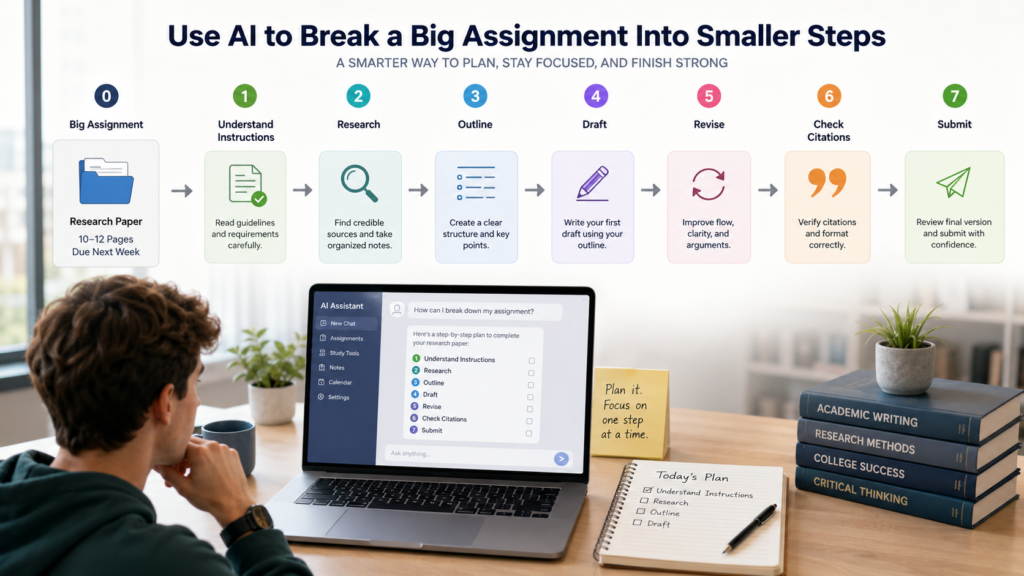
Start with the actual assignment instructions rather than a vague description.
Step 1: Assignment
Copy the assignment prompt and requirements into your AI tool.
Step 2: Understand Requirements
Ask AI to identify:
• What must be submitted
• Required sections
• Length requirements
• Sources or citations
• Important deadlines
• Grading criteria
Step 3: Break Into Tasks
Turn the requirements into a short sequence of actionable tasks.
Step 4: Estimate Effort
Ask which tasks are likely to require the most time.
Treat the estimate as a starting point, not a fact.
Step 5: Schedule Tasks
Put the tasks into your calendar or task manager based on your actual available time.
Step 6: Complete One Task
Do not keep redesigning the plan.
Start with the next actionable task and work on that.
Step 7: Review Progress
After each study session, update the remaining tasks rather than rebuilding the entire system.
Copyable Assignment Prompt
“I have pasted my assignment instructions below. Break the assignment into a short sequence of actionable tasks. Identify the required deliverables, important constraints, and dependencies. Put the tasks in a logical order and suggest which task I should start with. Do not write the assignment for me.”
Best AI Prompts for Students With ADHD
Copy any prompt below, replace the information in brackets, and paste it into your AI tool.
01. Assignment Breakdown
02. Study Plan
03. Task Prioritization
04. Study Questions
05. Difficult Concept
06. Research Organization
07. Starting a Difficult Assignment
08. Daily Plan
How AI Can Help With Procrastination and Task Starting
AI can be useful when the problem is not understanding the assignment but figuring out how to begin.
Instead of asking for a complete solution, reduce the starting barrier.
Turn a Large Task Into One Action
Change:
“Write research paper.”
into:
“Open the assignment instructions and highlight the required sections.”
That first action is easier to understand and complete.
Create a 5–10 Minute Starting Step
Ask AI:
“I have been avoiding this assignment. Give me one useful action that takes no more than 10 minutes. Do not give me the whole plan.”
This prevents the planning process from becoming another form of procrastination.
Turn Vague Instructions Into Concrete Actions
If the assignment says:
“Analyze the causes of the event.”
ask:
“Turn this instruction into three concrete actions I can complete.”
Use a Starting Checklist
Keep the checklist short:
• Open course materials
• Read requirements
• Choose first task
• Set a short work period
• Begin
The goal is to create movement, not another elaborate productivity system.
AI for Notes, Reading, and Research
AI can reduce the effort required to organize large amounts of academic information.
Students can use it to:
• Summarize notes
• Explain difficult passages
• Generate study questions
• Compare concepts
• Group research material
• Identify missing information
• Create review outlines
For source-heavy work, tools that keep answers connected to provided documents can be useful.
Gemini Notebook, for example, is designed around user-provided sources and can help users explore and understand those materials.
Still, summarization is not verification.
If a fact, quotation, statistic, or research claim matters to your grade, check it against the original source.
AI for Deadlines and Academic Organization
AI can help turn a collection of deadlines into a more manageable academic system.
Useful categories include:
• Assignment deadlines
• Exam dates
• Project milestones
• Recurring study tasks
• Reading assignments
• Revision sessions
A simple workflow is:
Capture → Prioritize → Schedule → Complete → Review
Task-management tools such as Todoist can help maintain smaller subtasks, while scheduling-focused tools such as Motion can place tasks into available calendar time.
But no AI system can guarantee that a student will never miss a deadline.
The student still needs to review the system and adjust it when plans change.
A Simple AI-Assisted Study Workflow
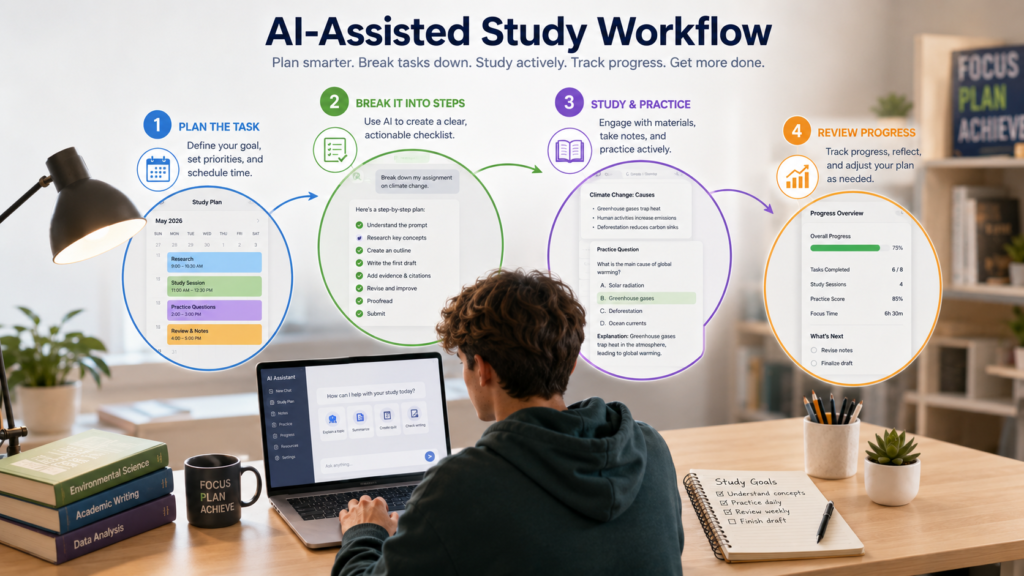
Keep the system simple:
Capture
Write down assignments, deadlines, and study responsibilities.
Break down
Turn large responsibilities into manageable actions.
Prioritize
Identify what needs attention first.
Study
Use AI for explanations, questions, summaries, or research organization where appropriate.
Review
Check what was completed and what remains.
Adjust
Change the plan based on real progress rather than trying to maintain the original schedule at all costs.
This workflow is intentionally small. A productivity system should make academic work easier to manage, not become another academic project.
What AI Cannot Do for Students With ADHD
AI can provide useful academic structure, but it has important limits.
AI cannot:
• Diagnose ADHD
• Treat ADHD
• Guarantee focus
• Guarantee productivity
• Guarantee academic success
• Replace teachers or academic advisors
• Replace professional medical care
• Fully understand an individual’s circumstances
If a student needs medical, mental-health, or disability-related support, an appropriate qualified professional or school support service is a better source of guidance.
AI can help with academic tasks. It should not be presented as a medical solution.
Academic Integrity and Responsible AI Use
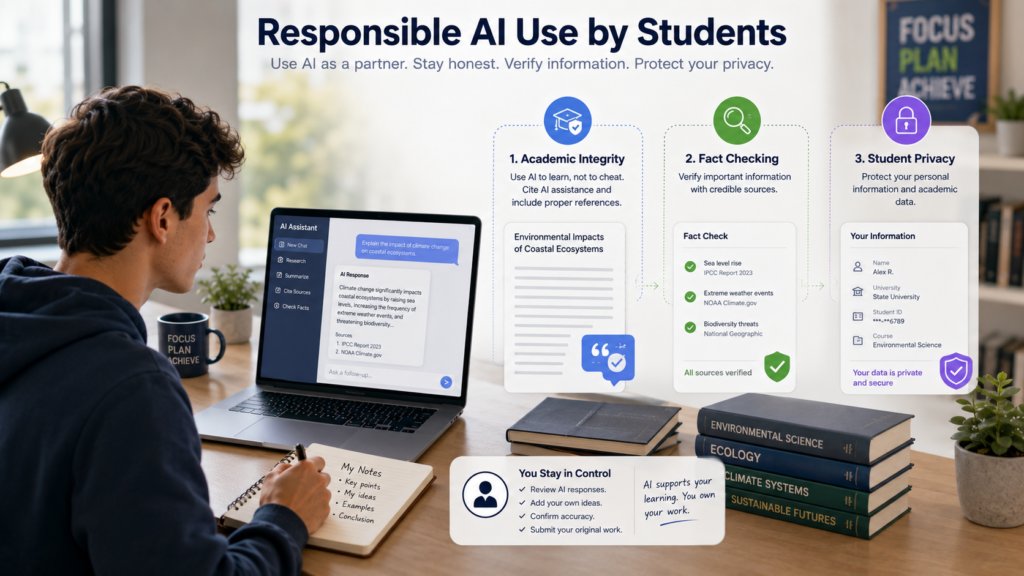
Using AI for academic support is different from asking it to complete prohibited work.
Students should:
• Follow their school’s AI policy
• Verify generated information
• Do their own thinking
• Keep track of sources
• Avoid submitting prohibited AI-generated work
• Disclose AI assistance when required
A useful rule is:
Use AI to reduce friction, not to remove learning.
If your instructor expects you to explain a concept yourself, make sure you genuinely understand it before relying on an AI-generated explanation.
Student Privacy When Using AI Tools
Students should think carefully before uploading academic or personal information.
Avoid Sensitive Personal Information
Do not upload unnecessary:
• Student identification numbers
• Private contact information
• Personal records
• Other sensitive details
Protect Confidential Academic Material
Be especially careful with:
• Unpublished research
• Confidential project information
• Research-participant information
• Restricted course materials
Review Privacy Policies
Different AI services handle conversations, documents, and account information differently.
Before uploading files, check the service’s current privacy information.
Upload Only What You Need
If AI only needs one page of notes to answer a question, there may be no reason to upload an entire semester’s material.
Common Mistakes Students Make When Using AI
Asking AI to Do Everything
If AI handles every step, you may finish the task without developing the underlying skill.
Creating Unrealistic Schedules
A schedule should reflect your actual available time.
Using Too Many Productivity Tools
More apps do not automatically create better organization.
Trusting AI Blindly
AI can produce incorrect information, incomplete explanations, or unsuitable recommendations.
Skipping Verification
Important academic facts should be checked against reliable sources.
Building an Overcomplicated System
If maintaining your productivity system takes more time than using it, simplify it.
Using AI Instead of Learning
The goal should be:
Understand → Practice → Apply
not:
Ask AI → Copy → Submit
AI Myths vs Reality for Students With ADHD
Common Myths About AI and Student Productivity
AI can support studying and organization, but it does not replace effort, judgment, or responsible decision-making.
Expert Tips for Using AI Effectively
1. Start Small
Use AI to solve the next academic problem, not your entire semester at once.
2. Use One Tool for One Clear Problem
Avoid collecting apps simply because they have AI features.
3. Break Large Tasks Down
Ask for actionable steps rather than a massive productivity plan.
4. Keep Plans Realistic
Build schedules around actual available time.
5. Review AI Output
Treat AI suggestions as drafts or recommendations rather than unquestionable instructions.
6. Verify Important Information
Check facts, sources, quotations, calculations, and academic claims.
7. Avoid Overcomplicated Workflows
The simplest system you can consistently use is often more useful than a sophisticated system you abandon.
8. Combine AI With Human Support
Teachers, classmates, tutors, advisors, and appropriate support services can provide context AI does not have.
9. Adjust When a System Stops Working
A study method does not have to remain permanent. If it creates more friction than value, change it.
10. Keep the Goal Academic
Use AI to help organize, understand, practice, and review—not to avoid learning.
Conclusion
The Best AI Tools for Students With ADHD are the ones that solve a real academic problem without creating another complicated system to maintain.
AI can help students break down assignments, organize notes, understand difficult concepts, plan study sessions, manage tasks, support writing, and organize research.
The most effective approach is usually simple:
Capture → Break down → Prioritize → Study → Review → Adjust
Start with one problem. Choose one suitable tool. Use it consistently, verify important information, and keep the actual learning process in your hands.
AI can provide structure and reduce friction around academic work, but it cannot diagnose or treat ADHD, guarantee productivity, or replace teachers, professional support, or genuine learning.
The goal is not to make schoolwork effortless.
The goal is to make the next useful step clearer.
Continue Learning
Using AI effectively for academic work is easier when you build a simple system around the tasks you actually need to complete. Once you know how AI can help with planning and task breakdown, you can apply the same approach to homework, assignments, studying, presentations, and other common student challenges.
Here are a few useful next steps:
Explore More Student AI Guides
Explore these related guides to use AI for homework, assignments, presentations, research, and academic productivity.
Best Free AI Tools for Homework Help
Understand questions, work through difficult topics, and get useful help while studying.
How to Manage Assignment Deadlines With AI Tools
Learn practical ways to turn academic work into smaller, trackable tasks and stay organized.
Best AI Tools for Students to Practice Presentations
Learn how AI can help you rehearse, improve your delivery, and prepare for presentation questions.
Best AI Tools for Students to Prepare Viva Questions
Use AI for viva practice, active recall, question generation, and oral-exam preparation.
Best AI Tools for Students to Create Charts From Data
Learn how AI can help turn student datasets, reports, and raw data into useful charts and visualizations.
Best AI Tools for University Productivity
Explore a broader approach to planning, studying, research, writing, and managing university work.
Frequently Asked Questions About AI Tools for Students With ADHD
Common questions about using AI tools for studying, assignments, organization, and productivity.
Final Takeaway
The best AI tools for students with ADHD are not necessarily the tools with the most features. The most useful tool is the one that removes friction from the specific academic task you are struggling to organize.
Use AI to:
• turn large assignments into smaller actions
• create realistic study plans
• summarize and organize notes
• explain difficult concepts
• prepare practice questions
• organize research
• improve drafts and writing
• keep track of academic deadlines
A simple system often works better than using many tools at once: one AI assistant for thinking and studying + one task manager for deadlines and organization.
Most importantly, keep yourself in control of the learning process. Check AI-generated information, protect your academic work and personal data, and follow your school’s AI rules.
That makes AI a practical academic support tool—not a substitute for your own thinking.