
Quick Answer
AI Tools for Group Project Collaboration for Students help teams communicate, organize tasks, share documents, brainstorm ideas, track deadlines, and complete assignments more efficiently. Tools like Notion AI, ClickUp AI, Google Workspace AI, Microsoft Copilot, ChatGPT, Claude, Miro AI, Slack AI, Trello, and NotebookLM reduce confusion, improve teamwork, and make group projects easier to manage from start to finish.
Introduction
For many students, group projects are one of the most stressful parts of school or college.
The assignment itself may not be difficult, but coordinating multiple people often is.
One teammate forgets the deadline.
Another edits the wrong version of the document.
Someone disappears until the night before submission.
Messages are scattered across different apps, files get renamed multiple times, and nobody is completely sure who is responsible for which task.
Whether you’re working on a classroom presentation, engineering project, research paper, business case study, or semester-long assignment, collaboration can quickly become disorganized without the right system.
Remote and hybrid learning have made this challenge even bigger.
Students now collaborate across different cities, countries, and time zones. Instead of meeting in one classroom, teams often rely on shared documents, video meetings, messaging apps, and cloud storage to complete assignments together.
Managing all of these tools manually can become overwhelming.
This is where AI Tools for Group Project Collaboration for Students are changing how academic teams work.
Modern AI collaboration platforms do much more than store files.
They help students:
• Organize group tasks automatically
• Assign responsibilities
• Track project deadlines
• Summarize meetings
• Brainstorm ideas
• Generate project outlines
• Manage shared documents
• Keep everyone updated in real time
• Reduce version confusion
• Improve overall team productivity
Instead of spending hours figuring out who should do what, students can focus on producing higher-quality work together.
However, choosing the right collaboration platform isn’t easy.
Some AI tools are excellent for managing tasks.
Others specialize in brainstorming ideas.
Some focus on document collaboration, while others are designed for communication or meeting summaries.
This guide goes far beyond another “Top 10 AI Tools” list.
You’ll learn:
• What AI collaboration tools actually do
• Why group projects become difficult
• Which AI tools solve specific teamwork problems
• How to build an efficient AI-powered collaboration system
• Real student collaboration examples
• Best practices for ethical AI teamwork
• How to choose the right platform for your group
Whether you’re a high school student completing your first team assignment, a university student managing semester-long projects, or an MBA student working with international teammates, this guide will help you collaborate smarter—not harder.
Definition Box
What Are AI Tools for Group Project Collaboration?
AI Tools for Group Project Collaboration are applications that use artificial intelligence to help students communicate, organize tasks, manage shared documents, brainstorm ideas, summarize meetings, and coordinate teamwork more effectively. Unlike traditional collaboration software, AI-powered platforms automate repetitive project management tasks, improve communication, and help teams stay organized from planning through final submission.
Why Group Project Collaboration Matters
Group projects aren’t just classroom assignments.
They help students develop workplace skills that employers value across almost every industry.
Learning how to collaborate effectively prepares students for future careers where teamwork, communication, and project management are everyday responsibilities.
Students who consistently use AI Tools for Group Project Collaboration for Students often spend less time managing project logistics and more time producing high-quality assignments because communication, task tracking, and document sharing become much more organized.
Better Communication
Successful projects depend on clear communication.
AI collaboration tools centralize conversations, meeting summaries, shared notes, and announcements so every teammate stays informed without searching through endless message threads.
Improved Task Management
One of the biggest reasons group projects fail is unclear responsibility.
AI helps assign tasks, set priorities, monitor deadlines, and automatically remind teammates about upcoming work.
Everyone knows exactly what they’re responsible for.
Shared Knowledge
Instead of keeping ideas inside individual notebooks or private documents, AI collaboration platforms create shared workspaces where research, notes, files, and resources remain accessible to the entire team.
Knowledge becomes easier to organize and much harder to lose.
Higher Quality Assignments
When communication improves, project quality usually improves too.
Students spend less time solving organizational problems and more time:
• Researching
• Writing
• Designing presentations
• Solving problems
• Improving final submissions
Better Remote Teamwork
Modern student teams rarely meet every day in person.
AI collaboration platforms allow students to:
• Work from different locations
• Share updates instantly
• Collaborate across time zones
• Continue projects outside classroom hours
This flexibility makes remote teamwork much more manageable.
Career-Ready Skills
Employers increasingly expect graduates to know how to work with digital collaboration tools.
Learning AI-powered teamwork now helps students develop practical skills they’ll continue using in internships, university research, and future careers.
Why Students Struggle With Group Projects

Group projects are designed to encourage teamwork, but they often become frustrating because students must coordinate different schedules, work habits, and communication styles.
The assignment itself is usually manageable.
The real challenge is making sure everyone contributes equally while keeping the project organized from start to finish.
Without a clear collaboration system, even simple projects can become stressful.
Below are the most common reasons student teams struggle.
Poor Communication
Communication problems are one of the biggest causes of unsuccessful group projects.
Students often communicate through multiple platforms such as:
• Google Chat
• Discord
• Microsoft Teams
• Text messages
• Important updates become scattered across different conversations.
As a result:
• Instructions get missed.
• Tasks become unclear.
• Team members receive different information.
• Last-minute confusion increases.
AI collaboration platforms centralize communication so everyone works from the same information.
Unequal Work Distribution
Almost every student has experienced the “one person does everything” problem.
Some teammates finish their work early.
Some contribute only a little.
Others disappear until the day before submission.
Unequal participation creates frustration and lowers the overall quality of the project.
AI task management tools solve this by:
• Assigning responsibilities
• Tracking progress
• Setting deadlines
• Showing completed work
• Increasing accountability
Everyone knows what they’re responsible for throughout the project.
Missed Deadlines
Many projects fail because students wait until the final week to begin working.
Without reminders and milestone tracking, teams often discover unfinished tasks only a day or two before submission.
AI helps students stay ahead by automatically:
• Scheduling deadlines
• Sending reminders
• Prioritizing tasks
• Tracking project progress
• Identifying overdue work
Instead of reacting to deadlines, teams can plan proactively.
This is one of the biggest reasons why AI Tools for Group Project Collaboration for Students have become increasingly popular among college and university teams managing multiple assignments each semester.
Version Conflicts
Imagine three teammates editing the same report.
One edits Version 2.
Another edits Version 4.
Someone accidentally submits Version 3.
Hours of work can disappear simply because the wrong file was shared.
Modern AI collaboration platforms reduce this problem through:
• Shared cloud documents
• Real-time editing
• Automatic version history
• File recovery
• Change tracking
Everyone works from one updated document instead of multiple copies.
Scheduling Difficulties
Finding a meeting time that works for every student can be surprisingly difficult.
Different class schedules, part-time jobs, internships, extracurricular activities, and time zones make coordination challenging.
AI-powered scheduling tools help teams:
• Find common availability
• Organize meetings
• Create shared calendars
• Send reminders
• Reduce scheduling conflicts
This allows students to spend less time planning meetings and more time completing the project.
Lack of Accountability
Many teams assume everyone is making progress.
Unfortunately, assumptions often lead to unfinished work.
Without visibility into task completion, students may not realize problems until it’s too late.
AI dashboards improve accountability by displaying:
• Completed tasks
• Pending assignments
• Upcoming deadlines
• Individual responsibilities
• Overall project progress
Transparent progress tracking encourages every team member to contribute consistently.
How AI Changes Group Collaboration

Artificial intelligence doesn’t replace teamwork.
It improves how teams organize, communicate, and complete projects together.
Instead of spending valuable time managing logistics, AI automates repetitive coordination tasks so students can focus on producing better work.
A typical AI-powered collaboration workflow looks like this:
Create Project Workspace
↓
Assign Team Members
↓
Upload Shared Resources
↓
Brainstorm Ideas with AI
↓
Assign Individual Tasks
↓
Track Progress Automatically
↓
Summarize Meetings
↓
Review Final Document
↓
Submit Assignment
This structured workflow reduces confusion and keeps every team member aligned throughout the project.
🤝 Traditional Collaboration vs AI Collaboration
See how AI transforms student teamwork by reducing manual work and making collaboration faster, smarter, and more organized.
Traditional collaboration often relies on manual coordination, scattered communication, and repetitive administrative work. AI collaboration tools automate these tasks, helping students focus more on learning, teamwork, creativity, and completing projects on time.
The biggest advantage isn’t simply working faster.
It’s reducing the organizational problems that usually slow student teams down.
How We Selected These AI Collaboration Tools
Hundreds of productivity and collaboration platforms claim to improve teamwork.
However, not every platform is suitable for student group projects.
For this guide, every tool was evaluated using practical criteria that matter most to students working on academic assignments.
AI Accuracy
Does the platform provide reliable AI assistance for writing, summarizing, brainstorming, and organizing projects without introducing unnecessary errors?
Ease of Collaboration
Can new team members quickly join the workspace and begin collaborating without spending hours learning the software?
Task Management
Does the tool make it easy to assign responsibilities, monitor deadlines, and track project completion?
Real-Time Team Features
Can multiple students work together simultaneously through shared documents, comments, editing, and communication?
Cross-Platform Support
Does the platform work smoothly across:
• Windows
• macOS
• Android
• iPhone
• Tablets
• Web browsers
Students should be able to collaborate from virtually any device.
Pricing
Does the free version offer enough functionality for most student teams?
Are premium features reasonably priced for users who need advanced AI capabilities?
Privacy & Security
Group projects often include shared research, personal notes, and academic work.
We evaluated whether each platform provides reasonable privacy protections, secure collaboration features, and responsible handling of shared documents.
Best AI Tools for Group Project Collaboration for Students
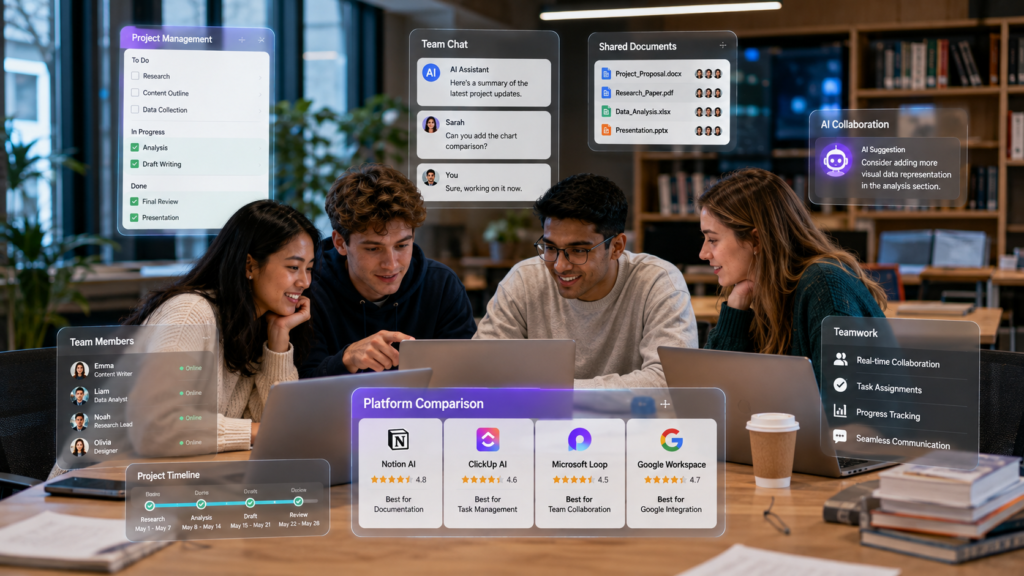
The best collaboration platform isn’t necessarily the one with the most AI features.
Instead, it’s the one that helps your team communicate clearly, stay organized, meet deadlines, and complete projects efficiently.
Some tools specialize in project management, while others focus on brainstorming, document collaboration, or meeting summaries.
Below are the best AI Tools for Group Project Collaboration for Students in 2026.
📝 Notion AI
💰 Freemium
🎯 Best For: Semester-Long Group Projects & Team Collaboration
📖 Overview
Notion AI combines note-taking, project management, document collaboration, databases, and AI writing assistance into one unified workspace. Instead of switching between multiple apps for notes, tasks, documents, and project planning, student teams can manage everything inside a single shared workspace.
Its flexibility makes it one of the most popular collaboration platforms for semester-long projects, helping teams stay organized from the first meeting to the final presentation.
🎯 Best For
✅ Semester-Long Group Projects✅ Research Assignments
✅ Shared Documentation
✅ Team Planning
✅ MBA Case Studies
✅ Collaborative Reports
⚡ Key Features
✅ AI Writing Assistance✅ Shared Workspaces
✅ Project Dashboards
✅ Task Assignment
✅ Smart Databases
✅ Team Document Collaboration
✅ Meeting Notes
✅ Calendar Integration
✅ Progress Tracking
✅ Why Students Love It
✔ All-in-one collaboration platform✔ Excellent organization tools
✔ Highly customizable workspace
✔ Real-time document editing
✔ Cross-device synchronization
✔ Perfect for academic teamwork
⚠ Things to Consider
✖ Learning curve for beginners✖ Advanced AI features require a subscription
✖ Too many customization options can overwhelm new users
💰 Pricing
FreemiumPremium plans unlock advanced AI capabilities, larger workspaces, and additional collaboration features.
🌍 Official Website
Visit Notion AI →👨🎓 Ideal Student Type
🎓 College Students💼 MBA Students
🔬 Graduate Research Teams
📚 Students Managing Multiple Projects
🤝 Long-Term Collaborative Teams
💡 Real Student Scenario
A marketing team is preparing a semester-long brand strategy project. Instead of using different apps for documents, tasks, calendars, and meeting notes, they manage everything inside one shared Notion AI workspace.
📊 Project Dashboard
✅ Weekly Task Lists
📚 Research Database
📝 Meeting Notes
🎤 Presentation Outlines
📅 Deadline Tracker
Every teammate always knows what needs to be completed next, project progress stays transparent, and collaboration becomes far more organized throughout the semester.
🚀 ClickUp AI
💰 Freemium
🎯 Best For: Project Management & Team Collaboration
📖 Overview
ClickUp AI is an AI-powered productivity platform designed to help teams manage projects from planning to completion. For student groups, it combines task management, document collaboration, calendars, reminders, and AI writing assistance into one organized workspace.
It works especially well for complex assignments with multiple deadlines, making it easier for every team member to stay organized and contribute throughout the project lifecycle.
🎯 Best For
✅ Project Management✅ Engineering Projects
✅ Software Development Assignments
✅ Team Presentations
✅ Multi-Stage Academic Projects
⚡ Key Features
✅ AI Task Generation✅ Smart Project Planning
✅ Shared Documents
✅ Deadline Reminders
✅ Progress Dashboards
✅ Time Tracking
✅ Team Chat
✅ Workflow Automation
✅ Why Students Love It
✔ Outstanding project organization✔ Powerful deadline tracking
✔ Excellent task visibility
✔ Supports large teams
✔ Highly customizable workflows
⚠ Things to Consider
✖ Interface can feel complex initially✖ AI features require premium plans
✖ More features than many students need
💰 Pricing
FreemiumAdvanced AI capabilities, workflow automation, and premium collaboration features require a paid subscription.
🌍 Official Website
Visit ClickUp →👨🎓 Ideal Student Type
🎓 Engineering Students💻 Computer Science Students
💼 MBA Project Teams
📚 Students Managing Complex Assignments
💡 Real Student Scenario
An engineering team has six weeks to build a robotics prototype. Instead of manually tracking every task and deadline, they use ClickUp AI to organize the entire project from start to finish.
📋 Creates project task lists
📅 Assigns deadlines and milestones
📊 Tracks team progress in real time
🔔 Sends reminder notifications
💬 Keeps collaboration organized in one workspace
Throughout the six-week project, every teammate knows their responsibilities, upcoming deadlines, and overall project progress. This reduces confusion, improves teamwork, and helps the group finish their robotics prototype on schedule.
☁️ Google Workspace AI Features
💰 Free for Many Students
🎯 Best For: Shared Documents & Classroom Collaboration
📖 Overview
Google Workspace combines familiar tools like Google Docs, Sheets, Slides, Drive, Meet, and Gmail with AI-powered features that improve writing, collaboration, document organization, and productivity.
Because many schools and universities already use Google Workspace, students can collaborate in real time without learning an entirely new platform, making it one of the easiest collaboration systems for academic teamwork.
🎯 Best For
✅ Shared Documents✅ Classroom Collaboration
✅ Presentations
✅ Group Reports
✅ Real-Time Editing
✅ Cloud Document Management
⚡ Key Features
✅ AI Writing Assistance✅ Real-Time Document Collaboration
✅ Shared Cloud Storage
✅ Smart Writing Suggestions
✅ Google Meet Integration
✅ Shared Calendars
✅ Comments & Version History
✅ Team Presentation Support
✅ Why Students Love It
✔ Familiar interface✔ Excellent real-time collaboration
✔ Automatic cloud saving
✔ Strong version history
✔ Easy document sharing
✔ Works across nearly every device
⚠ Things to Consider
✖ AI capabilities vary depending on the Google Workspace plan✖ Advanced AI features may not be available with every educational account
✖ Less comprehensive project management than dedicated collaboration platforms
💰 Pricing
Free for Many Educational InstitutionsAdvanced AI features depend on your school’s or university’s Google Workspace subscription plan.
🌍 Official Website
Visit Google Workspace →👨🎓 Ideal Student Type
🎓 High School Students🏫 College Students
🎓 University Students
💻 Remote Learning Teams
📊 Students Collaborating on Presentations & Reports
💡 Real Student Scenario
Four classmates are preparing a business presentation. Instead of sending multiple file versions back and forth, they collaborate inside a single Google Slides presentation while using Google Workspace’s AI-powered features.
🎨 One teammate designs the slides
📝 Another writes speaker notes
📚 A third updates research findings
📖 The fourth reviews citations
✨ AI suggests writing improvements and formatting updates in real time
Everyone works on the same presentation simultaneously, with changes saved automatically. This eliminates duplicate files, improves teamwork, and helps the group finish a polished presentation more efficiently.
🤖 Microsoft Copilot
💰 Free + Premium
🎯 Best For: Microsoft 365 Collaboration & Group Projects
📖 Overview
Microsoft Copilot brings AI directly into Microsoft 365 applications like Word, Excel, PowerPoint, Teams, and OneNote. For students already using Microsoft’s ecosystem, it acts as an intelligent project assistant by helping teams draft reports, summarize meetings, organize documents, and create professional presentations.
Instead of switching between multiple applications, teams can collaborate inside familiar Microsoft tools while Copilot automates repetitive tasks and improves productivity throughout the project.
🎯 Best For
✅ Group Reports✅ PowerPoint Presentations
✅ Microsoft Teams Collaboration
✅ Research Documentation
✅ Shared Class Projects
⚡ Key Features
✅ AI Writing Assistance✅ Meeting Summaries
✅ PowerPoint Generation
✅ Excel Data Analysis
✅ Shared Document Collaboration
✅ Smart Search
✅ Microsoft Teams Integration
✅ OneNote AI Support
✅ Why Students Love It
✔ Excellent Microsoft integration✔ Strong document collaboration
✔ Saves time creating presentations
✔ Helpful AI meeting summaries
✔ Ideal for academic reports and team projects
⚠ Things to Consider
✖ Advanced AI requires Microsoft 365 Copilot✖ Best experience within Microsoft’s ecosystem
✖ Premium subscription is needed for many AI features
💰 Pricing
Free + PremiumMicrosoft applications have free and paid versions. Copilot AI features require an eligible Microsoft 365 subscription.
🌍 Official Website
Visit Microsoft Copilot →👨🎓 Ideal Student Type
🎓 Business Students💼 MBA Students
⚙️ Engineering Teams
💻 Windows Laptop Users
📊 Students Already Using Microsoft 365
💡 Real Student Scenario
An MBA team is preparing a business strategy presentation. Instead of manually creating every document and presentation, they use Microsoft Copilot to streamline the entire workflow across Microsoft 365 applications.
📝 Summarizing meeting notes in Teams
📄 Drafting reports in Microsoft Word
📊 Analyzing financial data in Excel
🎤 Creating presentation slides in PowerPoint
📚 Organizing project notes in OneNote
With repetitive tasks handled by Copilot, the team spends less time formatting documents and more time refining ideas, improving collaboration, and delivering a polished final presentation before the deadline.
🤖 ChatGPT
💰 Free + Premium
🎯 Best For: Brainstorming, Writing & Team Collaboration
📖 Overview
ChatGPT has become one of the most versatile AI collaboration tools available to students. While it isn’t a traditional project management platform, it excels at brainstorming ideas, improving writing, explaining concepts, generating outlines, and helping teams solve problems together.
Many student groups use ChatGPT alongside collaboration platforms like Notion AI or Google Docs to generate ideas faster, improve assignments, and prepare polished presentations.
🎯 Best For
✅ Brainstorming✅ Group Discussions
✅ Assignment Planning
✅ Report Writing
✅ Presentation Preparation
⚡ Key Features
✅ Brainstorming Assistance✅ AI Writing
✅ Research Summaries
✅ Content Improvement
✅ Outline Generation
✅ Practice Questions
✅ Idea Expansion
✅ Presentation Scripting
✅ Why Students Love It
✔ Extremely easy to use✔ Excellent creative assistance
✔ Helps overcome writer’s block
✔ Useful across almost every subject
✔ Supports collaborative idea generation
⚠ Things to Consider
✖ Doesn’t manage projects directly✖ Students should verify AI-generated information
✖ Free version has usage limits
💰 Pricing
Free Plan AvailableChatGPT Plus unlocks advanced AI models, larger file uploads, faster responses, and additional collaboration capabilities.
🌍 Official Website
Visit ChatGPT →👨🎓 Ideal Student Type
🎓 High School Students🏫 College Students
🎓 University Students
🔬 Research Teams
🎤 Presentation Groups
💡 Real Student Scenario
A history project team struggles to organize a group report before the submission deadline. Instead of staring at a blank document, they use ChatGPT to structure their ideas and prepare for their presentation.
📝 Creates a structured report outline
💡 Brainstorms new discussion ideas
📚 Simplifies difficult historical concepts
🎤 Generates presentation questions
✨ Improves writing clarity and flow
The team uses ChatGPT’s suggestions to organize their research, improve their report, and prepare confidently for class. By combining ChatGPT with collaborative tools like Google Docs or Notion AI, everyone contributes more effectively throughout the project.
🧠 Claude
💰 Free + Premium
🎯 Best For: Research Summaries & Collaborative Writing
📖 Overview
Claude is an AI assistant known for analyzing long documents and generating thoughtful, well-structured responses. Student teams often use Claude to review lengthy reports, summarize shared research, and improve collaborative writing.
It performs especially well when projects involve extensive reading, detailed documentation, or research-heavy assignments where clear writing and logical organization are essential.
🎯 Best For
✅ Research Summaries✅ Group Reports
✅ Long Documents
✅ Collaborative Writing
✅ Critical Analysis
⚡ Key Features
✅ Long Document Analysis✅ AI Writing Assistance
✅ Research Summaries
✅ Question Answering
✅ Document Organization
✅ Brainstorming Support
✅ Why Students Love It
✔ Excellent with large documents✔ Clear and detailed explanations
✔ Strong academic writing quality
✔ Helpful for research-based projects
✔ Organizes complex information effectively
⚠ Things to Consider
✖ Not a dedicated project management platform✖ Free plan has usage limits
✖ Requires external collaboration tools for task tracking
💰 Pricing
Free Plan AvailablePremium subscriptions provide higher document limits, faster performance, and access to more advanced AI capabilities.
🌍 Official Website
Visit Claude →👨🎓 Ideal Student Type
🎓 Graduate Students💼 MBA Students
🔬 Research Teams
📝 Students Writing Detailed Reports
💡 Real Student Scenario
A graduate research group uploads a lengthy project draft into Claude before the final submission. Instead of manually reviewing hundreds of paragraphs, they ask Claude to improve the overall quality of the document.
📄 Identifies repetitive content
✍️ Improves writing clarity and flow
🔗 Creates smoother transitions between sections
📚 Summarizes the most important findings
💡 Suggests stronger academic wording
The research team spends less time editing and more time refining ideas, resulting in a clearer, more professional report that is ready for final submission.
🎨 Miro AI
💰 Freemium
🎯 Best For: Brainstorming & Visual Team Collaboration
📖 Overview
Miro AI transforms online whiteboards into collaborative brainstorming spaces. Instead of exchanging scattered ideas through messages, student teams can visually organize concepts, mind maps, workflows, and project plans together.
It is especially useful during the early planning stages of group assignments, helping teams organize ideas visually before creating reports, presentations, or research documents.
🎯 Best For
✅ Brainstorming✅ Mind Mapping
✅ Design Thinking
✅ Project Planning
✅ Visual Collaboration
⚡ Key Features
✅ AI Mind Maps✅ Digital Whiteboards
✅ Sticky Notes
✅ Flowcharts
✅ Brainstorm Templates
✅ Team Collaboration
✅ Presentation Mode
✅ Why Students Love It
✔ Excellent visual collaboration✔ Easy brainstorming sessions
✔ Great for creative teams
✔ Supports remote collaboration
✔ Intuitive and beginner-friendly interface
⚠ Things to Consider
✖ Limited project management features✖ Premium templates require paid plans
✖ Better suited for planning than document writing
💰 Pricing
FreemiumPremium plans unlock advanced collaboration tools, AI-powered templates, and additional workspace features.
🌍 Official Website
Visit Miro →👨🎓 Ideal Student Type
🎨 Design Students⚙️ Engineering Teams
💼 MBA Groups
🚀 Creative Project Teams
💡 Real Student Scenario
An entrepreneurship class begins a semester-long startup project. Before writing the business plan, the team uses Miro AI to organize ideas visually and build a clear project roadmap together.
🧠 Generates AI-powered mind maps
🎯 Organizes customer journey maps
📌 Creates visual project workflows
💡 Groups brainstorming ideas automatically
🖥️ Prepares presentation-ready whiteboards
Instead of discussing scattered ideas across multiple chats, the entire team collaborates on one interactive whiteboard, making planning faster, more organized, and much easier to present during class.
💬 Slack AI
💰 Free + Premium
🎯 Best For: Team Communication & Remote Collaboration
📖 Overview
Slack AI enhances team communication by organizing conversations, summarizing discussions, and helping students quickly find important information inside busy chat channels. Instead of scrolling through hundreds of unread messages, teams can instantly catch up with AI-generated summaries.
It is especially valuable for remote learning groups and long-term academic projects where communication happens across multiple channels and different time zones.
🎯 Best For
✅ Team Communication✅ Remote Collaboration
✅ Study Groups
✅ Group Discussions
✅ Project Updates
⚡ Key Features
✅ AI Conversation Summaries✅ Smart Search
✅ Channel Organization
✅ File Sharing
✅ Team Messaging
✅ Notification Management
✅ Why Students Love It
✔ Excellent communication platform✔ Reduces message overload
✔ Fast information retrieval
✔ Supports remote teamwork
✔ Keeps group discussions organized
⚠ Things to Consider
✖ Not a complete project management solution✖ AI features require eligible paid plans
✖ Best when combined with document collaboration tools
💰 Pricing
Free Plan AvailableAdvanced AI capabilities, including conversation summaries and enhanced search, require eligible paid Slack plans.
🌍 Official Website
Visit Slack →👨🎓 Ideal Student Type
🎓 Remote Learning Groups🔬 Research Teams
🌍 International Student Teams
👥 Large Project Groups
💡 Real Student Scenario
An international project team collaborates across three different time zones. While some teammates sleep, others continue discussing research, updating tasks, and sharing documents inside Slack.
💬 Summarizes overnight conversations
📌 Highlights important project updates
✅ Lists pending action items
🔍 Finds important shared files and messages
🌍 Helps every teammate catch up in minutes
Instead of reading dozens of chat messages every morning, each teammate immediately understands project progress, outstanding tasks, and recent decisions, making collaboration faster and far more efficient.
📌 Trello
💰 Freemium
🎯 Best For: Assignment Tracking & Visual Project Management
📖 Overview
Trello is a visual project management platform that helps teams organize assignments using boards, lists, and cards. Combined with AI features and automation, it simplifies task tracking throughout long-term academic projects.
Its intuitive Kanban-style interface makes it especially popular among students who are new to project management and want an easy way to organize deadlines, assignments, and team responsibilities.
🎯 Best For
✅ Assignment Tracking✅ Deadline Management
✅ Small Project Teams
✅ Visual Task Organization
⚡ Key Features
✅ Kanban Boards✅ Task Cards
✅ Due Dates
✅ Checklists
✅ Automation
✅ Team Collaboration
✅ Calendar View
✅ Why Students Love It
✔ Extremely easy to learn✔ Clear visual workflow
✔ Excellent for deadline tracking
✔ Great free version
✔ Simple drag-and-drop task management
⚠ Things to Consider
✖ Limited AI compared to dedicated AI platforms✖ Not ideal for complex documentation
✖ Advanced automation requires premium plans
💰 Pricing
FreemiumPaid plans unlock additional automation, integrations, and AI-powered productivity features.
🌍 Official Website
Visit Trello →👨🎓 Ideal Student Type
🎓 High School Students🏫 College Students
👥 Small Project Teams
💰 Budget-Conscious Students
💡 Real Student Scenario
A four-person biology team creates a Trello board to organize a semester project. Instead of keeping track of tasks through chat messages, every stage of the project is managed visually in one place.
🔬 Research
✍️ Writing
📝 Editing
✅ Completed
📌 Assigns tasks to teammates
📅 Tracks upcoming deadlines
✔️ Monitors completed work
📊 Visualizes overall project progress
🔄 Keeps everyone aligned throughout the assignment
As each member moves task cards across the board, everyone can instantly see project progress, identify unfinished work, and stay on schedule until the assignment is complete.
📚 NotebookLM
💰 Mostly Free
🎯 Best For: Research Collaboration & Evidence-Based Projects
📖 Overview
NotebookLM is best known for research, but it also supports collaborative academic work by helping teams understand shared PDFs, lecture slides, and research papers. Instead of generating generic responses, it answers questions using the uploaded source material.
This source-grounded approach makes NotebookLM especially valuable for research-based group projects where students need reliable evidence, organized references, and faster document analysis.
🎯 Best For
✅ Research Collaboration✅ Literature Reviews
✅ Shared Academic Sources
✅ Evidence Organization
⚡ Key Features
✅ Source-Grounded AI✅ PDF Summaries
✅ Research Comparison
✅ Study Guide Generation
✅ AI Question Answering
✅ Shared Knowledge Organization
✅ Why Students Love It
✔ Highly accurate with uploaded sources✔ Excellent for academic research
✔ Reduces time spent reading documents
✔ Strong support for evidence-based projects
✔ Makes complex research easier to understand
⚠ Things to Consider
✖ Not a project management platform✖ Requires uploaded source material
✖ Limited collaboration features compared to dedicated workspace tools
💰 Pricing
Mostly FreeAdditional AI capabilities are available through Google’s premium AI subscription plans.
🌍 Official Website
Visit NotebookLM →👨🎓 Ideal Student Type
🎓 Graduate Students💼 MBA Teams
🔬 Research Groups
📑 Students Preparing Evidence-Based Reports
💡 Real Student Scenario
A public policy team uploads research papers, government reports, and lecture notes into NotebookLM before starting their final report. Instead of manually searching through hundreds of pages, they use AI to explore the material more efficiently.
📄 Summarizes research papers
⚖️ Compares findings across multiple sources
📚 Identifies supporting evidence
🔍 Answers questions using uploaded documents
📝 Organizes information for the final report
The team spends less time searching through documents and more time analyzing evidence, collaborating on ideas, and producing a well-supported academic report with greater confidence.
AI Collaboration Tools Comparison Table
Choosing the right collaboration platform depends on your team’s workflow, project complexity, budget, and communication style.
Comparing multiple AI Tools for Group Project Collaboration for Students makes it much easier to choose a platform that matches your team’s academic goals instead of selecting the most popular option.
Some AI tools excel at brainstorming, while others focus on project management, shared documents, or research collaboration.
The table below compares the strengths and limitations of the most useful AI collaboration tools for students.
| Tool | Best For | Free Plan | Biggest Strength | Main Limitation |
|---|---|---|---|---|
| 📝 Notion AI | Semester-long projects | ✅ Yes | All-in-one workspace | Learning curve |
| 🚀 ClickUp AI | Project management | ✅ Yes | Powerful task tracking | Can feel overwhelming |
| ☁️ Google Workspace AI | Shared documents | ✅ Education Accounts | Real-time collaboration | Limited project management |
| 🤖 Microsoft Copilot | Reports & Presentations | ⚪ Limited | Excellent Microsoft integration | Premium AI subscription |
| 💬 ChatGPT | Brainstorming & Writing | ✅ Yes | Creative idea generation | No built-in task management |
| 🧠 Claude | Research & Long Reports | ✅ Yes | Outstanding document analysis | Requires external collaboration tools |
| 🎨 Miro AI | Brainstorming | ✅ Yes | Visual planning & mind maps | Limited document editing |
| 💬 Slack AI | Team communication | ✅ Basic | Conversation summaries | Not a project management platform |
| 📌 Trello | Task organization | ✅ Yes | Simple visual workflow | Basic AI capabilities |
| 📚 NotebookLM | Research collaboration | ✅ Yes | Source-grounded AI | Not designed for task management |
Which Collaboration Tool Is Right for Your Team?
If your group is writing a semester-long research report, Notion AI or Google Workspace provides an excellent balance between document collaboration and organization.
If your assignment involves multiple deadlines, ClickUp AI offers the strongest project management capabilities.
For creative brainstorming sessions, Miro AI helps visualize ideas before writing begins.
Students working primarily with academic papers will benefit most from NotebookLM, while ChatGPT and Claude are excellent companions for brainstorming, editing, and improving written content.
The strongest student teams often combine two or three complementary tools instead of relying on a single platform.
Best AI Collaboration Tool by Student Situation
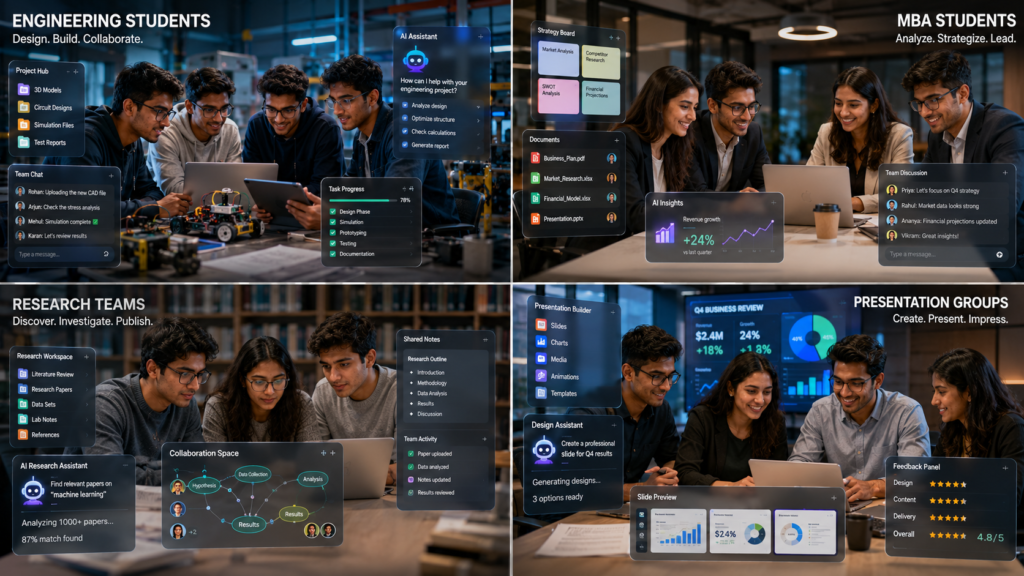
Different academic projects require different collaboration strategies.
The following recommendations match common student situations with the AI tool that performs best for each scenario.
Remote Team Collaboration
Real-time editing, cloud storage, and seamless document sharing make it ideal for students working from different locations.
Semester-Long Research Project
Keeps research papers, notes, tasks, deadlines, and documentation organized inside one shared workspace.
Engineering Design Project
Tracks milestones, responsibilities, timelines, and project progress throughout complex engineering assignments.
MBA Case Study
Creates professional reports, analyzes spreadsheets, and prepares polished presentations faster.
Brainstorming Ideas
Transforms ideas into visual mind maps and collaborative whiteboards for creative teamwork.
Group Presentation
Enables simultaneous editing in Google Slides, making presentations easy to build together.
Literature Review Team
Compares research papers using uploaded sources and quickly identifies supporting evidence.
Writing Group Reports
Improves writing quality, summarizes lengthy reports, and creates clearer academic content.
Assignment Planning
Visual Kanban boards make assignments, deadlines, and responsibilities easy to organize.
Budget-Friendly Student Team
A powerful free combination for brainstorming ideas, improving writing, and collaborating on shared documents without spending money.
Recommended AI Collaboration Setups
Small Classroom Projects
Recommended stack:
• Google Workspace
• ChatGPT
Ideal for:
• Short reports
• Classroom presentations
• Homework assignments
Research-Based University Projects
Recommended stack:
• NotebookLM
• Notion AI
• Google Workspace
Ideal for:
• Literature reviews
• Academic research
• Evidence-based reports
Engineering and Computer Science Teams
Recommended stack:
• ClickUp AI
• GitHub (if coding is involved)
• ChatGPT
Ideal for:
• Software development
• Engineering documentation
• Technical presentations
MBA and Business School Teams
Recommended stack:
• Microsoft Copilot
• Notion AI
• Miro AI
Ideal for:
• Business strategy
• Market research
• Startup planning
• Case competitions
Fully Remote Student Teams
Recommended stack:
• Slack AI
• Google Workspace
• Notion AI
Ideal for:
• International students
• Distance learning
• Teams working across different time zones
Quick Decision Guide
If you’re still unsure, use this simple guide:
• Need one complete workspace? → Notion AI
• Managing lots of deadlines? → ClickUp AI
• Collaborating on documents? → Google Workspace
• Brainstorming creative ideas? → Miro AI
• Analyzing research papers? → NotebookLM
• Improving writing quality? → Claude
• Generating ideas quickly? → ChatGPT
• Managing team communication? → Slack AI
• Tracking simple tasks? → Trello
• Creating professional presentations? → Microsoft Copilot
How to Build the Perfect AI Group Collaboration System
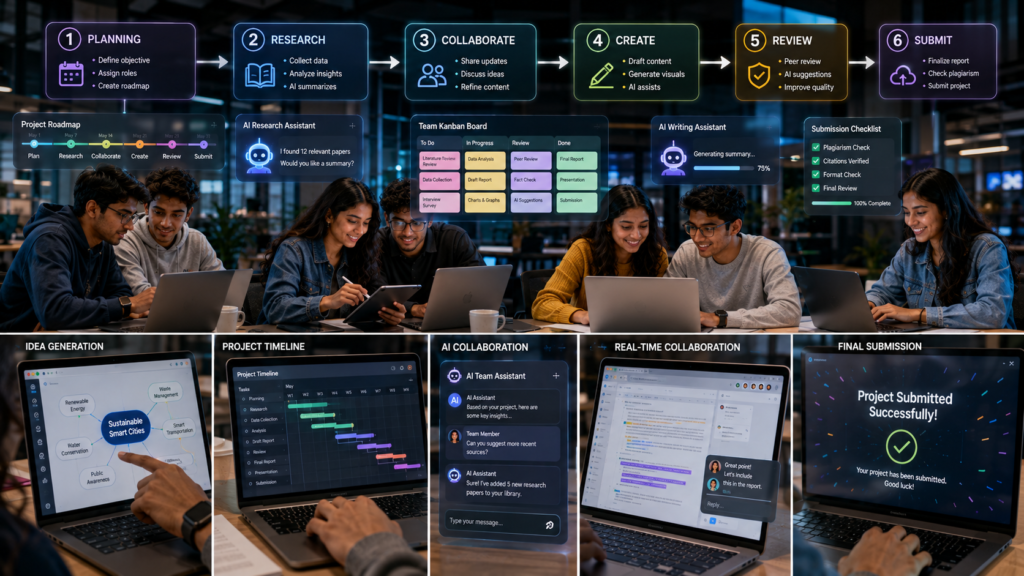
The most successful student teams don’t rely on a single AI tool.
Instead, they build a simple collaboration system where every platform has a specific purpose.
One tool manages tasks.
Another stores documents.
Another helps brainstorm ideas.
Another summarizes research.
This approach keeps projects organized from the first meeting until final submission.
Step 1 – Create a Shared Project Workspace
Every successful project begins with one central workspace.
Choose a platform where every teammate has access to:
• Project overview
• Assignment instructions
• Research materials
• Meeting notes
• Deadlines
• Progress updates
Recommended tools:
• Notion AI
• ClickUp AI
• Google Workspace
Avoid creating multiple disconnected workspaces.
One shared hub reduces confusion.
Step 2 – Assign Clear Responsibilities
Before any research begins, divide responsibilities.
Examples include:
• Project Manager
• Research LeadWriter
• Editor
• Presentation Designer
• Citation Reviewer
AI task managers make responsibilities visible so everyone understands their role.
Step 3 – Store All Documents in One Location
Scattered files create unnecessary problems.
Keep everything together:
• PDFs
• Research papers
• Images
• Meeting notes
• Draft reports
• Presentation slides
Cloud storage prevents duplicate files and outdated versions.
Step 4 – Brainstorm Together Using AI
Instead of spending the first meeting wondering where to start, ask AI to generate ideas.
Examples include:
• Project outline
• Research questions
• Discussion topics
• SWOT analysis
• Mind maps
• Presentation structure
After AI generates ideas, the team should review and improve them together.
Step 5 – Track Progress Every Week
Large assignments should be divided into milestones.
Example:
Week 1
Research
↓
Week 2
Writing
↓
Week 3
Editing
↓
Week 4
Presentation
↓
Week 5
Final Review
AI dashboards make it easy to see:
• Completed tasks
• Pending work
• Overdue assignments
• Upcoming milestones
Step 6 – Review Before Submission
Never submit immediately after finishing.
Schedule one final review meeting.
Checklist:
• Grammar review
• Fact checking
• Citation verification
• Formatting
• AI output verification
• Presentation practice
A final review often improves grades more than adding extra content.
Weekly Group Collaboration Workflow
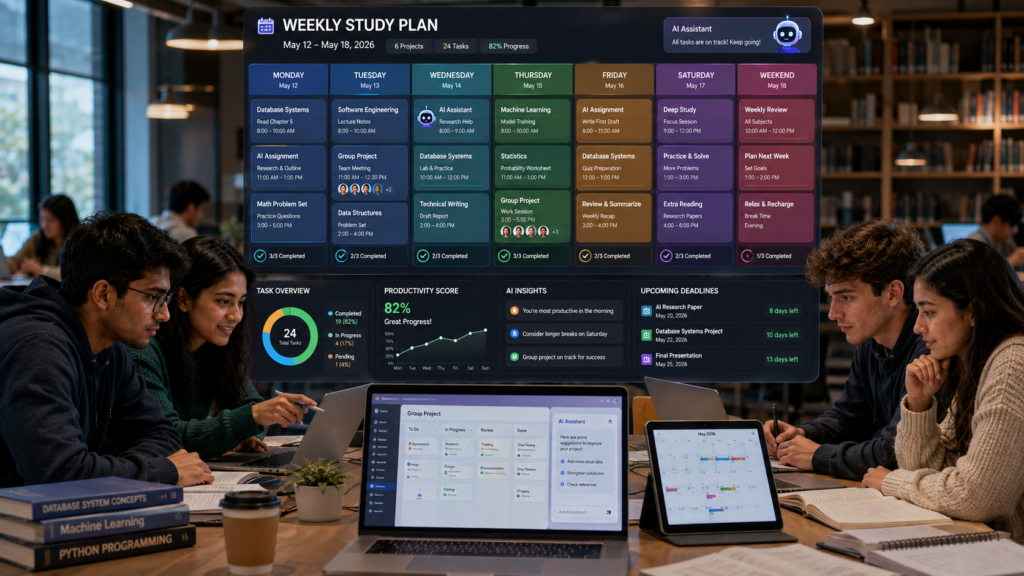
Successful teams work consistently throughout the semester instead of rushing during the final week.
Here’s a practical weekly workflow.
Monday – Project Planning
Goals:
• Review assignment requirements
• Create task list
• Assign responsibilities
• Set weekly deadlines
Recommended AI Tools:
• Notion AI
• ClickUp AI
Tuesday – Research
Activities:
• Collect academic sources
• Read PDFs
• Compare research
• Organize references
Recommended AI Tools:
• NotebookLM
• Claude
• ChatGPT
Wednesday – Drafting
Activities:
• Write report sections
• Create shared documents
• Generate outlines
• Expand ideas
Recommended AI Tools:
• Google Workspace
• Microsoft Copilot
• ChatGPT
Thursday – Editing
Activities:
• Improve writing
• Remove duplicate information
• Verify facts
• Improve transitions
Recommended AI Tools:
• Claude
• Microsoft Copilot
• ChatGPT
Friday – Presentation Preparation
Activities:
• Create slides
• Design visuals
• Practice speaking
• Review timing
Recommended AI Tools:
• Google Slides
• Microsoft Copilot
• Miro AI
Weekend – Final Review
Before submitting:
✅ Review every section
✅ Confirm citations
✅ Verify AI-generated information
✅ Check formatting
✅ Ensure every teammate approves the final version
This habit dramatically reduces last-minute mistakes.
🤝 Traditional Collaboration vs AI Collaboration
See how AI transforms the way students communicate, manage projects, and collaborate on assignments.
Key Takeaway
Traditional teamwork still builds valuable communication skills.
However, AI removes repetitive administrative work that often slows projects down.
Instead of replacing collaboration, AI improves it by helping students:
• Stay organized
• Communicate more clearly
• Track responsibilities
• Meet deadlines
• Focus on producing higher-quality work
The strongest student teams combine human teamwork with AI-powered organization, using technology to support collaboration—not replace it.
Privacy & Ethical Considerations
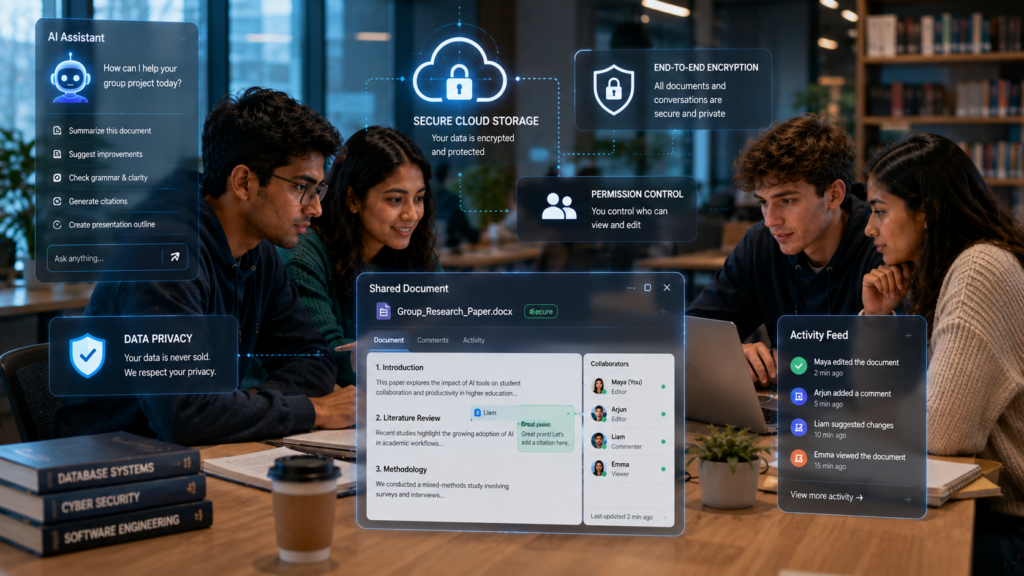
Artificial intelligence can dramatically improve teamwork, but responsible collaboration is just as important as productivity.
Responsible use of AI Tools for Group Project Collaboration for Students means balancing productivity with academic integrity, teamwork, and respect for shared project materials.
Group projects often involve shared documents, personal ideas, research data, and academic work. Every team member should understand how to use AI ethically while respecting both university policies and their teammates.
Respect Your Teammates’ Privacy
Not every shared document should be uploaded to an AI platform.
Before uploading meeting notes, reports, or research files, ask yourself:
• Does everyone on the team agree?
• Does the file contain personal information?
• Is the document confidential?
• Does the instructor have restrictions on AI use?
Always respect your teammates’ preferences before sharing project files with AI tools.
Avoid Uploading Confidential Documents
Some projects may contain:
• Unpublished research
• Client case studies
• Company information
• Survey responses
• Personal student information
Only upload sensitive files to platforms that meet your institution’s privacy requirements.
When in doubt, remove personal information before using AI.
Review Every AI-Generated Suggestion
AI can:
• Organize ideas
• Improve writing
• Summarize discussions
• Generate project outlines
However, it can also misunderstand instructions or introduce factual errors.
Before submitting your assignment:
• Verify facts
• Check citations
• Confirm calculations
• Review AI-generated writing
• Ensure the final report reflects your team’s own understanding
Use AI to Support Teamwork—Not Replace It
The purpose of group projects is collaboration.
AI should help students:
• Organize tasks
• Improve communication
• Save time
Brainstorm ideasIt should never replace:
• Team discussions
• Critical thinking
• Individual contributions
• Decision-making
Strong teamwork still depends on people—not software.
Common Mistakes Students Make
Even the best collaboration platform cannot fix poor teamwork.
Avoid these common mistakes when using AI Tools for Group Project Collaboration for Students.
Mistake 1 – Using Too Many Collaboration Apps
One teammate uses WhatsApp.
Another prefers Discord.
Someone else uploads files to Google Drive.
Another uses email.
Instead of improving communication, too many platforms create confusion.
Choose one primary collaboration hub and keep everything there.
Mistake 2 – No Clear Task Ownership
Many groups assume everyone knows their responsibilities.
Unfortunately, assumptions often lead to unfinished work.
Every task should have:
• One owner
• One deadline
• One clear outcome
AI task managers make ownership visible for the entire team.
Mistake 3 – Trusting AI Blindly
AI suggestions should never be accepted without review.
Always verify:
• Research findings
• Statistics
• References
• Grammar
• Formatting
Human review remains essential before submission.
Mistake 4 – Poor Communication
Ignoring team messages for several days slows the entire project.
Successful teams:
• Respond regularly
• Share progress updates
• Ask questions early
• Resolve problems quickly
AI communication summaries help everyone stay informed.
Mistake 5 – Ignoring Deadlines
Waiting until the last few days creates unnecessary pressure.
Instead:
• Break projects into weekly milestones.
• Track progress continuously.
• Complete sections early.
• Leave time for revision.
Consistent progress produces better results than last-minute work.
Mistake 6 – Skipping the Final Review
Submitting immediately after finishing is risky.
Always review:
• GrammarFormatting
• References
• AI-generated content
• Team feedback
A final review often catches mistakes that could reduce grades.
🧐 Myth vs Reality
Many students have misconceptions about AI collaboration tools. Here’s what actually happens in real academic teamwork.
Conclusion
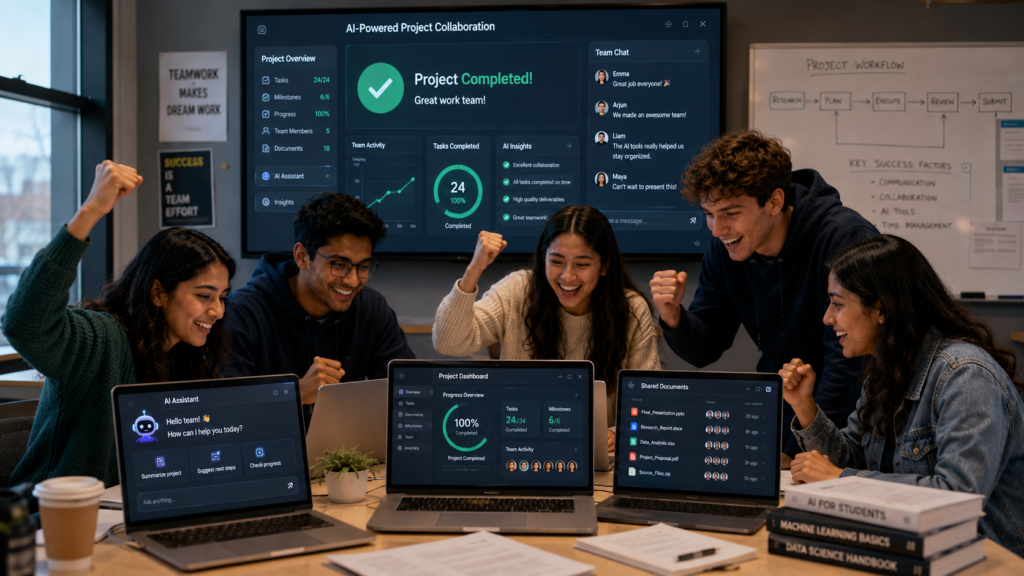
Choosing the right AI Tools for Group Project Collaboration for Students isn’t about finding the platform with the longest feature list.
It’s about building a collaboration system that helps your team communicate clearly, stay organized, and complete projects efficiently.
Whether your group prefers Notion AI for project management, ClickUp AI for task tracking, Google Workspace for document collaboration, or NotebookLM for research, the best results come from matching the right tool to the right task.
Remember that AI is most effective when it supports strong teamwork—not when it replaces it.
Communicate openly, review AI-generated content carefully, respect your teammates’ contributions, and stay accountable throughout the project.
If you’re serious about improving teamwork, reducing stress, and delivering better assignments, choosing the right AI Tools for Group Project Collaboration for Students could become one of the smartest decisions your team makes this semester.
📚 Continue Learning
Want to build a complete AI-powered academic workflow? Explore these related guides on IndiaAITools.
📅 Best AI Study Planner for College Students
Plan assignments, deadlines, and semester schedules with AI.
Read Guide →📄 AI Tools for Reading PDFs for Students
Read textbooks, lecture notes, and research papers faster using AI.
Read Guide →📝 Best AI Note-Taking Apps for College Students
Organize lecture notes and class materials more effectively.
Read Guide →🔬 Best AI Tools for Academic Research
Discover AI tools for finding and analyzing scholarly sources.
Read Guide →📚 Best AI Tools for Literature Review
Compare studies, identify research gaps, and organize evidence.
Read Guide →🎤 AI Tools for Automatic Lecture Notes
Capture and summarize classroom lectures automatically.
Read Guide →🃏 How to Create Study Flashcards With AI
Turn notes into flashcards for active recall and better retention.
Read Guide →📖 AI Tools to Help Students Review Long Chapters
Understand lengthy textbooks more efficiently with AI.
Read Guide →⚡ AI Tools for Last-Minute Exam Preparation
Build an effective AI-assisted revision strategy when time is short.
Read Guide →📂 AI Tools for Students With Too Many Assignments
Manage heavy workloads and stay productive throughout the semester.
Read Guide →❓ Frequently Asked Questions
Students often have questions before choosing AI collaboration tools for group assignments, research projects, and presentations. Here are the most common answers.
💬 What are the best AI tools for group project collaboration for students?
Notion AI, ClickUp AI, Google Workspace, Microsoft Copilot, ChatGPT, Claude, Miro AI, Slack AI, Trello, and NotebookLM are among the best options, depending on your project’s needs.
🎓 Which AI collaboration tool is best for college students?
Notion AI is an excellent all-in-one workspace for most college projects, while Google Workspace remains one of the easiest options for document collaboration.
📋 Can AI help manage group assignments?
Yes. AI can organize tasks, assign responsibilities, monitor deadlines, summarize meetings, and improve team communication.
🧠 Which AI tool is best for brainstorming ideas?
Miro AI and ChatGPT are excellent for brainstorming, creating mind maps, and generating project ideas.
📝 Can AI summarize team meetings?
Yes. Platforms like Slack AI and Microsoft Copilot can summarize discussions, highlight action items, and help teammates catch up quickly.
💰 Are AI collaboration tools free?
Many offer free plans with useful collaboration features. Premium subscriptions unlock advanced AI capabilities and larger team workspaces.
✅ Can students use AI ethically in group projects?
Yes. AI should support planning, organization, and communication while students continue to perform the research, analysis, and final decision-making themselves.
📚 Which AI tool is best for research-based group projects?
NotebookLM is one of the strongest choices because it analyzes uploaded academic sources and provides source-grounded answers.
👥 Should every teammate use the same collaboration platform?
Yes. Using one shared platform improves communication, reduces version conflicts, and keeps project resources organized.
🏆 Can AI improve group project grades?
AI cannot guarantee higher grades, but it can improve organization, communication, and productivity, allowing teams to focus more on producing high-quality work.