
College students spend thousands of hours reading PDFs during their academic journey.
Lecture slides.
Research papers.
Academic journals.
eBooks.
Textbooks.
Course handouts.
Assignment instructions.
The problem isn’t just the amount of reading.
It’s how difficult it has become to find important information quickly.
Reading a 250-page textbook to locate one formula.
Searching through a 40-page research paper for a single methodology.
Trying to understand a complex academic journal written in technical language.
Preparing for tomorrow’s exam with hundreds of pages still unread.
This is exactly where AI Tools for Reading PDFs for Students are changing the way students learn.
Modern AI PDF readers don’t simply open documents.
They summarize chapters.
Explain difficult concepts.
Answer questions about uploaded PDFs.
Highlight important ideas.
Extract key points.
Generate study notes.
Create flashcards.
Help students review faster before exams.
For many students, this means spending less time searching for information and more time actually learning it.
Whether you’re a high school student reading digital textbooks, a college student reviewing lecture PDFs, or a graduate student analyzing research papers, AI can dramatically improve the way you study.
This guide explores the best AI Tools for Reading PDFs for Students, explains how they work, compares their strengths and limitations, and helps you choose the right tool for your learning style.
By the end of this article, you’ll know which AI PDF reader deserves a place in your study workflow—and how to use it responsibly to save time without compromising academic integrity.
Quick Answer
AI Tools for Reading PDFs for Students use artificial intelligence to summarize textbooks, explain difficult concepts, answer questions about uploaded documents, identify important sections, generate study notes, and create flashcards. Tools like NotebookLM, ChatGPT, SciSpace, Claude, Humata AI, Adobe Acrobat AI Assistant, and UPDF AI help students study large PDFs faster while improving comprehension and exam preparation.
Introduction
Academic life today revolves around digital documents.
A typical college student may receive dozens of PDFs every week, including lecture notes, reading assignments, journal articles, textbook chapters, case studies, and research papers.
While digital learning offers flexibility, it also creates a new challenge: information overload.
Students aren’t struggling because they dislike reading.
As a result, AI Tools for Reading PDFs for Students have become one of the fastest-growing categories of AI study tools for improving reading speed, comprehension, and exam preparation.
They’re struggling because they have too much to read in too little time.
Imagine preparing for finals while facing:
• A 600-page biology textbook
• Twenty-five research papers
• Forty lecture slide decks
• Multiple lab manuals
• Course handouts from several professors
Finding one important concept can feel like searching for a needle in a haystack.
This is why AI-powered PDF reading tools have become some of the most valuable study resources available in 2026.
Instead of reading every page line by line, students can now:
• Generate concise summaries
• Ask questions directly about PDFs
• Find definitions instantly
• Compare research findings
• Highlight important information
• Create revision notes
• Build flashcards automatically
However, not every AI PDF reader performs equally well.
Some excel at research papers.
Others work better for textbooks.
Some focus on lecture slides, while others specialize in academic journals.
Choosing the right tool depends on how you study—not simply on which app has the most AI features.
This guide goes far beyond a basic “Top AI Tools” list.
You’ll discover:
• What AI PDF readers actually do
• Why students struggle with long PDFs
• The biggest benefits and limitations
• The best AI tools for different academic needs
• Real student examples
• A complete AI PDF study workflow
• Ethical ways to use AI responsibly
• Expert recommendations for faster learning
Whether you’re preparing for midterms, reviewing lecture notes, reading scientific papers, or organizing hundreds of course PDFs, this guide will help you build a smarter and more efficient study system.
What Are AI Tools for Reading PDFs?

AI Tools for Reading PDFs for Students are applications that use artificial intelligence to help students understand digital documents faster instead of simply displaying them on a screen.
Unlike traditional PDF readers, these tools actively interact with the document.
Rather than forcing students to manually search through hundreds of pages, AI identifies key ideas, summarizes content, answers questions, explains difficult concepts, and organizes information into easier-to-study formats.
Think of an AI PDF reader as a personal study assistant that has already read the document and can help explain it in seconds.
Instead of spending hours searching for one paragraph inside a textbook, students can simply ask:
• “Summarize Chapter 6.”
• “Explain this concept in simple words.”
• “What are the main arguments?”
• “Compare these two research studies.”
• “Create revision notes from this PDF.”
The AI analyzes the uploaded document before responding, making the answers significantly more relevant than general web searches.
How AI PDF Readers Work
Although every platform uses different technology, most AI PDF readers follow a similar workflow.
Upload PDF
↓
AI scans document structure
↓
Extracts text and headings
↓
Understands context
↓
Indexes important information
↓
Allows interactive questions
↓
Generates summaries, notes, and explanations
Instead of reading every page manually, students can jump directly to the information they need.
What Can AI PDF Readers Actually Do?
• Modern AI PDF readers offer far more than simple text search.
• Common capabilities include:
• Summarizing long chapters
• Explaining difficult academic language
• Answering questions from uploaded PDFs
• Highlighting key concepts
• Comparing multiple research papers
• Generating study guides
• Creating revision notes
• Building flashcards
• Finding important definitions
• Extracting citationsIdentifying research gaps
• Translating technical language into simpler explanations
These features save significant time, especially during exam preparation.
AI PDF Readers vs Traditional PDF Readers
Traditional PDF software is mainly designed for viewing documents.
AI-powered readers are designed for learning from documents.
The difference becomes especially noticeable when working with long research papers or technical textbooks.
Who Should Use AI PDF Reading Tools?
These tools are useful for almost every type of student.
College Students
Quickly summarize lecture notes, textbooks, and weekly readings without losing important information.
University Students
Analyze multiple academic sources while preparing assignments, essays, and presentations.
Graduate Students
Review lengthy research papers, compare studies, and identify key findings more efficiently.
MBA Students
Extract business insights from case studies, market reports, and management research.
High School Students
Understand difficult textbook chapters using simplified explanations and AI-generated summaries.
Students Preparing for Exams
Review hundreds of pages faster by generating concise revision notes instead of rereading entire textbooks.
Understanding how AI Tools for Reading PDFs for Students work helps you choose the right platform based on whether you’re reading textbooks, research papers, lecture notes, or academic journals.
Why Students Struggle With Long PDFs

Reading digital documents has become an unavoidable part of modern education.
The average college student may download dozens of PDFs every month, but finishing them is another story.
The challenge isn’t reading one document.
It’s managing hundreds of pages across multiple subjects while balancing assignments, exams, and personal responsibilities.
Below are the biggest reasons students find academic PDFs so difficult to manage.
Textbooks Are Becoming Larger
Many university textbooks contain:
• 300–1,000 pages
• Complex terminology
• Detailed diagrams
• Multiple case studies
• End-of-chapter exercises
Reading everything from beginning to end isn’t always realistic—especially during busy semesters.
Students often need to locate specific concepts quickly rather than rereading entire chapters.
Research Papers Use Complex Academic Language
Academic journals are written for researchers, not beginners.
Students frequently struggle with:
• Technical vocabulary
• Statistical analysis
• Research methodology
• Scientific terminology
• Dense writing styles
Even understanding the abstract can sometimes require additional explanation.
AI PDF readers simplify complicated research into language that’s easier to understand without changing the original meaning.
Lecture PDFs Don’t Tell the Whole Story
Lecture slides are designed to support classroom teaching—not replace it.
Many slides contain only:
• Short bullet points
• Diagrams
• ChartsImages
• Keywords
Without the professor’s explanation, students often struggle to understand the complete concept.
AI helps bridge this gap by explaining lecture content in greater detail.
Academic Journals Require Critical Comparison
Graduate students rarely read just one paper.
Instead, they compare multiple studies to identify:
• Similar findings
• Different conclusions
• Research gaps
• Methodological differences
• Supporting evidence
Doing this manually across dozens of PDFs takes enormous amounts of time.
Several AI research assistants now help compare papers side by side, making literature reviews significantly faster.
Searching Inside PDFs Is Slow
Traditional PDF search works only when students know the exact keyword.
Problems arise when:
• Terminology changes
• Synonyms are used
• Concepts are explained without obvious keywords
• Information appears across multiple chapters
AI understands context instead of relying only on keyword matching, making searches much more effective.
Exam Preparation Creates Information Overload
During finals week, students rarely have time to reread every textbook or research article.
Instead, they need to identify:
• Most important concepts
• Frequently tested topics
• Key formulas
• Critical definitions
• Important arguments
AI-generated summaries and study guides dramatically reduce preparation time while helping students focus on high-value material.
Benefits of AI PDF Reading Tools

The biggest advantage of AI isn’t reading faster.
It’s learning more efficiently.
Instead of replacing study, AI removes repetitive tasks so students can spend more time understanding concepts.
Major benefits include:
Faster Reading
AI quickly summarizes lengthy documents into manageable sections.
Better Understanding
Complex topics become easier through simplified explanations.
Smarter Revision
Students review concise summaries instead of hundreds of pages.
Improved Organization
Notes, highlights, and important concepts remain searchable and structured.
Stronger Exam Preparation
AI helps generate:
• Study guides
• Revision notes
• Flashcards
• Practice questions
Better Research Efficiency
Students working with academic papers can compare findings, identify themes, and organize evidence much more effectively.
When used consistently, AI Tools for Reading PDFs for Students can reduce reading time while improving note quality, concept retention, and overall study efficiency.
Best AI Tools for Reading PDFs for Students
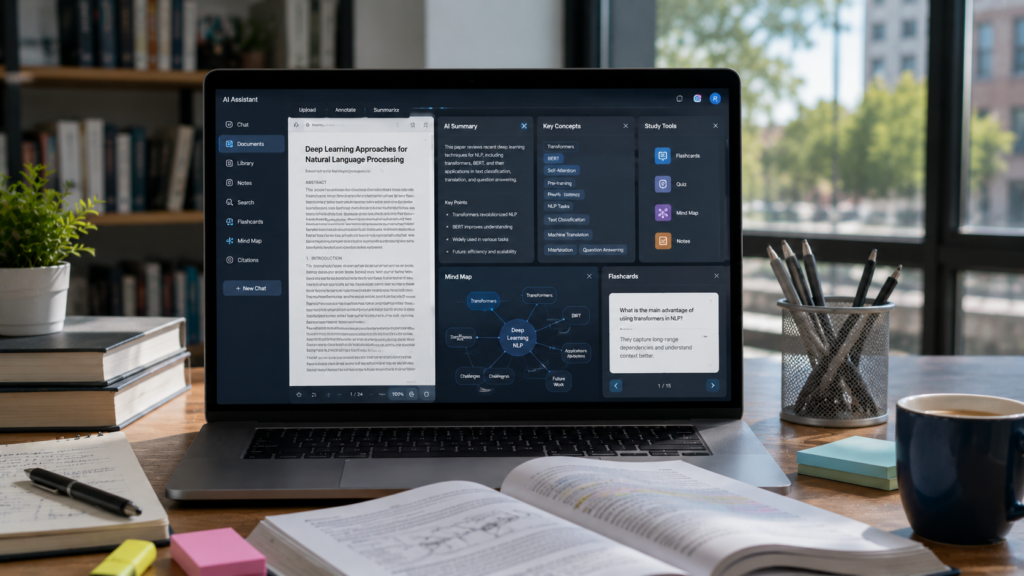
Not every platform offers the same experience. Some AI Tools for Reading PDFs for Students specialize in research papers, while others are designed for textbooks, lecture slides, or exam revision.
No single AI PDF reader is perfect for every student.
Some tools excel at summarizing research papers, while others are better for textbooks, lecture slides, or asking questions about complex academic documents.
The best choice depends on how you study, what type of PDFs you read, and how much AI assistance you need.
Below are the best AI Tools for Reading PDFs for Students in 2026.
📚 NotebookLM
💰 Mostly Free
🎯 Best For: Research Papers & PDF Learning
📖 Overview
NotebookLM is Google’s AI-powered research notebook designed specifically for learning from documents. Instead of giving generic AI answers, it only responds using the PDFs, lecture slides, research papers, and notes that you upload.
This source-grounded approach makes NotebookLM one of the most trustworthy AI PDF readers available for students, helping reduce inaccurate AI responses while improving research quality.
🎯 Best For
✅ Research Papers✅ College Textbooks
✅ Lecture PDFs
✅ Literature Reviews
✅ Graduate Research
✅ Exam Preparation
⚡ Key Features
✅ AI-Powered PDF Summaries✅ Source-Based Question Answering
✅ Smart Document Search
✅ Audio Overview Generation
✅ Study Guide Creation
✅ Timeline Organization
✅ Multiple Notebook Management
✅ Citation-Aware Responses
✅ Why Students Love It
✔ Extremely accurate with uploaded sources✔ Excellent for academic research
✔ Handles large PDF collections
✔ Reduces hallucinations compared to general AI chatbots
✔ Free for most students
✔ Integrates well with Google’s ecosystem
⚠ Things to Consider
✖ Requires uploaded documents✖ Limited usefulness without source material
✖ Doesn’t replace traditional note-taking
💰 Pricing
Mostly FreePremium AI features are available through Google’s AI subscription plans.
🌍 Official Website
Visit NotebookLM →👨🎓 Ideal Student
🎓 College Students💼 MBA Students
📖 Graduate Students
🔬 PhD Researchers
📚 Students Reading Academic Literature
💡 Real Student Use Case
Emma uploads ten psychology research papers before writing her literature review. Instead of reading every paper from beginning to end, she asks NotebookLM a single question.
📄 Compares all uploaded research papers
🧠 Identifies major theories
🔍 Highlights research gaps
📚 Generates an organized comparison
⏱️ Saves hours of manual analysis
Within seconds, Emma receives a well-structured comparison that would normally take several hours to prepare manually, allowing her to focus on writing instead of searching through documents.
🤖 ChatGPT
💰 Free + Premium
🎯 Best For: Interactive PDF Learning & Study Assistance
📖 Overview
ChatGPT has evolved into one of the most versatile AI study assistants available. When students upload PDFs, it can summarize chapters, explain confusing concepts, answer questions, generate study notes, and even create quizzes based on the document.
Its conversational style makes learning feel far more interactive than simply reading static pages, making it an excellent companion for studying complex subjects.
🎯 Best For
✅ Explaining Difficult Concepts✅ Textbook Summaries
✅ Study Guides
✅ Homework Preparation
✅ Interactive Learning
✅ Practice Questions
⚡ Key Features
✅ PDF Summarization✅ Natural Language Explanations
✅ Question Answering
✅ Flashcard Generation
✅ Quiz Creation
✅ Note Rewriting
✅ Concept Simplification
✅ Personalized Tutoring
✅ Why Students Love It
✔ Extremely easy to use✔ Explains difficult topics clearly
✔ Excellent conversational interface
✔ Supports multiple learning styles
✔ Helpful across nearly every subject
✔ Generates revision materials quickly
⚠ Things to Consider
✖ Accuracy depends on uploaded material and prompts✖ Can occasionally misunderstand complex academic content
✖ Premium plans provide larger document support
💰 Pricing
Free Plan AvailableChatGPT Plus unlocks larger file uploads, faster responses, and access to more advanced AI models.
🌍 Official Website
Visit ChatGPT →👨🎓 Ideal Student
🎓 High School Students🏫 College Students
🎓 University Students
💬 Students Who Prefer Learning Through Conversation
📖 Students Needing Additional Explanations
💡 Real Student Use Case
Michael uploads a 120-page economics textbook chapter. Instead of reading every page first, he asks ChatGPT to create a personalized study plan before starting detailed revision.
📑 Summarizes every chapter section
📊 Explains graphs in simple language
❓ Creates 10 practice questions
🎯 Highlights likely exam topics
📝 Builds a structured revision plan
Within minutes, Michael has a well-organized study guide that helps him understand the chapter faster, identify key concepts, and begin focused exam preparation without feeling overwhelmed.
📄 Humata AI
💰 Freemium
🎯 Best For: Academic PDFs & Research Papers
📖 Overview
Humata AI is built specifically for understanding PDFs. It allows students to upload large academic documents and ask questions directly about the content, almost like chatting with a research assistant who has already read the entire document.
For students dealing with lengthy journal articles, research papers, and technical reports, Humata AI dramatically reduces reading time while making complex information much easier to understand.
🎯 Best For
✅ Academic Journals✅ Scientific Research Papers
✅ Long PDF Reports
✅ Technical Documentation
✅ Literature Reviews
⚡ Key Features
✅ AI PDF Chat✅ Instant Document Summaries
✅ Citation-Aware Responses
✅ Fast Semantic Search
✅ Key Point Extraction
✅ Research Assistance
✅ Multi-Document Support
✅ Why Students Love It
✔ Purpose-built for PDFs✔ Excellent at understanding long research papers
✔ Saves significant reading time
✔ Easy question-and-answer interface
✔ Strong academic focus
⚠ Things to Consider
✖ Free usage limits✖ Premium plans required for heavy academic workloads
✖ Less flexible outside PDF-based learning
💰 Pricing
FreemiumAdvanced document limits and premium AI features require a paid subscription.
🌍 Official Website
Visit Humata AI →👨🎓 Ideal Student
🎓 Graduate Students🔬 Research Students
🩺 Medical Students
⚙️ Engineering Students
📚 Students Reading Scientific Literature
💡 Real Student Use Case
Sophia is preparing a graduate research proposal. She uploads several 40-page journal articles into Humata AI instead of reading every paper from beginning to end.
📑 Summarizes every research paper
⚖️ Compares research methodologies
🔍 Identifies study limitations
💡 Extracts the most important findings
📚 Organizes literature for faster review
Instead of manually creating pages of research notes, Sophia receives structured AI summaries that help her understand the literature, compare studies, and begin writing her proposal much faster.
🔬 SciSpace
💰 Freemium
🎯 Best For: Academic Research & Scientific Papers
📖 Overview
SciSpace is an AI-powered research assistant designed specifically for understanding academic papers, journal articles, and scientific documents. Unlike general AI chatbots, SciSpace focuses heavily on academic reading by helping students understand complex research faster.
It explains difficult sections, technical terms, formulas, research methodologies, and findings in simple language, making it an excellent companion for students working on research-intensive projects.
🎯 Best For
✅ Research Papers✅ Academic Journals
✅ Literature Reviews
✅ Scientific Articles
✅ Graduate Research
✅ Students Learning Research Methods
⚡ Key Features
✅ AI PDF Chat✅ Research Paper Explanations
✅ Citation Discovery
✅ Literature Search
✅ Paper Summaries
✅ Explanation of Technical Terms
✅ Related Paper Recommendations
✅ Academic Question Answering
✅ Why Students Love It
✔ Built specifically for academic research✔ Excellent for understanding scientific papers
✔ Explains complex terminology clearly
✔ Helps discover related research papers
✔ Makes literature reviews much easier
⚠ Things to Consider
✖ More research-focused than general studying✖ Some advanced features require paid plans
✖ Less useful for casual textbook reading
💰 Pricing
FreemiumPaid plans provide additional research features, advanced AI tools, and higher usage limits.
🌍 Official Website
Visit SciSpace →👨🎓 Ideal Student
🎓 Graduate Students📖 Master’s Students
🔬 PhD Students
🏫 Research-Focused College Students
✍️ Students Writing Academic Papers
💡 Real Student Use Case
Daniel is preparing his thesis proposal and needs to understand dozens of research papers. Instead of reading every paper multiple times, he uploads them into SciSpace and asks one focused question.
📄 Explains the research problem
🧪 Breaks down the methodology
📊 Summarizes key findings
⚠️ Identifies study limitations
🔗 Suggests related research papers
Within minutes, Daniel receives a clear, structured explanation of each paper, allowing him to compare studies, understand complex research faster, and build a stronger thesis proposal with much less manual effort.
🧠 Claude
💰 Free + Premium
🎯 Best For: Long Documents & Deep Explanations
📖 Overview
Claude is a powerful AI assistant known for handling large documents and producing clear, detailed explanations. For students, it works exceptionally well as an AI textbook reader and PDF study assistant because it can analyze lengthy documents while maintaining context throughout the conversation.
It is especially valuable when students need in-depth explanations rather than short summaries, making complex academic topics easier to understand and revise.
🎯 Best For
✅ Long Textbooks✅ Lecture Materials
✅ Research Summaries
✅ Complex Explanations
✅ Study Guides
⚡ Key Features
✅ Large Document Analysis✅ PDF Summarization
✅ Detailed Explanations
✅ Question Answering
✅ Study Guide Creation
✅ Concept Breakdown
✅ Writing Assistance
✅ Why Students Love It
✔ Excellent long-document understanding✔ Natural educational explanations
✔ Strong reasoning ability
✔ Helpful for complex subjects
✔ High-quality writing assistance
⚠ Things to Consider
✖ Less specialized for academic citations✖ Free usage limits
✖ Not designed specifically as a PDF research platform
💰 Pricing
Free Plan AvailablePaid plans provide higher usage limits, faster performance, and access to additional advanced AI features.
🌍 Official Website
Visit Claude →👨🎓 Ideal Student
🎓 College Students💼 MBA Students
📖 Graduate Students
🧠 Students Studying Complex Subjects
💡 Real Student Use Case
A business student uploads a 150-page management textbook chapter before an upcoming exam. Instead of reading every page first, they ask Claude to prepare a complete revision guide.
📚 Summarizes the textbook chapter
🧠 Explains important theories in simple language
💼 Highlights real-world business examples
❓ Generates possible exam questions
📝 Creates a structured revision guide
Within minutes, the student receives an organized study guide that makes revision faster, improves understanding of complex concepts, and helps focus on the most important exam topics.
📄 Adobe Acrobat AI Assistant
💰 Paid
🎯 Best For: PDF-Heavy Courses & Professional Documents
📖 Overview
Adobe Acrobat AI Assistant brings artificial intelligence directly into one of the world’s most popular PDF platforms. Students who already use Adobe Acrobat can analyze documents without moving their files to another application.
It combines trusted PDF editing tools with AI-powered summarization, question answering, and document analysis, making it an excellent choice for students working with textbooks, reports, and professional documents.
🎯 Best For
✅ Textbooks✅ Lecture PDFs
✅ Professional Documents
✅ Students Already Using Adobe Acrobat
✅ PDF-Heavy Courses
⚡ Key Features
✅ AI-Generated Summaries✅ Document Questions & Answers
✅ Key Point Extraction
✅ Citation References
✅ PDF Organization
✅ Adobe Document Integration
✅ Why Students Love It
✔ Works inside a trusted PDF platform✔ Strong document handling capabilities
✔ Familiar Adobe interface
✔ Excellent for professional PDFs
✔ Handles large documents efficiently
⚠ Things to Consider
✖ Requires an Adobe subscription✖ Less focused on student-specific workflows
✖ AI features are not available in the free version
💰 Pricing
Paid Subscription RequiredAdobe Acrobat AI Assistant requires a paid Adobe subscription to access its AI-powered features.
🌍 Official Website
Visit Adobe Acrobat AI →👨🎓 Ideal Student
🎓 University Students💼 MBA Students
📊 Students Working with Professional Reports
📄 Students Already Using Adobe Acrobat
💡 Real Student Use Case
A finance student receives a 200-page industry report for a class project. Instead of manually reading the entire document, they use Adobe Acrobat AI Assistant to quickly identify the most valuable information.
📑 Summarizes lengthy sections
📊 Finds important statistics
💡 Extracts key findings
🔍 Answers document-related questions
🎤 Prepares concise presentation notes
Instead of spending hours searching through hundreds of pages, the student quickly identifies the most relevant information and prepares for the presentation with greater confidence and significantly less effort.
📑 UPDF AI
💰 Freemium
🎯 Best For: PDF Editing & AI Document Assistance
📖 Overview
UPDF AI combines PDF editing features with artificial intelligence tools for summarization, translation, explanation, and document analysis. Instead of switching between multiple applications, students can manage and study their PDFs from a single workspace.
It is especially useful for learners who frequently annotate textbooks, organize study materials, translate documents, and need AI-powered explanations while reading.
🎯 Best For
✅ Students Managing Many PDFs✅ PDF Annotation
✅ Document Organization
✅ Textbook Reading
✅ Multilingual Learners
⚡ Key Features
✅ AI PDF Summaries✅ Ask Questions About Documents
✅ PDF Translation
✅ AI Explanation Tools
✅ PDF Editing
✅ Annotation Features
✅ Document Conversion
✅ Why Students Love It
✔ Combines PDF editing with AI features✔ Excellent annotation tools
✔ Supports multiple document tasks
✔ Great for organizing study materials
✔ Helpful for multilingual learning
⚠ Things to Consider
✖ Some AI features require premium plans✖ Less recognized in academic research than NotebookLM or SciSpace
✖ Smaller student community
💰 Pricing
FreemiumPremium plans unlock advanced AI capabilities, additional PDF editing tools, and higher usage limits.
🌍 Official Website
Visit UPDF AI →👨🎓 Ideal Student
🎓 College Students🌍 International Students
📄 Students Working with Multilingual Documents
✍️ Students Who Frequently Annotate PDFs
💡 Real Student Use Case
A student studying international business receives research papers in English along with documents written in another language. Instead of using separate tools for translation, annotation, and summarization, they complete everything inside UPDF AI.
🌐 Translates multilingual documents
📄 Summarizes lengthy PDFs
💡 Explains difficult concepts
🖍️ Lets students annotate directly inside the PDF
📚 Organizes study materials in one place
Instead of juggling multiple applications, the student studies, translates, highlights, and summarizes everything within a single workspace, making revision faster and far more organized.
How to Read PDFs Faster Using AI

Reading faster doesn’t always mean learning better.
The goal isn’t to skip information.
The goal is to spend less time searching and more time understanding.
The following workflow is one of the most effective ways students can use AI Tools for Reading PDFs for Students throughout an entire semester.
Step 1 – Upload the PDF
Start by uploading your document into an AI PDF reader.
This could be:
• A textbook chapter
• Lecture slides
• Research paper
• Academic journal
• Case study
• Assignment instructions
The AI first scans the document structure before generating responses.
Step 2 – Generate a Quick Summary
Before reading every page, ask the AI to create an overview.
Good prompts include:
• “Summarize this chapter in 200 words.”
• “Explain the main ideas.”
• “List the most important concepts.”
• “What should I remember for the exam?”
This gives you context before diving deeper.
Step 3 – Highlight Important Sections
Instead of highlighting every paragraph, let AI identify:
• Key definitions
• Important formulas
• Main arguments
• Supporting evidence
• Frequently repeated concepts
• Professor emphasis points
Focused highlighting makes later revision much easier.
Step 4 – Ask Questions About the PDF
One of the biggest advantages of AI is conversational learning.
Instead of rereading pages repeatedly, ask questions like:
• “Explain this theorem in simple words.”
• “Why is this experiment important?”
• “Compare Chapters 4 and 5.”
• “What are the author’s main conclusions?”
• “Give me real-world examples.”
This transforms passive reading into active learning.
Step 5 – Generate Study Notes
After understanding the document, create structured notes.
Ask AI to generate:
• Chapter summaries
• Topic outlines
• Bullet-point notes
• Definition lists
• Formula sheets
• Revision checklists
These notes become valuable during exam preparation.
Step 6 – Create Flashcards
Reading alone doesn’t improve long-term memory.
Convert your notes into active recall material.
Ask AI to create:
• Question-and-answer cards
• Definition flashcards
• Formula recall cards
• Concept quizzes
• Multiple-choice questions
Students can later import these into their preferred flashcard app.
Step 7 – Review Before Exams
Don’t wait until finals week.
A smarter workflow looks like this:
Read PDF
↓
Generate Summary
↓
Ask Questions
↓
Create Notes
↓
Build Flashcards
↓
Weekly Review
↓
Final Exam Revision
Small, consistent review sessions reduce stress and improve retention.
Real Student Use Cases

Different students read different types of PDFs.
The right AI tool depends on the subject, learning style, and academic goals.
Below are practical examples showing how students can use AI PDF readers effectively.
Engineering Student
Engineering students often deal with lengthy textbooks containing formulas, diagrams, and technical explanations.
Best Tool
NotebookLM
Workflow
• Upload engineering textbook
• Generate chapter summaries
• Explain formulas in simple language
• Create revision notes
• Build flashcards before exams
Medical Student
Medical education involves hundreds of pages of anatomy, physiology, pharmacology, and clinical research.
Instead of rereading every chapter, AI helps identify:
• Diseases
• Symptoms
• Drug mechanisms
• Medical terminology
• Clinical case summaries
Recommended Tool
SciSpace + ChatGPT
Law Student
Law students frequently analyze lengthy legal judgments, case law, and constitutional documents.
AI can help:
• Summarize legal cases
• Compare judgments
• Explain legal terminology
• Identify precedents
Recommended Tool
Claude
Business Student
Business courses include:
• Case studies
• Market reports
• Financial statements
• Industry research
AI quickly extracts:
• Major findings
• Business strategies
• SWOT insights
• Key recommendations
Recommended Tool
Adobe Acrobat AI Assistant
Computer Science Student
Students studying programming often read:
• API documentation
• Technical guides
• Research papers
• Software manuals
AI explains:
• Algorithms
• Code concepts
• Technical terminology
• Architecture diagrams
Recommended Tool
ChatGPT
Humanities Student
History, sociology, literature, and philosophy students often analyze lengthy readings with multiple interpretations.
AI helps:
• Summarize chapters
• Explain themes
• Compare authors
• Identify historical context
Recommended Tool
Claude
MBA Student
MBA programs require reading numerous case studies, leadership books, and market research reports.
AI can:
• Identify business frameworks
• Summarize executive reports
• Compare strategies
• Generate presentation notes
Recommended Tool
NotebookLM + Adobe Acrobat AI Assistant
Graduate Research Student
Graduate students often work with dozens of journal articles simultaneously.
Instead of manually comparing studies, AI helps identify:
• Research gaps
• Similar methodologies
• Contradictory findings
• Future research opportunities
Recommended Too
lNotebookLM + SciSpace
High School Student
High school students mainly use PDFs for textbooks, homework, and classroom notes.
AI simplifies difficult chapters into language that’s easier to understand while creating quizzes for revision.
Recommended Tool
ChatGPT
Common Mistakes Students Make When Using AI PDF Readers

AI can save hours of reading time, but only when students use it effectively.
Many students expect AI to do all the learning for them. In reality, AI works best as a study assistant—not as a replacement for reading, thinking, or practicing.
Avoid these common mistakes to get the most value from AI Tools for Reading PDFs for Students.
Mistake 1 – Reading Only the Summary
Summaries are helpful, but they don’t include every important detail.
Students who rely only on AI summaries often miss:
• Supporting evidence
• Important examples
• Graphs and diagrams
• Research limitations
• Context behind key concepts
Use summaries as a starting point, then review the original PDF for important sections.
Mistake 2 – Asking Generic Questions
Questions like:
“Summarize this PDF.”
usually produce generic answers.
Instead, ask specific questions such as:
• “Explain Chapter 4 in simple language.”
• “List five exam topics from this chapter.”
• “Compare the author’s main arguments.”
• “Generate practice questions from this lecture.”
Better prompts produce better study material.
Mistake 3 – Never Verifying AI Responses
AI occasionally misunderstands:
• Formulas
• Statistics
• Research findings
• Medical terminology
• Legal language
Always verify important academic information using:
• Your textbook
• Lecture slides
• Professor notes
• Original research paper
Mistake 4 – Uploading Disorganized PDFs
Students often upload files named:
• PDF1Notes Final
• Chapter New
• Lecture Latest
Instead, organize files like this:
• Biology Week 01
• Marketing Lecture 05
• Economics Chapter 08
• Research Paper – Consumer Behavior
Good organization improves both AI search and your own productivity.
Mistake 5 – Waiting Until Finals Week
Uploading an entire semester’s worth of PDFs a few days before exams creates unnecessary stress.
A better strategy is to:
• Upload documents weekly
• Generate summaries immediately
• Review notes regularly
• Build flashcards throughout the semester
Small weekly study sessions are far more effective than last-minute cramming.
Tips to Get Better AI PDF Summaries
Even the best AI tools perform better when students provide clear instructions.
These simple techniques improve both accuracy and usefulness.
Give AI a Specific Role
Instead of saying:
“Summarize this.”
Try:
“Act as a biology professor and explain this chapter for first-year college students.”
Break Large PDFs Into Sections
Instead of uploading a 500-page textbook all at once, work chapter by chapter.
This improves:
• Accuracy
• Context
• Organization
• Study efficiency
Ask Follow-Up Questions
Learning becomes much deeper when you continue the conversation.
Examples include:
“Give me three examples.”
“Explain this using a real-life scenario.”
“Why is this concept important?”
“What questions might appear on an exam?”
Turn Every Summary Into Study Material
After generating a summary, ask AI to create:
• Flashcards
• Practice quizzes
• Revision notes
• Mind map outlines
• Formula sheets
This transforms passive reading into active learning.
Compare Multiple PDFs
Many AI tools allow students to analyze more than one document.
Ask questions like:
• “Compare these two research papers.”
• “Identify common themes.”
• “Which study provides stronger evidence?”
This is especially valuable for literature reviews and graduate research.
AI Ethics

Artificial intelligence should improve learning—not replace it.
Responsible use protects academic integrity while helping students become more efficient learners.
Never Submit AI Summaries as Your Own Work
AI-generated notes should support understanding.
Assignments, essays, and research papers should always reflect your own thinking and analysis.
Verify Important Information
Even advanced AI systems occasionally make mistakes.
Always confirm:
• Statistics
• Research findings
• Equations
• Definitions
• Citations
Accuracy matters more than speed.
Protect Private Documents
Before uploading PDFs, consider whether they contain:
• Personal information
• Confidential research
• Patient records
• Company documents
• Unpublished academic work
Only upload sensitive files to platforms you trust and that comply with your institution’s privacy expectations.
Use AI to Learn Faster—Not to Avoid Learning
The most successful students use AI to:
• Understand difficult concepts
• Organize information
• Review efficiently
• Save time on repetitive tasks
They still:
• Attend lectures
• Read important sections
• Ask questions
• Think critically
AI enhances education. It should never replace genuine learning.
Final Verdict
Choosing the right AI Tools for Reading PDFs for Students isn’t about finding the platform with the most AI features—it’s about selecting the tool that fits your learning style and academic workload.
If you regularly analyze research papers, NotebookLM and SciSpace stand out for their source-based explanations and research-focused capabilities. If you want an interactive study partner that explains difficult concepts, ChatGPT and Claude are excellent choices. Students already working with professional PDF documents may prefer Adobe Acrobat AI Assistant, while UPDF AI offers a strong balance between PDF editing and AI-powered learning.
The most effective students rarely rely on a single tool. Instead, they combine AI PDF readers with note-taking apps, study planners, flashcards, and lecture note tools to build a complete learning system.
Use AI responsibly, verify important information, stay consistent with your study routine, and remember that technology is most valuable when it supports genuine understanding.
If you’re serious about studying smarter rather than simply studying longer, choosing the right AI Tools for Reading PDFs for Students could become one of the best academic decisions you make this semester.
🚀 Continue Learning
Build your complete AI-powered study system with these related guides from IndiaAITools.
📝 AI Note-Taking Apps
Organize lecture notes, research papers, and class materials more efficiently.
Read Guide →🔬 AI Academic Research
Discover smarter ways to find, analyze, and organize academic sources.
Read Guide →📚 AI Literature Review
Compare research papers, identify themes, and speed up literature reviews.
Read Guide →📖 Review Long Chapters
Learn strategies and AI tools for understanding lengthy textbook chapters faster.
Read Guide →📚 Too Many Assignments?
Manage heavy workloads while staying productive throughout the semester.
Read Guide →