
Quick Answer
AI Tools for University Productivity help students manage assignments, organize notes, plan schedules, conduct research, improve writing, and stay on top of deadlines. Platforms like ChatGPT, Notion AI, Google Gemini, Claude, Motion, Todoist AI, ClickUp AI, Grammarly, Perplexity AI, and Otter.ai enable university students to study smarter, reduce academic stress, and build productive learning habits throughout the semester.
Introduction
University life is exciting, but it can also become overwhelming surprisingly quickly.
A typical week may include multiple lectures, assignment deadlines, research papers, quizzes, presentations, group projects, internship applications, part-time work, and extracurricular activities.
Many students begin each semester with good intentions.
Then reality arrives.
Assignments overlap.
Deadlines pile up.
Lecture notes become scattered across different apps.
Emails go unread.
Research takes longer than expected.
Study plans fall apart.
Before long, productivity starts slipping—not because students lack motivation, but because they lack an efficient system.
This is exactly where AI Tools for University Productivity can make a meaningful difference.
Instead of trying to remember every deadline or manually organize every task, students can use artificial intelligence to build a structured academic workflow that saves time without sacrificing learning quality.
Modern AI productivity tools do far more than create schedules.
They can help students:
• Plan weekly study sessions
• Organize assignments
• Summarize lecture notes
• Conduct faster academic research
• Improve essays and reports
• Record lectures
• Manage group projects
• Track deadlines
• Reduce repetitive administrative work
• Build healthier study habits
The goal isn’t to study longer.
The goal is to study more effectively.
Rather than spending hours deciding what to do next, students can focus their energy on learning, solving problems, and developing practical skills.
However, not every productivity tool solves the same problem.
Some platforms specialize in planning.
Others excel at research, note organization, writing improvement, task management, or collaboration.
Choosing the right combination of tools can dramatically improve both academic performance and overall university life.
This guide goes beyond another generic “Top AI Productivity Apps” list.
You’ll discover:
• What AI productivity tools actually do
• Why productivity matters throughout university
• The biggest productivity challenges students face
• How artificial intelligence improves academic workflows
• The best AI productivity tools available in 2026
• Practical productivity systems you can use immediately
• Weekly planning strategies
• Real student scenarios
• Common productivity mistakes
• Responsible ways to use AI without compromising academic integrity
Whether you’re a freshman learning how to manage university life, a graduate student balancing research, an MBA student handling multiple deadlines, or a working student juggling classes and employment, this guide will help you build a smarter and more sustainable productivity system using AI Tools for University Productivity.
Definition Box
What Are AI Tools for University Productivity?
AI Tools for University Productivity are intelligent software platforms that help students manage their academic responsibilities more efficiently. They use artificial intelligence to organize schedules, plan assignments, summarize notes, assist with research, improve writing, automate repetitive tasks, and track academic progress. Rather than replacing studying, these tools help students spend less time on organization and more time learning, thinking critically, and achieving their educational goals.
Why University Productivity Matters
University success depends on much more than intelligence.
Students must consistently manage time, organize information, prioritize responsibilities, and maintain healthy study habits over an entire semester.
Improving productivity helps students accomplish more while reducing unnecessary stress and last-minute cramming.
Managing Multiple Courses
Unlike high school, university students often manage several courses simultaneously, each with different professors, deadlines, assignments, reading lists, and exams.
Without an organized system, it’s easy to overlook important responsibilities.
AI productivity tools help students consolidate academic tasks into one structured workflow, making it easier to stay organized throughout the semester.
Meeting Assignment Deadlines
Missing one assignment can affect overall academic performance.
Students often struggle because deadlines are spread across:
• Learning management systems
• Emails
• Course syllabi
• Calendar apps
• Group chats
AI-powered planners reduce the risk of forgotten assignments by organizing deadlines and helping students prioritize important work.
Reducing Academic Stress
Academic stress often comes from poor organization rather than difficult coursework.
When students know:
• What needs to be done
• When it is due
• How much time each task requires
• Which assignments should be prioritized
they are more likely to remain calm and productive throughout the semester.
Improving Learning Efficiency
Being productive isn’t about studying every available hour.
It’s about making every study session more effective.
AI can support students by helping them:
• Organize notes
• Summarize research
• Improve writing
• Create study plans
• Review material more efficiently
This allows students to spend more time understanding concepts instead of managing administrative tasks.
Balancing Study and Personal Life
University life includes more than academics.
Many students also balance:
• Part-time jobs
• Internships
• Clubs
• Sports
• Volunteer work
• Family responsibilities
• Personal wellness
A well-designed productivity system helps students maintain academic performance while preserving time for rest, relationships, and personal growth.
Productivity isn’t about staying busy every minute of the day—it’s about using your time intentionally. AI Tools for University Productivity can help students create healthier routines that support both academic success and long-term well-being.
Why Students Lose Productivity

Most students don’t struggle because they lack intelligence or motivation.
Instead, productivity often declines because of poor planning, constant interruptions, and inefficient study habits.
Recognizing these challenges is the first step toward building a smarter academic workflow.
Poor Time Management
One of the biggest productivity killers in university is ineffective time management.
Many students underestimate how long assignments, research papers, and exam preparation actually take.
Common problems include:
• Starting assignments too late
• Underestimating workload
• Poor calendar management
• Ignoring deadlines
• Spending too much time on low-priority tasks
Without a clear plan, students often feel busy all day while making very little meaningful progress.
AI scheduling assistants and planners help students estimate workloads, organize priorities, and allocate study time more effectively.
Constant Distractions
Modern students face more distractions than ever before.
Some of the most common include:
• Social media
• Mobile notifications
• Streaming platforms
• Gaming
• Group chats
• Email overload
• Multitasking
Frequent interruptions reduce concentration and increase the time needed to complete academic work.
AI productivity tools can help students organize focused work sessions, prioritize important tasks, and reduce unnecessary distractions.
Lack of Planning
Many students rely on memory instead of using structured planning systems.
As the semester progresses, they begin forgetting:
• Assignment deadlines
• Quiz dates
• Project milestones
• Reading schedules
• Group meetings
Without a centralized productivity system, academic responsibilities become increasingly difficult to manage.
AI planners automatically organize schedules, helping students stay ahead instead of constantly reacting to deadlines.
Information Overload
University students consume enormous amounts of information every week.
This includes:
• Lecture slides
• Textbooks
• Research papers
• PDFs
• Recorded lectures
• Discussion boards
• Emails
• Notes
Managing so much information manually can become overwhelming.
AI tools help summarize, organize, search, and retrieve important information much faster.
Procrastination
Procrastination affects nearly every student at some point.
Assignments often feel overwhelming because students:
• Don’t know where to begin
• Break tasks into large chunks
• Feel anxious about difficult subjects
• Delay work until deadlines become urgent
AI productivity assistants encourage students to divide large assignments into smaller, more manageable tasks, making it easier to get started.
Burnout
Productivity isn’t about working continuously.
Without proper breaks and realistic planning, students risk academic burnout.
Signs include:
• Mental exhaustion
• Difficulty concentrating
• Lack of motivation
• Reduced academic performance
• Increased stress
A balanced productivity system helps students work consistently while maintaining time for sleep, exercise, hobbies, and personal well-being.
How AI Improves University Productivity

Traditional productivity often depends on manual planning, handwritten notes, multiple calendars, and constant self-organization.
Artificial intelligence simplifies many of these repetitive tasks, allowing students to focus more on learning and less on administration.
Instead of managing separate tools for planning, research, note-taking, writing, and scheduling, students can build an integrated academic workflow.
A typical AI-powered university productivity system looks like this:
Capture Tasks
↓
Plan Weekly Schedule
↓
Organize Notes
↓
Research Efficiently
↓
Complete Assignments
↓
Review Progress
↓
Prepare for Exams
This structured approach reduces decision fatigue while improving consistency throughout the semester.
⚡ Traditional Productivity vs AI Productivity
See how AI transforms everyday student productivity by reducing repetitive work, improving organization, and supporting smarter academic decisions.
Task Management
Manual to-do lists
AI-powered task organization
Planning
Static calendars
Smart scheduling with automatic prioritization
Knowledge Organization
Separate note-taking apps
AI-assisted knowledge organization
Research
Manual research
AI-powered research assistance
Study Planning
Generic study plans
Personalized productivity recommendations
Workflow Automation
Repetitive administrative work
Automated reminders and workflows
Writing Support
Manual writing corrections
AI grammar and writing improvement
Overall Productivity
Time-consuming planning
Faster, smarter academic organization
Key Takeaway
The greatest advantage of AI isn’t simply saving time. It’s helping students make better academic decisions while reducing unnecessary workload. Instead of spending hours on repetitive tasks, students can focus more on learning, creativity, and achieving their academic goals.
How We Selected These AI Productivity Tools
There are hundreds of productivity apps available today.
However, not every platform provides meaningful value for university students.
For this guide, we evaluated each AI tool based on criteria that directly improve academic productivity and long-term learning efficiency.
Ease of Use
Students should spend time studying—not learning complicated software.
The best AI productivity tools offer intuitive interfaces, quick setup, and workflows that fit naturally into university life.
Productivity Features
We prioritized platforms that genuinely improve productivity by supporting:
• Task management
• Scheduling
• Note organization
• Writing assistance
• Research
• Collaboration
• Assignment planning
These features help students reduce administrative work while increasing focus.
Student Value
Some AI tools are designed primarily for businesses.
This guide focuses on platforms that provide practical benefits specifically for students, including affordable pricing, academic features, and educational workflows.
AI Accuracy
Reliable recommendations are essential.
We evaluated how effectively each tool performs tasks such as:
• Summarization
• Writing assistance
• Planning
• Organization
• Research support
• Productivity suggestions
Accuracy directly affects how useful AI becomes during daily academic work.
Cross-Platform Support
University students often switch between:
• Windows laptops
• MacBooks
• iPads
• Android phones
• iPhones
• Chromebooks
The strongest productivity tools synchronize seamlessly across multiple devices, allowing students to stay organized wherever they study.
Privacy
Students frequently upload:
• Lecture notes
• Research papers
• Personal schedules
• Academic documents
• Assignments
We favored tools with transparent privacy practices and responsible data handling to help students protect sensitive academic information.
Pricing
Budgets matter.
Many students prefer tools with generous free plans before upgrading to premium subscriptions.
We considered whether each platform delivers meaningful value without requiring expensive monthly fees.
Best AI Tools for University Productivity

Staying productive at university isn’t about working every minute of the day.
It’s about building a system that helps you plan smarter, study more efficiently, and stay organized throughout the semester.
The following AI Tools for University Productivity were selected because they solve real academic challenges such as assignment planning, research, writing, note organization, scheduling, and collaboration.
Rather than choosing one “perfect” app, many students achieve the best results by combining multiple AI tools based on their specific workflow.
🤖 ChatGPT
📖 Overview
ChatGPT is one of the most versatile AI productivity assistants available to university students. It helps with brainstorming, assignment planning, research support, note organization, study schedules, writing improvement, coding assistance, and exam preparation.
Instead of replacing critical thinking, ChatGPT works best as an academic productivity partner that helps students organize ideas and complete tasks more efficiently.
🎯 Best For
✨ Key Features
✅ Pros
- Extremely versatile
- Easy to use
- Supports nearly every subject
- Excellent brainstorming assistance
- Helpful for daily productivity
⚠️ Cons
- Information should always be verified
- Doesn’t replace academic research
- Premium features require subscription
💰 Pricing
Free Plan Available.
ChatGPT Plus provides access to advanced AI models and additional capabilities.
🌐 Official Website
Visit ChatGPT →🎓 Ideal Student Type
🎓 Real Student Scenario
Sophia has three assignments due next week. She uses ChatGPT to create a weekly study schedule, outline her essays, generate revision questions, and organize her priorities so she can complete everything without last-minute stress.
📝 Notion AI
📖 Overview
Notion AI combines note-taking, task management, databases, project planning, and AI writing into one organized workspace. It allows students to manage courses, assignments, lecture notes, deadlines, and study materials from a single dashboard.
Its flexibility makes it one of the strongest all-in-one productivity platforms for university students.
🎯 Best For
✨ Key Features
✅ Pros
- Excellent organization
- Highly customizable
- Combines multiple productivity tools
- Great collaboration features
- Strong academic workflows
⚠️ Cons
- Learning curve for beginners
- Premium AI features require subscription
- Can feel overwhelming initially
💰 Pricing
Free Plan Available.
Premium plans unlock additional AI functionality and collaboration features.
🌐 Official Website
Visit Notion →🎓 Ideal Student Type
🎓 Real Student Scenario
Daniel creates a semester dashboard inside Notion AI where every subject has its own notes, assignments, deadlines, reading lists, and exam schedule. Everything stays organized in one place, helping him manage multiple courses without missing important deadlines.
✨ Google Gemini
📖 Overview
Google Gemini integrates AI assistance with Google Workspace, helping students organize documents, summarize information, improve writing, research topics, and manage academic tasks using familiar tools like Google Docs, Gmail, Drive, and Calendar.
Students already using Google’s ecosystem can boost productivity without changing their existing workflow.
🎯 Best For
✨ Key Features
✅ Pros
- Familiar interface
- Excellent Workspace integration
- Strong research capabilities
- Helpful productivity features
- Free access for many students
⚠️ Cons
- Advanced AI features may require premium plans
- Research output should always be verified
- Less customizable than dedicated productivity platforms
💰 Pricing
Free Plan Available.
Additional AI capabilities are available through Google’s premium AI plans.
🌐 Official Website
Visit Google Gemini →🎓 Ideal Student Type
🎓 Real Student Scenario
Emma uses Google Gemini to summarize lecture notes in Google Docs, organize deadlines in Google Calendar, draft assignment ideas, and prepare for exams while keeping all her academic work inside one familiar Google Workspace ecosystem.
🧠 Claude
📖 Overview
Claude is an AI assistant known for its thoughtful responses, long-document analysis, and structured writing support. University students frequently use Claude to summarize research papers, organize complex notes, improve assignments, and manage lengthy academic projects.
Its ability to process detailed information makes it especially valuable for graduate students and research-intensive programs.
🎯 Best For
✨ Key Features
✅ Pros
- Excellent writing quality
- Handles lengthy documents well
- Helpful academic explanations
- Natural writing style
- Strong reasoning capabilities
⚠️ Cons
- Doesn’t manage schedules directly
- Information should still be verified
- Premium plan offers higher usage limits
💰 Pricing
Free Plan Available.
Premium subscription provides additional AI capabilities and higher usage limits.
🌐 Official Website
Visit Claude →🎓 Ideal Student Type
🎓 Real Student Scenario
Ryan is preparing a 25-page research paper. Claude helps summarize journal articles, organize literature, improve writing clarity, and create an efficient writing schedule before submission, allowing him to focus more on analysis and final revisions.
⏳ Motion
📖 Overview
Motion is an AI-powered productivity platform that automatically plans your daily schedule based on deadlines, meetings, priorities, and available time. Instead of manually creating study timetables, students receive intelligent schedules that continuously adjust as new tasks appear.
For busy university students, Motion acts like a personal academic planner that helps optimize every study session and deadline.
🎯 Best For
✨ Key Features
✅ Pros
- Saves planning time
- Automatically adjusts schedules
- Excellent deadline management
- Reduces decision fatigue
- Helps avoid procrastination
⚠️ Cons
- No permanent free plan
- Better suited for heavy workloads
- Requires calendar setup
💰 Pricing
Paid Subscription.
A free trial is available for new users who want to explore Motion’s AI scheduling features before subscribing.
🌐 Official Website
Visit Motion →🎓 Ideal Student Type
🎓 Real Student Scenario
Jessica balances five university courses with a part-time job. Motion automatically rearranges her study sessions whenever a professor changes assignment deadlines, helping her stay productive without constantly updating her calendar manually.
✅ Todoist AI
📖 Overview
Todoist AI enhances one of the most popular task management platforms by helping students organize assignments, prioritize responsibilities, create smart task lists, and manage academic projects more efficiently.
Its clean and intuitive interface makes it an excellent productivity solution for students who want simple yet powerful task management without unnecessary complexity.
🎯 Best For
✨ Key Features
✅ Pros
- Very easy to use
- Excellent mobile experience
- Fast task organization
- Strong reminder system
- Cross-platform support
⚠️ Cons
- Advanced AI features are limited
- Complex project management is better handled elsewhere
- Premium features require subscription
💰 Pricing
Free Plan Available.
Premium subscription unlocks advanced productivity features and additional customization options.
🌐 Official Website
Visit Todoist →🎓 Ideal Student Type
🎓 Real Student Scenario
Alex uses Todoist AI to organize homework, quizzes, reading assignments, personal errands, and weekly study goals in one place. Smart reminders and prioritized task lists help ensure nothing gets overlooked during a busy semester.
🚀 ClickUp AI
📖 Overview
ClickUp AI is a powerful productivity and project management platform that combines task management, collaborative workspaces, document creation, calendars, and AI assistance. Students working on large academic projects or group assignments benefit from its centralized organization.
Rather than managing scattered notes, files, and deadlines, ClickUp AI keeps everything connected inside one intelligent workspace, making teamwork more organized and efficient.
🎯 Best For
✨ Key Features
✅ Pros
- Excellent collaboration features
- Powerful project organization
- Highly customizable
- Supports large academic projects
- Strong productivity features
⚠️ Cons
- Learning curve for beginners
- Some AI tools require paid plans
- May feel feature-heavy for simple task lists
💰 Pricing
Free Plan Available.
Premium subscriptions unlock advanced AI features, automation, and enhanced collaboration capabilities.
🌐 Official Website
Visit ClickUp →🎓 Ideal Student Type
🎓 Real Student Scenario
A four-member engineering team uses ClickUp AI to assign responsibilities, track project milestones, collaborate on shared documents, monitor deadlines, and keep everyone aligned while preparing their final capstone presentation.
AI Productivity Tools Comparison Table
Every student has a different definition of productivity.
Some students need help organizing assignments, while others want smarter scheduling, faster research, better writing, or improved collaboration.
Instead of choosing the most popular AI platform, choose the tool that solves your biggest productivity challenge.
The comparison below summarizes the strengths and limitations of the best AI Tools for University Productivity.
Which AI Productivity Tool Should You Choose?
The most productive students rarely depend on just one application.
Instead, they combine specialized tools to create an efficient academic workflow.
For example:
• Daily planning → Motion
• Assignment writing → ChatGPT
• Research → Perplexity AI
• Grammar improvement → Grammarly
• Lecture transcription → Otter.ai
• Project management → ClickUp AI
• Organization → Notion AI
• General academic assistance → Google Gemini
• Research paper analysis → Claude
Choosing the right combination allows students to reduce repetitive work while focusing on learning and critical thinking.
Best AI Tool by Student Situation
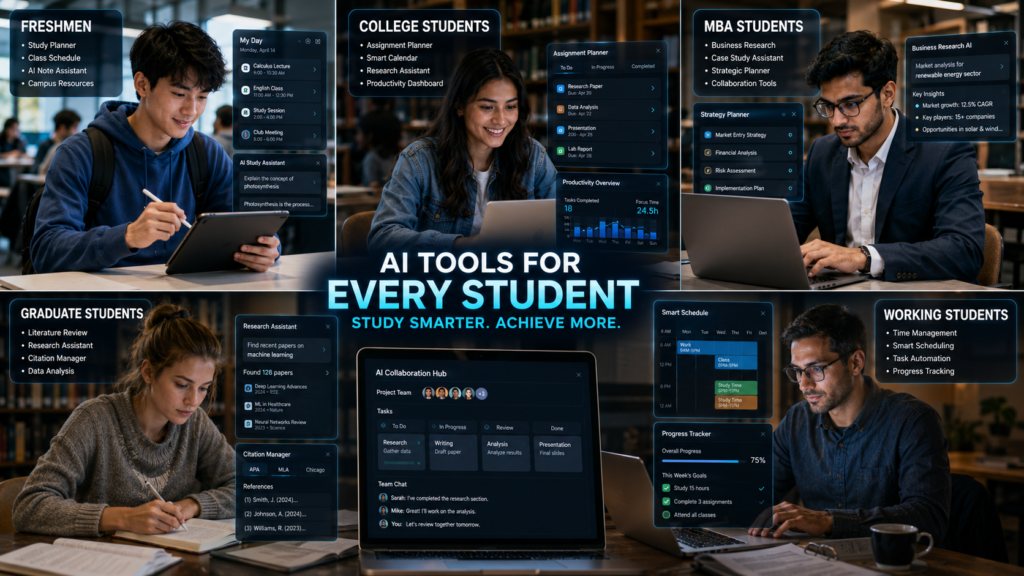
Different academic situations require different AI solutions.
The recommendations below help students choose the right productivity tool based on their immediate needs.
📅 Daily Planning
Recommended Tool: Motion
Automatically creates smart schedules and adjusts tasks around deadlines, helping students stay productive throughout the day.
✍️ Assignment Writing
Recommended Tool: ChatGPT
Helps brainstorm ideas, organize outlines, improve writing quality, and boost productivity during assignments.
🔍 Academic Research
Recommended Tool: Perplexity AI
Quickly finds reliable information with cited sources, making academic research faster and more trustworthy.
📝 Grammar & Editing
Recommended Tool: Grammarly
Improves grammar, clarity, readability, and writing confidence before submitting assignments.
🎙️ Lecture Notes
Recommended Tool: Otter.ai
Records lectures and automatically generates searchable transcripts for easier revision.
📊 Project Management
Recommended Tool: ClickUp AI
Organizes tasks, deadlines, files, and team collaboration inside one centralized workspace.
📚 Academic Organization
Recommended Tool: Notion AI
Combines notes, calendars, assignments, databases, and study planning into one organized workspace.
💰 Budget Students
Recommended Tool: Google Gemini
Provides powerful AI assistance through Google’s free ecosystem for writing, planning, and research.
🎓 Graduate Research
Recommended Tool: Claude
Excels at analyzing long academic documents, improving writing quality, and organizing research efficiently.
⚡ Busy Working Students
Recommended Tool: Motion
Optimizes schedules automatically to balance classes, work commitments, study sessions, and personal responsibilities.
🎯 Recommended Productivity Stacks
Instead of relying on a single platform, build an AI productivity system that matches your academic workload, study style, and daily responsibilities.
🎒 Freshmen
Recommended Stack
Ideal For
- Building study habits
- Organizing assignments
- Managing coursework
- Learning time management
🎓 College Students
Recommended Stack
Ideal For
- Assignment writing
- Course organization
- Daily productivity
- Writing improvement
🎓 Graduate & MBA Students
Recommended Stack
Ideal For
- Research projects
- Long-form writing
- Knowledge management
- Academic productivity
💼 Working Students
Recommended Stack
Ideal For
- Time management
- Smart scheduling
- Balancing work and university life
🤝 Team-Based Courses
Recommended Stack
Ideal For
- Group projects
- Shared task management
- Meeting notes
- Collaborative assignments
Quick Decision Guide
If you’re still unsure which tool fits your workflow, use this quick reference.
• Need an all-purpose AI assistant? → ChatGPT
• Want one organized academic workspace? → Notion AI
• Using Google Workspace every day? → Google Gemini
• Writing research papers? → Claude
• Need smarter scheduling? → Motion
• Managing daily tasks? → Todoist AI
• Working on group projects? → ClickUp AI
• Improving grammar and writing? → Grammarly
• Researching faster with sources? → Perplexity AI
• Recording lectures automatically? → Otter.ai
How to Build the Perfect AI Productivity System

Being productive at university isn’t about studying longer.
It’s about building a repeatable system that helps you stay organized, reduce stress, and complete important work consistently.
The workflow below combines the best AI Tools for University Productivity into a practical academic system that students can use throughout the semester.
📌 Step 1 – Capture Every Task
Never rely on memory. As soon as you receive an assignment, quiz announcement, or project update, record it immediately so nothing gets forgotten.
📋 Capture Everything
🤖 Recommended Tools
📅 Step 2 – Plan Your Week
Instead of planning each day separately, organize your workload for the entire week. Weekly planning gives you a clear picture of upcoming priorities and reduces last-minute stress.
🎯 Prioritize
AI scheduling tools automatically adjust your calendar whenever priorities or deadlines change.
🤖 Recommended Tool
⏳ Motion📚 Step 3 – Organize Notes
Scattered notes slow down learning. Keep everything inside one structured workspace so your study materials are always easy to find.
📂 Organize Everything
🤖 Recommended Tools
🔍 Step 4 – Research Efficiently
Instead of opening dozens of browser tabs, use AI research assistants to understand topics faster while staying focused on reliable academic information.
📖 Use AI To
Always verify important academic information using trusted books, scholarly articles, and official sources.
🤖 Recommended Tools
✍️ Step 5 – Complete Assignments
Use AI to improve productivity—not replace your own thinking. AI should support your learning process while your final submission reflects your understanding, creativity, and critical thinking.
🛠 AI Can Help You
Your final assignment should always represent your own understanding and comply with your institution’s academic integrity policies.
🤖 Recommended Tools
📈 Step 6 – Review Progress
Set aside a few minutes at the end of every week to review your progress. Small weekly check-ins help prevent missed deadlines and keep your productivity system working effectively.
✅ Weekly Review Checklist
A one-hour weekly review can prevent major problems later in the semester and help you stay consistent.
💡 Productivity Tip
Review completed work, update your task list, remove finished items, and prepare priorities before starting the next week.
🎓 Step 7 – Prepare for Exams
Exam preparation becomes much easier when your productivity system stays organized throughout the semester. Consistent preparation reduces stress and eliminates last-minute cramming.
📚 Use AI To
🚀 Success Tip
Students who review notes regularly, revise weekly, and use AI to organize study materials are generally better prepared than those who rely only on last-minute study sessions.
Weekly AI Productivity Workflow
A productive semester is built through consistent weekly habits rather than occasional bursts of motivation.
The following workflow helps students maintain steady academic progress.
Traditional Productivity vs AI Productivity
Key Takeaway
Traditional productivity methods still work, but they often require significant manual effort.
AI Tools for University Productivity simplify planning, research, writing, scheduling, and organization so students can spend more time learning and less time managing administrative tasks.
The best results come from combining AI with disciplined study habits, critical thinking, and consistent effort.
🎓 AI Productivity Blueprint for an Entire Semester
Productivity needs change as the semester progresses. Instead of using the same strategy every week, students should adapt their AI workflow to match their academic priorities. The roadmap below provides a simple semester-long productivity plan.
🗂 Organize Courses & Schedules
Set up your semester dashboard, class schedules, assignments, and study resources before coursework becomes busy.
📝 Notion AI
📋 Assignment Planning
Create smart study schedules, organize deadlines, and stay ahead of assignments before they pile up.
⏳ Motion
🔍 Research & Writing
Focus on researching reliable sources, drafting assignments, and improving writing quality for major coursework.
🔍 Perplexity AI 🤖 ChatGPT
🤝 Team Projects
Coordinate group assignments, share documents, monitor deadlines, and keep every team member aligned.
🚀 ClickUp AI
📚 Revision & Maximum Productivity
During finals, focus on reviewing notes, improving writing quality, summarizing important concepts, and maximizing study efficiency instead of learning everything from scratch.
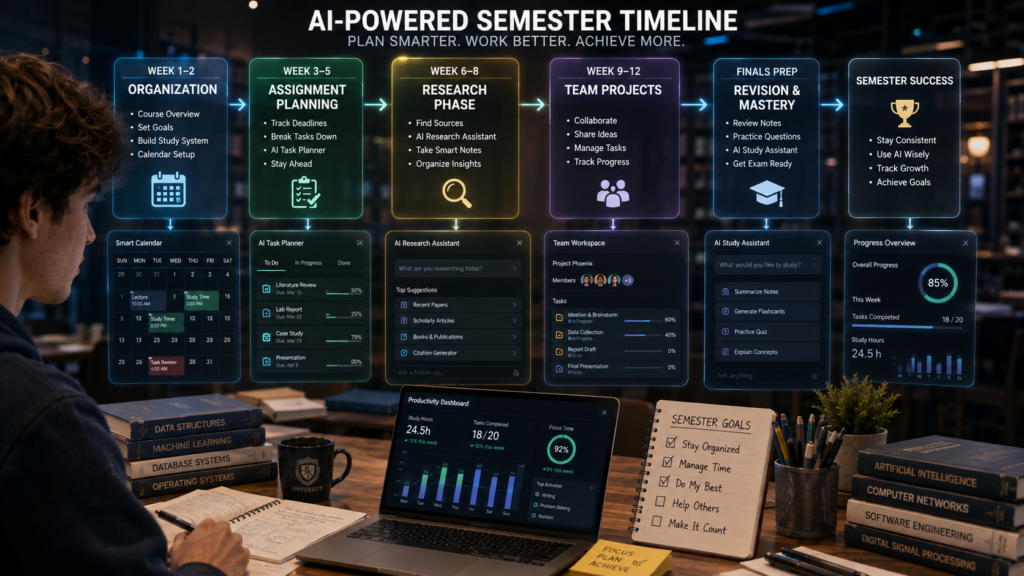
How to Use This Blueprint
Rather than trying every productivity app at once, gradually build your system as the semester progresses.
• Weeks 1–2: Set up course dashboards, calendars, deadlines, and note organization.
• Weeks 3–5: Build weekly schedules and manage assignments before deadlines become overwhelming.
• Weeks 6–8: Focus on research papers, essays, and major academic projects using AI-assisted research and writing tools.
• Weeks 9–12: Strengthen collaboration, monitor project milestones, and prepare presentations with your team.
• Final Exam Period: Shift your attention to revision, proofreading, summaries, and exam preparation using AI responsibly.
Following this semester blueprint helps students stay organized from the first day of class until final exams instead of constantly reacting to deadlines.
Privacy & Ethical Considerations

Artificial intelligence can significantly improve productivity, but students should use it responsibly and ethically.
Your assignments, research notes, schedules, and academic documents represent your own learning journey. AI should help you become more organized—not replace your critical thinking or academic integrity.
Protect Your Personal Information
Many productivity platforms store sensitive information, including:
• Course schedules
• Assignment files
• Research documents
• Personal notes
• Email addresses
• Calendar events
Before uploading documents, review the platform’s privacy policy and avoid sharing highly sensitive personal or university information unless necessary.
Verify AI-Generated Content
AI can summarize notes, explain concepts, and improve writing, but it can still make mistakes.
Always verify:
• Facts
• Citations
• Calculations
• Deadlines
• Research findings
• Technical explanations
Treat AI as a study assistant—not as the final authority.
Avoid Overdependence on AI
AI should make studying more efficient, not eliminate active learning.
Continue practicing:
• Problem-solving
• Critical thinking
• Note-taking
• Independent research
• Time management
These skills remain essential throughout university and future careers.
Maintain Academic Integrity
Every university has policies regarding AI use.
Students should:
• Follow course guidelines
• Cite sources where appropriate
• Complete original work
• Avoid submitting AI-generated assignments without meaningful personal contribution
Responsible AI use supports learning instead of replacing it.
Review AI-Generated Work Carefully
Before submitting any assignment, review:
• Grammar
• Clarity
• Formatting
• Sources
• Logic
• Originality
Your final submission should accurately reflect your understanding of the subject.
Common Mistakes Students Make
Even excellent students can lose productivity because of avoidable habits.
Recognizing these mistakes early helps build a more effective academic workflow.
Using Too Many AI Tools
Trying every new AI app often creates unnecessary complexity.
Instead, build one consistent productivity system using a small number of reliable tools.
No Weekly Planning
Students frequently begin assignments without reviewing their weekly workload.
Spending just 20–30 minutes planning each week can prevent missed deadlines and reduce academic stress.
Blindly Trusting AI
AI suggestions should always be evaluated critically.
Students remain responsible for:
• Research accuracy
• Assignment quality
• Ethical use
• Final editing
• Academic decisions
Ignoring Deadlines
No productivity app can help if deadlines aren’t entered correctly.
Update your planner immediately whenever professors announce:
• Assignments
• Exams
• Project milestones
• Reading schedules
• Group meetings
Poor Organization
Scattered notes and documents waste valuable study time.
Organize:
• Lecture notes
• PDFs
• Research papers
• Assignments
• Course materials
inside one centralized system.
Skipping Weekly Reviews
Many students plan their semester once and never review it again.
A weekly productivity review helps you:
• Catch overdue tasks
• Reorganize priorities
• Prepare upcoming assignments
• Improve time management
💡 Myth vs Reality
Expert Tips
Build One Productivity System
Avoid switching between multiple apps unnecessarily.
Choose a small set of AI tools that work well together and use them consistently throughout the semester.
Review Your Week Regularly
Every Sunday:
• Review completed work
• Update deadlines
• Prepare next week’s schedule
• Adjust priorities
Consistent reviews help prevent academic overload.
Automate Repetitive Tasks
Use AI for activities like:
• Scheduling
• Grammar checking
• Summarizing notes
• Organizing tasks
• Creating study plans
This allows you to spend more time on meaningful learning.
Prioritize Important Work First
Not every task deserves equal attention.
Complete:
• Major assignments
• Research projects
• Upcoming exams
before smaller administrative tasks.
Balance AI with Deep Learning
The best university students don’t simply finish assignments quickly.
They understand concepts deeply.
Use AI to improve efficiency while continuing to:
• Think critically
• Solve problems independently
• Practice active recall
• Engage with course materials
Conclusion

University productivity isn’t about filling every hour of your day with work. It’s about building smart systems that help you stay organized, meet deadlines, and make steady academic progress without unnecessary stress.
AI Tools for University Productivity can help students manage assignments, organize notes, improve writing, plan schedules, conduct research, and collaborate more effectively throughout the semester. When used responsibly, these tools reduce repetitive work and create more time for meaningful learning.
The most successful students don’t rely on AI to do their work—they use it to organize their workflow, strengthen their study habits, and make better academic decisions. Choose the AI Tools for University Productivity that fit your learning style, stay consistent with your routine, and always combine AI assistance with critical thinking, academic integrity, and genuine effort.
📚 Continue Learning
Expand your AI-powered academic system with these related guides and continue building smarter study, research, and productivity workflows.
📅 Best AI Study Planner for College Students
Build smarter schedules, organize assignments, and manage your semester more effectively.
📄 AI Tools for Reading PDFs for Students
Read textbooks, lecture notes, and research papers faster with AI assistance.
👥 AI Tools for Group Project Collaboration
Improve teamwork, communication, and project management for university assignments.
🎓 AI Tools for Scholarship Search
Discover scholarships, organize applications, and simplify financial aid planning.
💼 AI Tools for Career Preparation
Build resumes, prepare for interviews, and plan your professional future using AI.
🔬 Best AI Tools for Academic Research
Conduct high-quality academic research with AI-powered research assistants.
📚 Best AI Tools for Literature Review
Summarize research papers and organize literature reviews more efficiently.
📝 Best AI Note-Taking Apps
Capture, organize, and review lecture notes with AI-powered note-taking tools.
🎙️ AI Tools for Automatic Lecture Notes
Automatically record, transcribe, and summarize classroom lectures.
🃏 How to Create Study Flashcards With AI
Turn notes into interactive flashcards for faster revision and better retention.
❓ Frequently Asked Questions
What are the best AI Tools for University Productivity?
Some of the best options include ChatGPT, Notion AI, Google Gemini, Claude, Motion, Todoist AI, ClickUp AI, Grammarly, Perplexity AI, and Otter.ai.
Can AI improve university productivity?
Yes. AI can help students organize schedules, manage assignments, conduct research, improve writing, summarize notes, and reduce time spent on repetitive administrative tasks.
Which AI tool is best for assignment planning?
Motion and Notion AI are excellent for planning assignments, while ChatGPT helps students break large projects into manageable tasks.
Which AI tool is best for academic research?
Perplexity AI is useful for quickly finding information with cited sources, while Claude helps analyze lengthy academic documents.
Can AI create better study schedules?
Yes. AI scheduling tools analyze deadlines, priorities, and available time to build more realistic and personalized study plans.
Is using AI for university work allowed?
Policies vary by institution and course. Students should always follow university guidelines, use AI responsibly, and ensure submitted work reflects their own understanding.
Are AI productivity tools free?
Many AI productivity platforms offer free plans, while premium subscriptions provide additional features such as advanced scheduling, automation, and collaboration tools.
How many AI productivity tools should students use?
Most students benefit from using three to five complementary tools rather than trying every available platform.
Can AI reduce academic stress?
When used responsibly, AI helps students stay organized, manage deadlines, and build consistent study routines, which can reduce unnecessary academic stress.
What is the biggest productivity mistake university students make?
Waiting until deadlines become urgent instead of planning consistently throughout the semester is one of the most common productivity mistakes students make.